
Quick Answer
Most businesses land in one of these three:
What an auto attendant actually is
It is the menu that answers before a person does. Every auto attendant is built from the same four parts, and how well a system handles each one is what separates them.
1
2
3
4
An auto attendant greets and transfers. An IVR can also collect information and finish a task, like checking a balance. Most vendors now use the two words for the same thing, so ignore the label and look at what the menu can do. Read our full breakdown in ACD vs IVR.
How we compared them
We looked at 14 systems and kept 7. Every one had to answer the same five questions.
Plans and prices come from each vendor's own pricing page as of September 2026, and we read through G2 and Capterra reviews to catch the things pricing pages leave out, like menus that need support tickets to change. Nobody paid to be here and there are no affiliate links.
Calilio is our own product, so we compete in this list. We say plainly what our auto attendant does not do, and we point to other systems where they are the better fit.
The 7 best auto attendant phone systems
The plan listed is the cheapest one that actually includes the auto attendant, not the vendor's cheapest tier.
# | System | Best for | Plan with auto attendant | Menu depth | Dial by name | Rating |
| 1 | RingCentral | Deep menus with a directory and full schedules | Core, from $20/user/mo annual ($30 monthly) | Multi-level | Yes | G2: 4.2/5 Capterra: 4.2/5 |
| 2 | GoTo Connect | Building a complicated menu visually | Quote based | Multi-level | Yes | G2: 4.4/5 Capterra: 4.5/5 |
| 3 | Nextiva | Established teams wanting phones plus support tools | From ~$15/user/mo annual | Multi-level | Yes | G2: 4.5/5 Capterra: 4.6/5 |
| 4 | Zoom Phone | The cheapest working menu | Metered $10/user/mo · Unlimited $15/user/mo | Multi-level | Yes | G2: 4.6/5 Capterra: 4.5/5 |
| 5 | Calilio | A simple menu plus AI that answers instead of a menu | Premium $35/user/mo ($28 annual) for the IVR menu | Single level | No | G2: 4.5/5 Capterra: 4.4/5 |
| 6 | Ooma Office | Offices still using desk phones | Essentials, from ~$19.95/user/mo | Multi-level | Yes | G2: 4.5/5 Capterra: 4.5/5 |
| 7 | Grasshopper | One-person businesses on a mobile | Flat ~$14-55/mo, not per user | Single level | Limited | G2: 3.9/5 Capterra: 4.3/5 |
Ratings are from G2 and Capterra as of September 2026. Vendors move features between tiers often, so confirm on the pricing page before you buy.
1. RingCentral
The most complete auto attendant, and the one most teams grow into
RingCentral gives you a multi-level auto attendant from its cheapest plan, which is unusual. You can nest menus several layers deep, give each submenu its own greeting and schedule, add a dial-by-name directory, and set separate holiday hours that override everything else for a day. For a business with more than a couple of departments, that combination is hard to find at this price.
The cost is complexity. Reviewers regularly say the admin console takes real time to learn, and the more advanced call handling and reporting sit in the Advanced and Ultra tiers. Monthly billing is also a lot dearer than annual, so the $20 figure only applies if you commit for a year.
Plans:
2. GoTo Connect
The best tool for seeing what your menu actually does
GoTo Connect builds your call flow as a drag-and-drop flowchart. You lay out the greeting, the menu options, the schedules and where each option goes, and you can see the whole thing on one screen. Anyone who has tried to work out what an inherited phone menu does from a list of settings will understand why this matters.
GoTo has moved to quote-based pricing, so there is no rate card to check, which is a nuisance if you just want to compare prices. Plans have historically landed around $26 to $30 per user a month. The rest of the interface also feels older than newer rivals, though the flow editor itself is excellent.
Plans:
3. Nextiva
A dependable menu attached to a wider customer-service platform
Nextiva covers the auto attendant basics properly: multi-level menus, dial-by-name, business hours routing and voicemail transcription. Where it differs from the others is what sits around it, since Nextiva has repositioned around customer experience and bundles shared inboxes and simple workflow tools with the phone system.
The catch is that Nextiva changes its plan structure more often than most, and the deeper routing and analytics move around with it. Check exactly what the current entry tier includes rather than trusting a comparison article, including this one.
Plans:
4. Zoom Phone
The cheapest way to get a real menu on your main number
Zoom Phone starts at $10 per user a month on its metered plan and still includes a multi-level auto attendant, a dial-by-name directory and business hours routing. Nothing else on this list gives you that much menu for that little. If your team already opens Zoom every day, the phone settings live in the same admin console.
The metered plan charges for each outbound call, so it only makes sense if your calls are mostly incoming. Most teams end up on the $15 unlimited tier. The menu builder is competent but plainer than a dedicated phone vendor, and Zoom clearly treats phone as a companion to meetings rather than the main event.
Plans:
5. Calilio
A simple menu, plus an AI that answers instead of making people press buttons
Calilio builds call handling as a call flow you set up per number: a greeting, a business hours check, the phone menu, then a ring strategy such as simultaneous ring, sequential ringing or round robin, with a fallback for when nobody picks up. The phone menu is on the Premium plan, and it is one level deep, so it suits a business sending callers to a handful of teams rather than one with a deep tree of departments.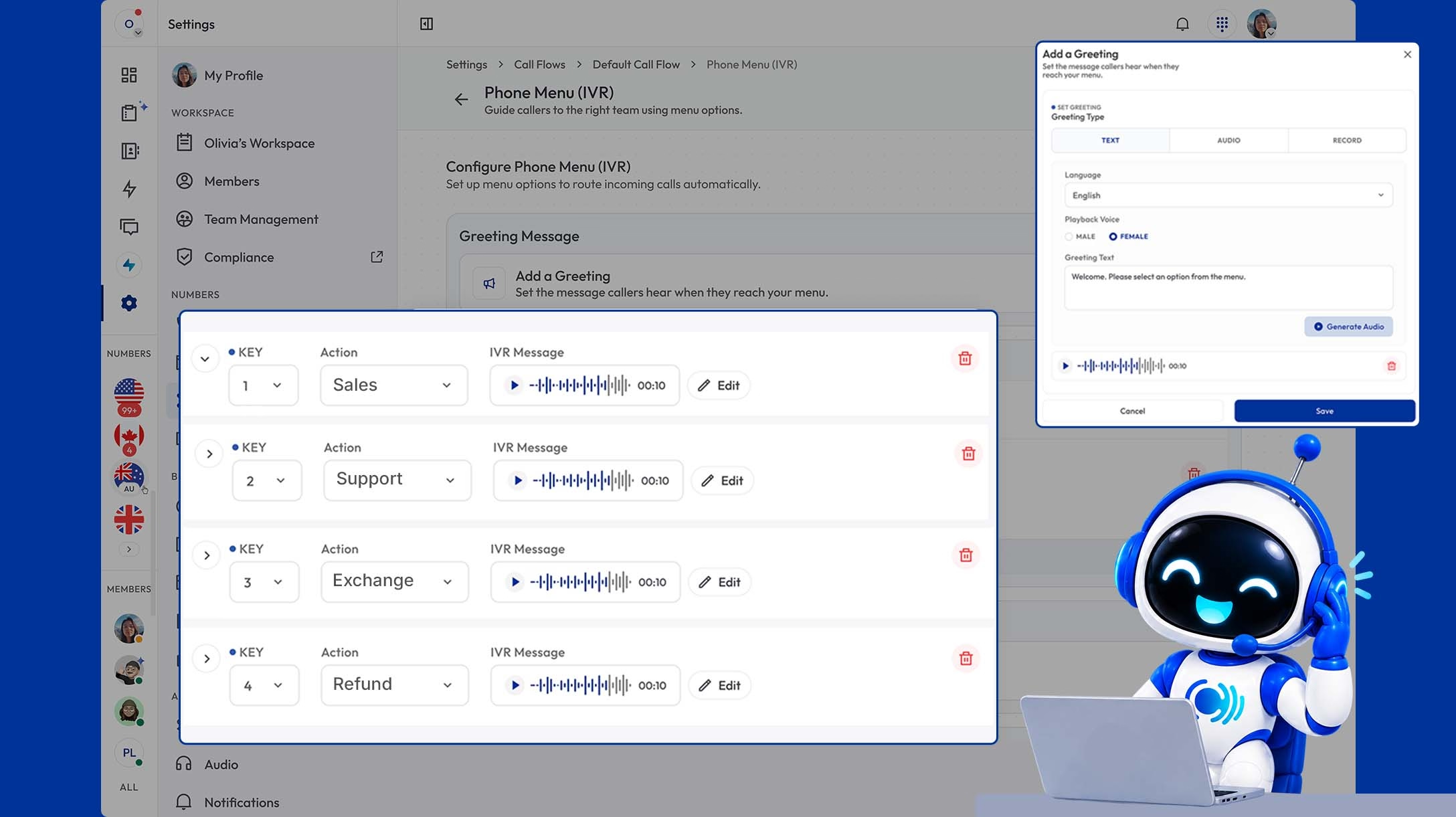
The part that is different is the AI Voice Agent, which is on both plans. Instead of reading options, it talks to the caller, answers routine questions from information you give it, and takes a message or passes the call on. It handles incoming calls only, and one agent can take five calls at the same time. Standard includes 10 free minutes per user a month, then charges $0.035 a minute; Premium includes 100 minutes, then $0.025 a minute.
Plans:
6. Ooma Office
A straightforward menu for offices that still use desk phones
Ooma calls its auto attendant a virtual receptionist, and it does the expected things: a recorded greeting, menu options, extensions, ring groups and business hours. What sets Ooma apart is proper support for physical desk phones, both analog and IP, which still matters in clinics, workshops and reception areas.
The routing behind the menu is deliberately basic. There is nothing clever about queues or overflow, call recording and analytics need the Pro tier, and there is no AI answering at any price. If your needs are simple, that simplicity is the point; if they are not, you will hit the ceiling fast.
Plans:
7. Grasshopper
The simplest way for one person to sound like a company
Grasshopper is not a full phone system. It puts a business number, a recorded greeting and a set of extensions on top of the mobile you already carry. A caller hears a proper menu and gets forwarded to whichever phone you nominate. For a solo consultant or a two-person trade business, that is the whole requirement.
Pricing is flat per account rather than per user, which makes it unusually cheap for tiny teams. The ceiling arrives quickly though: one menu level, no ring strategies, no real directory and no AI. When you add a third or fourth person, you will be shopping again.
Plans:
How to build a menu callers do not hate
The system matters less than what you do with it. Five rules cover most of it.
How to choose
The verdict
If your menu needs to branch several levels deep, with a directory and separate holiday schedules, RingCentral and GoTo Connect handle that best, and GoTo's visual flow builder makes a complicated menu far easier to look after. Zoom Phone gives you a working menu for the least money, and Grasshopper is still the simplest way for a one-person business to sound organised.
Where Calilio fits is different. Its phone menu is one level deep, so it is not the pick for a big branching tree. What it adds is a second way to answer: an AI Voice Agent included on both plans that talks to callers instead of asking them to press buttons, and takes over when nobody on the team is free.
Give Callers a Menu, or Skip the Menu Entirely
Set up a phone menu with business hours and department routing, or let the AI Voice Agent answer in plain conversation. Build both in the same call flow and pick which one your callers get.