
10 Best Pipedrive Phone Integrations in 2026

Pipedrive is a popular sales CRM that helps you manage leads, track deals, and keep customer information organized in one place. But there is one thing Pipedrive does not give you by itself: a built-in phone system for making calls directly from the CRM.
So, when it is time to call a customer, your team must pick up a separate phone or switch to another app and log the outcome manually. This makes your sales process slower.
The good news is that Pipedrive supports more than 50 phone integrations. However, the integration depth varies a lot from one provider to another.
Below, we compare the top 10 phone systems for Pipedrive integration, including what each integration actually does and which type of team should consider it.
Best Pipedrive Phone Integration Shortlist
- Calilio
- CloudTalk
- JustCall
- Kixie
- Aircall
- Ringover
- Allo
- Quo
- CallHippo
- RingCentral
What is Pipedrive Phone Integration?
Pipedrive phone integration connects your CRM with a phone system, allowing you to make and receive calls & texts directly from Pipedrive.
Once connected, it removes the need for manual dialing. You can usually click on any phone number inside Pipedrive to start a call. Most integrations also offer to automatically log the call duration, recording, transcript, notes, and outcome against the correct contact or deal.
How We Chose the Best Phone Systems for Pipedrive
Before deciding which tools deserved a place on this list, we compared 25 phone systems that claim to work with Pipedrive. We compared their integration pages, Pipedrive Marketplace listings, support documents, pricing plans, and available G2 and Capterra feedback.
Only 10 made the final list. To qualify, we made sure a provider offers more than a basic calling app. We looked for practical Pipedrive workflows such as click-to-call, automatic call logging, and contact syncing.
We also checked the lowest plan that actually includes the Pipedrive integration. This helped us identify providers that advertise a low starting price but require a higher plan for CRM access, advanced dialers, AI tools, or full activity syncing.
Finally, we considered where each integration falls short. Ratings supported our assessment, but they did not decide the ranking. The final order reflects integration depth, ease of use, total cost, and sales workflow.
10 Best Phone Systems for Pipedrive Integration
1. Calilio
Calilio is a cloud-based business phone system built for sales, support, remote, and call center teams. It provides virtual phone numbers from more than 100 countries, along with business calling, SMS, call routing, recordings, power dialing, and AI-generated call insights.
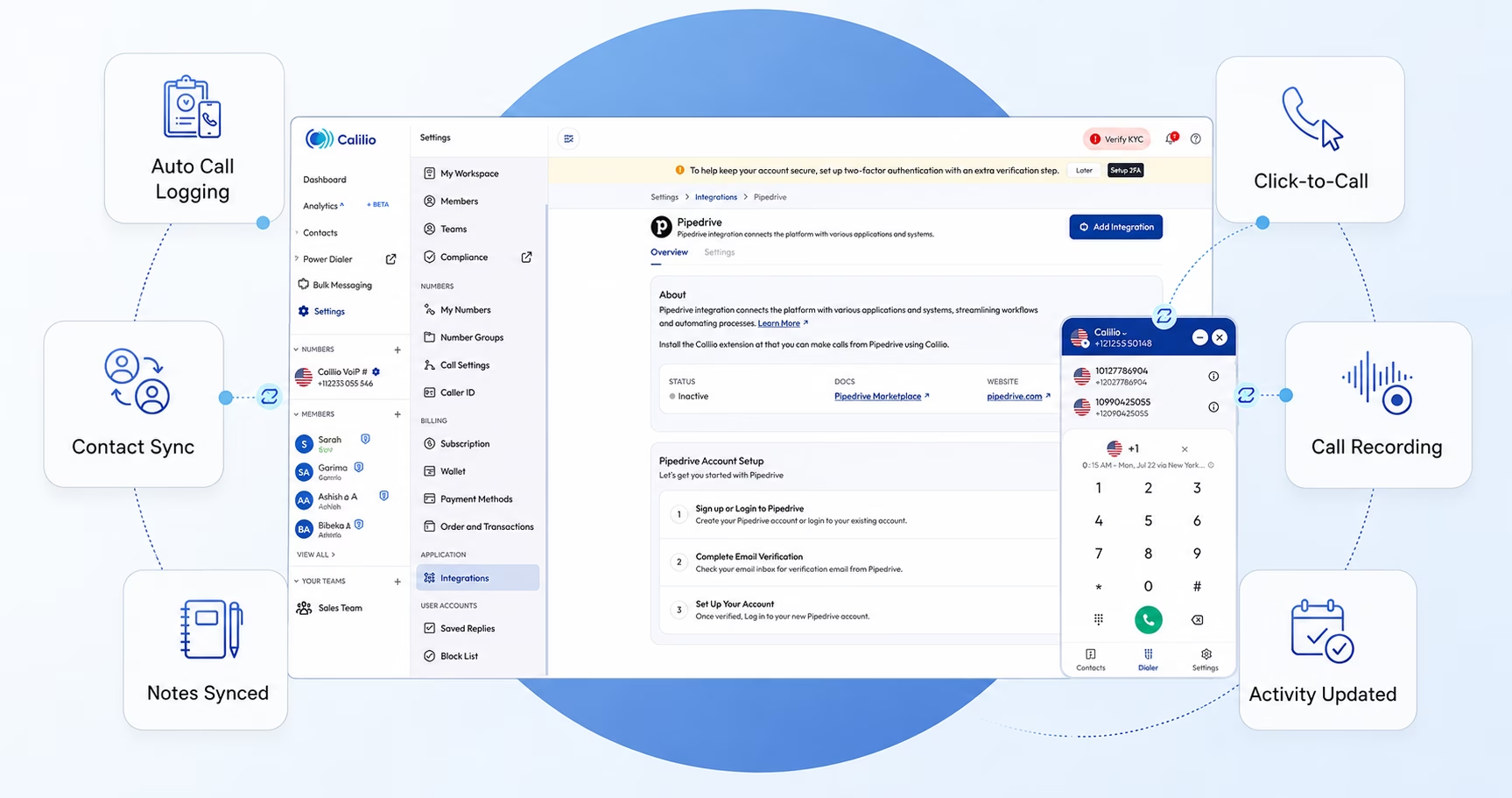
How Does Calilio Integrate with Pipedrive?
Calilio connects your business calls with the relevant records in Pipedrive. Incoming, outgoing, missed, and busy calls can be logged automatically, so your sales reps do not need to update every activity manually.
When integrated, you can also click a customer's phone number in Pipedrive. Recordings, notes, tags, call history, and outcomes are linked with the relevant contact or deal, giving your team better context before the next follow-up.
On the plus side, Calilio also generates call transcripts, summaries, sentiment, outcomes, and follow-up suggestions after each call. However, these AI insights are available only inside Calilio and are not automatically added to Pipedrive.
Pricing
Calilio offers three pricing plans, and the Pipedrive integration is available on all of them:
- Standard: $15/user/month, or $12/user/month (when billed annually)
- Premium: $35/user/month, or $28/user/month (when billed annually)
- Enterprise: Custom pricing
Calilio offers a 14-day refund policy, so you can test the platform before making a long-term commitment.
Ratings
- G2: 4.7/5
- Capterra: 4.3/5
Get an Affordable Phone System for Pipedrive Integration
Connect Calilio with Pipedrive to log call activity automatically, call leads with one click, and keep recordings, notes, tags, and outcomes linked to your sales records.
2. CloudTalk
CloudTalk is an AI-powered cloud phone and call center system built for sales and customer support teams. It offers international phone numbers, inbound call routing, outbound diallers, call monitoring, analytics, and conversation intelligence
How Does CloudTalk Integrate with Pipedrive?
CloudTalk offers a native CTI integration that lets your team make and receive calls directly from Pipedrive. When a call arrives, it can automatically open the caller's contact profile or most recently updated deal, so the rep has the right context before answering.
The integration syncs contacts and automatically records answered, missed, inbound, and outbound calls in Pipedrive. It can also save call durations, outcomes, sent and received SMS messages, and AI-generated notes. Your team can decide which call types to log and how each activity should appear in the CRM.
Pricing
CloudTalk's lower plans cover basic calling, but you need Essential or above to connect it with Pipedrive.
- Starter: $34/user/month, or $25/user/month (when billed annually)
- Essential: $39/user/month, or $29/user/month (when billed annually)
- Expert: $69/user/month, or $49/user/month (when billed annually)
CloudTalk offers a 14-day free trial.
Ratings
- G2: 4.4/5
- Capterra: 4.4/5
3. JustCall
JustCall is an AI-powered business communication platform for sales and support teams. It combines voice calls, SMS, outbound diallers, workflow automation, call monitoring, and AI coaching in one system.
How Does JustCall Integrate with Pipedrive?
JustCall lets your team call or text leads with one click from Pipedrive. It automatically logs calls and messages against the relevant person, organization, deal, lead, or activity, so your reps do not need to update the CRM after every conversation.
The integration can also sync call outcomes, durations, recordings, scheduled follow-ups, and voicemail activity. For outbound teams, JustCall's Power, Dynamic, and Predictive Diallers can use Pipedrive contacts for larger calling campaigns.
Pricing
JustCall includes its core Pipedrive integration from the entry-level Team plan, but advanced AI syncing requires a higher plan or add-on.
- Team: $39/user/month, or $29/user/month (when billed annually)
- Pro: $69/user/month, or $49/user/month (when billed annually)
- Pro Plus: $109/user/month, or $89/user/month (when billed annually)
- Business: Custom pricing
A 14-day free trial is available.
Ratings
- G2: 4.3/5
- Capterra: 4.1/5
4. Kixie
Kixie is built for sales teams that spend most of their day calling prospects. Its local presence dialing, multi-line PowerDialer, voicemail drops, and automated CRM updates make it especially useful for high-volume outbound outreach.
How Does Kixie Integrate with Pipedrive?
Kixie lets your team call or text prospects directly from Pipedrive using click-to-call and click-to-text. It automatically logs answered and missed calls, incoming and outgoing messages, call outcomes, and notes against the relevant contact. The same activities can also appear under the related organization and deal.
Here's where Kixie stands out: if a rep calls a number that does not already exist in Pipedrive, Kixie can create a new contact automatically. Reps can also update basic contact information, add a call outcome, write notes, and schedule the next call activity from the Kixie dialler.
Pricing
Kixie uses quote-based pricing, so you must contact its sales team for the exact cost.
Ratings
- G2: 4.8/5
- Capterra: 4.6/5
5. Aircall
Aircall is a well-established cloud phone system for sales and support teams that need strong CRM connectivity. It is not the cheapest option on our list, but its mature integrations and team-management tools make it better suited to growing or mid-sized businesses.
How Does Aircall Integrate with Pipedrive?
Aircall automatically synchronizes Pipedrive contacts and displays their CRM information inside the Aircall app when they call. This gives your reps access to the contact, organization, deal, and previous activity without searching through Pipedrive during the conversation.
Calls are automatically recorded as Pipedrive activities, while recordings, tags, comments, call outcomes, and AI-generated insights can be attached to the relevant record. Aircall can also log SMS activity and create new Pipedrive contacts when an unknown customer calls your business.
Pricing
Aircall offers 3 straightforward pricing plans. The Pipedrive integration is available right from the starting plan.
- Essentials: $40/license/month, or $30/license/month (when billed annually)
- Professional: $70/license/month, or $50/license/month (when billed annually)
- Custom: Custom pricing
Aircall requires at least three licenses and offers a 7-day free trial.
Ratings
- G2: 4.4/5
- Capterra: 4.2/5
6. Ringover
Ringover is a good fit for sales and recruitment teams that want calling, messaging, dialing, and call coaching connected to their CRM. Its communication tools cover everyday conversations as well as larger outbound campaigns.
How Does Ringover Integrate with Pipedrive?
Ringover syncs your Pipedrive contacts and lets reps call them with one click from the CRM. It automatically saves calls, SMS, WhatsApp conversations, call notes, and tags in the relevant customer profile, so reps can review previous interactions before following up.
You can also display selected Pipedrive fields inside the Ringover dialler. This gives your team useful customer information during the call without repeatedly moving between the two platforms.
Pricing
Ringover reserves its CRM integrations for the higher plans - Business plan and above.
- Talk: $24/user/month, or $15/user/month (when billed annually)
- Business: $57/user/month, or $47/user/month (when billed annually)
- Advanced: Custom pricing
Ringover offers a 7-day free trial for up to five users.
Ratings
- G2: 4.6/5
- Capterra: 4.7/5
7. Allo
Allo takes a mobile-first approach to business calling. It is aimed mainly at small sales teams that want calls recorded, summarised, and added to their CRM without paying separately for several AI tools in a business phone system.
How Does Allo Integrate with Pipedrive?
Allo automatically logs phone calls against the relevant contact or deal in Pipedrive. Each activity can include the call recording, transcript, AI-generated summary, and call details, giving your reps useful context without typing notes after every conversation.
Pipedrive contacts also sync to Allo, with the contact list refreshing every 10 minutes after the initial connection. This keeps all caller information available inside Allo and helps ensure each call is matched with the right CRM record.
Pricing
Allo keeps its plans simple, but you need Business or above to connect it with Pipedrive.
- Solo: $18/user/month
- Business: $45/user/month, or $32/user/month (when billed annually)
- Ultra: $120/user/month, or $100/user/month (when billed annually)
Allo offers a 7-day free trial.
Ratings
- G2: 4.7/5
- Capterra: Not yet rated
8. Quo
Quo, formerly OpenPhone, is a straightforward choice for small teams that want calls, texts, and customer details in one shared workspace. It is easier to manage than many full call center platforms, especially when several reps share the same business number.
How Does Quo Integrate with Pipedrive?
Quo syncs your Pipedrive contacts into its phone system, so reps can see who is calling and review the customer's CRM details before answering.
After a call or message, Quo automatically sends the activity back to Pipedrive. This can include calls, texts, voicemails, recordings, and AI-generated call summaries. You can also choose which Quo phone numbers should sync with Pipedrive, which is helpful when different teams manage separate business lines.
Pricing
Quo's Starter plan covers basic calling and texting, while CRM integrations begin with Business.
- Starter: $19/user/month, or $15/user/month (when billed annually)
- Business: $33/user/month, or $23/user/month (when billed annually)
- Scale: $47/user/month, or $35/user/month (when billed annually)
Quo offers a 7-day free trial.
Ratings
- G2: 4.7/5
- Capterra: 4.2/5
9. CallHippo
CallHippo suits growing sales and support teams that need a simple way to connect business calls with Pipedrive. It focuses on practical CRM calling features, including click-to-call, activity syncing, SMS, call routing, and sales dialing tools.
How Does CallHippo Integrate with Pipedrive?
CallHippo lets your reps call leads directly from Pipedrive using click-to-call. Once the call ends, it automatically adds the call activity, recording, notes, and related SMS messages to the lead's Pipedrive record. This gives your team the full conversation history without entering everything manually.
Here's where the integration becomes more useful: CallHippo can generate an AI call summary, create follow-up actions, and trigger workflows based on the call outcome. For example, it can send a follow-up email or move a deal to another stage after a successful conversation.
Pricing
CallHippo's Pipedrive integration is available from the Professional plan.
- Starter: $25/user/month, or $19/user/month (when billed annually)
- Professional: $40/user/month, or $30/user/month (when billed annually)
- Ultimate: $55/user/month, or $42/user/month (when billed annually
CallHippo offers a 10-day free trial.
Ratings
- G2: 4.4/5
- Capterra: 4.4/5
10. RingCentral
RingCentral offers a reliable phone system for established businesses that want phone calls, SMS, team messaging, video meetings, and other communication tools under one platform. Its large integration ecosystem also suits companies that use Pipedrive alongside several other business applications.
How Does RingCentral Integrate with Pipedrive?
RingCentral connects with Pipedrive through its App Connect extension for Chrome and Microsoft Edge. Your reps can make and receive calls, send SMS messages, and use click-to-call to dial customers from the Pipedrive dashboard.
When a customer calls, a screen pop displays their Pipedrive information. The integration can also save call history, call dispositions, SMS messages, and voicemail logs against the relevant contact, deal, or activity. Your team can choose whether this information is logged automatically or manually. However, as the integration depends on a browser extension, it does not offer the same native experience across every device.
Pricing
RingCentral offers Pipedrive integration in all of its 3 plans.
- Core: Contact Sales
- Advanced: Contact Sales
- Ultra: Contact Sales
It offers a 14-day free trial for new subscribers.
Ratings
- G2: 4.3/5
- Capterra: 4.5/5
How to Choose the Best Phone System for Pipedrive?
Choosing a phone system for Pipedrive is not only about finding the longest feature list. You need to check how well the integration fits your team's daily calling workflow.
Check What Data Syncs with Pipedrive
Some integrations only log basic call activity, while others add recordings, messages, notes, outcomes, transcripts, and AI summaries. Decide what your reps need to see inside the CRM after every conversation.
Consider How Your Team Makes Calls
Outbound sales teams may need a power dialler, local presence, voicemail drop, and automated follow-ups. Teams handling inbound calls should prioritize IVR, call routing, shared numbers, business hours, and caller information.
Look Beyond the Starting Price
The cheapest plan may not include the Pipedrive integration. Check the required plan, minimum number of users, phone number rental, call rates, SMS charges, and any additional costs for AI or dialing tools.
Review Contact Syncing
Find out whether contact syncing works in one direction or both. You should also check how frequently contacts update and what happens when the same phone number appears under multiple records.
Test the Integration Before Buying
Use the free trial to make calls, send messages, review synced activities, and test recordings or notes. This will show whether the integration works smoothly with your actual Pipedrive setup before you move the whole team.
Conclusion
The best phone system for Pipedrive depends on how much of your calling workflow you want connected to the CRM. Some integrations are enough for click-to-call and basic call logging, while others also sync contacts, messages, recordings, outcomes, and AI-generated summaries.
Before choosing, check what data actually appears in Pipedrive, which plan includes the integration, and whether extra charges apply for diallers, AI tools, phone numbers, or usage. The right option should reduce manual work without adding more complexity to your sales process.
Connect Pipedrive with the Best Phone System for your Business
Use Calilio to manage business calls, and give your team better context for every follow-up.
Summarize this blog with:
Frequently Asked Questions
Everything you need to know about Calilio. Can't find your answer? .
Pipedrive supports calls through third-party apps and mobile calling workflows, but it is not a complete business phone system. You still need a connected provider for business numbers, routing, recordings, SMS, dialers, and call center features.
Stay in the loop
Get the latest call insights, trends, and updates delivered straight to your inbox.
By subscribing, you agree to receive updates from Calilio.
You can unsubscribe anytime.
#1 Cloud Phone System for
|
Improve your business operation with Calilio's advanced virtual phone system. Join today for a better way to connect.