A manager who only hears about a bad call after the customer has hung up can coach the agent, but the call is already lost. Call monitoring software fixes the timing: supervisors listen to live calls, whisper coaching the caller never hears, or barge in when a conversation needs rescuing — then review recordings and AI call reports afterward for the calls they missed.
We compared platforms that offer live monitoring for call centers — from full contact center suites to phone systems with monitoring built in — and kept the 8 best, with real plans and pricing for each.
Quick Answer
You run a small or mid-sized call center and want monitoring without contact-center pricing
Calilio includes live listening, whisper and barge inside its phone system, plus recordings and AI call reports — at a per-seat price well under the contact center suites.
You run a large contact center with dedicated QA staff
Talkdesk and Five9 add workforce management, automated scorecards and analyst-grade dashboards on top of live monitoring, at enterprise per-agent pricing.
You already live in a helpdesk
Zendesk and Freshcaller put live monitoring next to the ticket queue, so supervisors coach from the same screen they manage support from.
What is call monitoring software?
Call monitoring software gives managers and supervisors visibility into what happens on customer calls — both while they are happening and after they end. It exists to turn coaching from guesswork ("how do you think the call went?") into evidence (what was actually said, by whom, and how it ended).
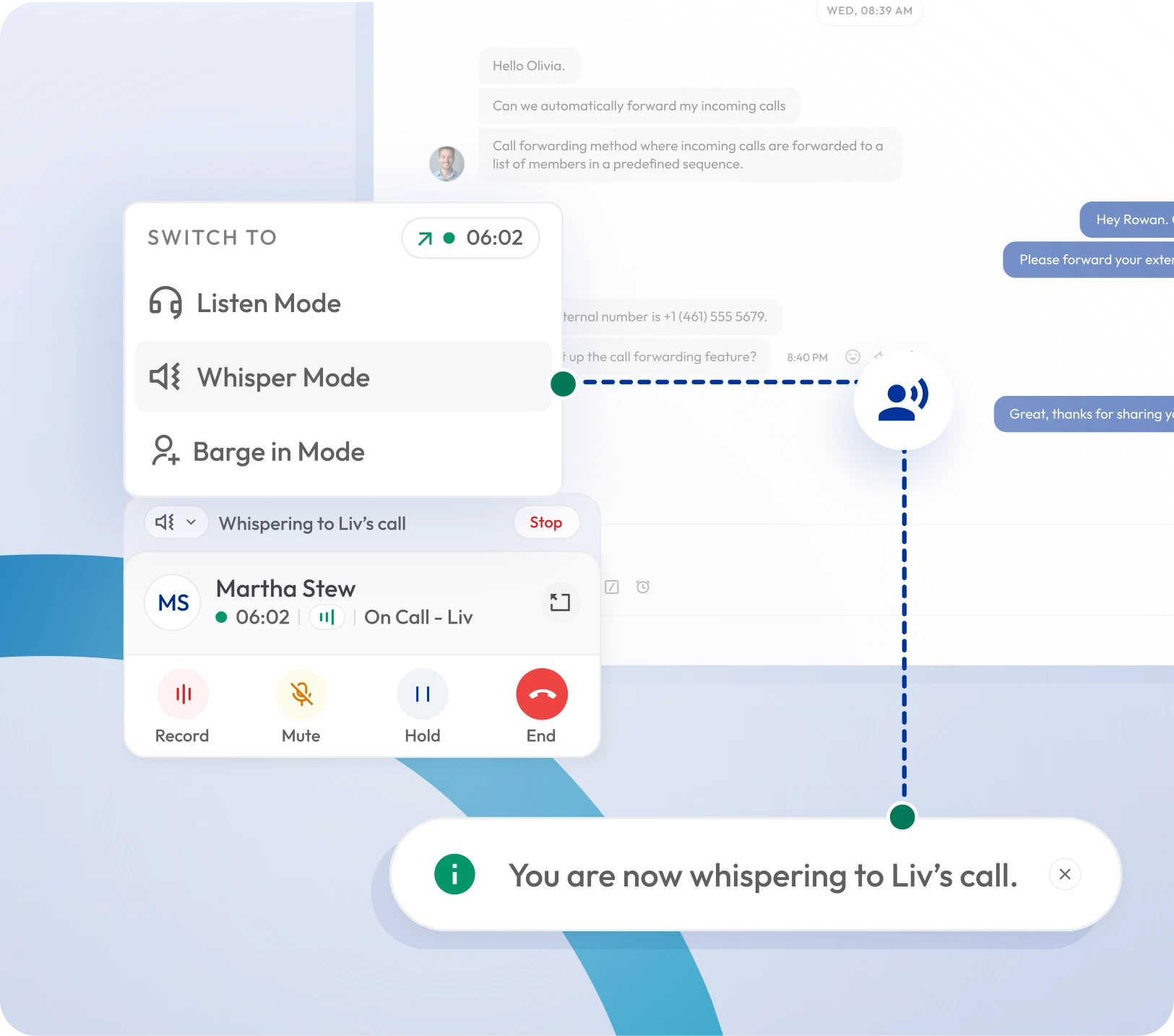
Live monitoring rests on three tools, and knowing the difference matters because they escalate in intrusiveness:
Call Listening
Silent
The supervisor hears the live call; neither the agent nor the caller knows. The default for quality checks and assessing a new agent without changing how they behave on the call.
Call Whispering
Agent hears you
The supervisor speaks to the agent privately — the caller hears nothing. Used for live coaching: feeding an answer, steering a negotiation, calming a rattled new hire mid-call.
Call Barging
Everyone hears you
The supervisor joins the call as a third participant, audible to both sides. The escalation tool for calls going wrong — an angry customer, a compliance risk, a deal about to be lost.
The other half of monitoring happens after the call: recordings you can replay, and — on the better platforms — AI call reports that include a transcript, the reason for the call, its outcome, and a summary, so a supervisor can review ten calls in the time it used to take to replay one.
How we compared them
✓The full live-monitoring set: Listening, whispering and barging — several vendors advertise "monitoring" but gate whisper or barge behind a higher tier.
✓The tier that actually includes it: We priced the cheapest plan where live monitoring works, not the vendor's advertised entry price.
✓Post-call review: Recordings, transcripts and AI summaries — how fast a supervisor can review calls they didn't catch live.
✓Ease of use for supervisors: Whether monitoring is one click from a live-calls view, or buried in an admin console.
✓Real cost at team size: Per-seat pricing modelled for a 10-30 seat call center, where suite pricing bites hardest.
Why you should trust this comparison
Plans and pricing come from each vendor's published pages as of August 2026, cross-checked against G2 and Capterra reviews for the complaints pricing pages don't mention — monitoring gated behind top tiers, per-minute surprises, and dashboards that need an analyst to read. No vendor paid for placement, and there are no affiliate links.
Calilio offers live call monitoring as part of its phone system, so we compete here. Our entry states its limits plainly, and the verdict names other tools as the better fit for enterprise QA workflows we do not serve.
The 8 best call monitoring software in 2026
#
Tool
Best for
Plan with monitoring
Notes / charges
1
Calilio
Live monitoring inside an affordable phone system
Premium $35/user/mo ($28 annual)
Listen, whisper, barge + recordings; AI call reports free up to 100 min/user/mo, then $0.025/min
2
CloudTalk
Monitoring with strong analytics for SMB call centers
Expert $69/user/mo ($49 annual)
Listen, whisper and barge sit on the Expert tier, not the cheaper Starter/Essential plans
3
Aircall
Helpdesk-style calling with easy monitoring
Professional $70/license/mo ($50 annual)
Monitoring is not on the $30-40 entry plans; 3-license minimum
4
Zendesk
Monitoring inside a support helpdesk
Suite Professional from $115/agent/mo (voice tiers vary)
Voice monitoring depends on Talk configuration; billed annually
5
Freshcaller
Budget-friendly monitoring in the Freshworks stack
Pro $39 per agent/month
Enterprise $69 per agent/month
Barge and advanced monitoring arrive on Pro (~$39/agent/mo annual);
6
Talkdesk
Enterprise contact center QA and analytics
Voice Essentials: $105 per user/mo
Elite: $165 per user/mo
Industry Experience Clouds: $225 per user/mo
3-year contract pricing; QM and workforce tools cost extra on lower tiers
7
Five9
Large centers needing workforce management built in
From ~$159/mo (Digital/Core), monitoring across tiers
Quote-driven; usage and telco charges on top of seat price
8
Enthu.AI
Automated QA scoring layered on your existing phone system
Quote-based pricing
Not a phone system — it reviews and scores calls your existing platform records
Plan with monitoring is the cheapest published tier that actually includes live listening, whisper and barge — not the vendor's entry price. Confirm current rates on each provider's pricing page before committing.
1. Calilio
Listen, whisper and barge inside your phone system — with AI reports for the calls you miss
Calilio gives managers and supervisors the full live call monitoring set: listen silently to any active call, whisper coaching only the agent hears, or barge in and speak to both sides when a call needs rescuing. It sits in the same dashboard as the rest of the phone system, so supervising a call is a click, not a console.
The after-the-call side is where it earns the top spot at this price: every recorded call can produce an AI call report — a speaker-labelled transcript, the reason for the call, its outcome, and a summary — so a supervisor reviews a morning's calls in minutes. AI reports are free up to a monthly minute allowance on each plan, then billed per minute.
What works
✓Full set: call listening, whispering and barging
✓AI call reports: transcript, call reason, outcome and summary
✓Recordings and reports tied to the call log, not a separate tool
✓Far cheaper per seat than contact center suites
✓Free AI-report minutes included every month
What to watch
✕No automated QA scorecards or workforce management
✕Live monitoring requires the Premium plan, not Standard
✕AI report minutes beyond the free allowance are billed per minute
✕Newer platform with a smaller integration catalog than the suites
Pricing:Premium $35/user/mo ($28/user/mo billed annually) includes live monitoring. AI call reports and transcription: free up to 100 min/user/mo on Premium, then $0.025/min. On Standard ($15/user/mo, $12 annually) reports are free up to 10 min/user/mo, then $0.035/min.
Verdict:The best value for small and mid-sized call centers that want real supervision without suite pricing.
SMB call center platform with monitoring on its upper tier
CloudTalk is a popular choice for small sales and support call centers, with solid call quality, 160+ country numbers and a clean analytics dashboard. Its live monitoring covers listening, whispering and barging from a real-time view of active calls.
The catch is tier placement: monitoring lives on the Expert plan, roughly double the price of the Essential tier most small teams start on. Budget against the plan you'll actually need, not the one on the homepage banner.
What works
✓Full listen/whisper/barge set with a live wallboard
✓Strong international number coverage
✓Good analytics without analyst-level complexity
✓Well-reviewed call quality
What to watch
✕Monitoring gated to the Expert tier
✕Entry-tier pricing is not what a monitored call center will pay
✕AI features cost extra per user
✕Per-user costs climb quickly with add-ons
Pricing:Expert $69/user/month, or $49/user/month billed annually. Cheaper Starter/Essential tiers do not include live monitoring.
Verdict:A strong SMB pick if the Expert-tier price fits your budget.
3. Aircall
Easy-to-run calling platform with monitoring on Professional
Aircall's appeal is operational simplicity: numbers, teams and call flows are easy to set up, and the live feed gives supervisors one-click listening, whispering and barging on active calls.
As with CloudTalk, the entry plans don't include monitoring — it arrives on the Professional tier, and Aircall requires a minimum of three licenses, which sets a real floor on what a small team pays.
What works
✓Very fast setup and clean supervisor experience
✓One-click listen, whisper, barge from the live feed
✓100+ integrations including major CRMs and helpdesks
✓Good coaching features on Professional
What to watch
✕Monitoring only on Professional, not the entry plans
✕3-license minimum raises the real starting cost
✕Per-license pricing adds up for larger centers
✕Analytics thinner than dedicated contact center suites
Pricing:Professional $70/license/month, or $50/license/month billed annually, with a 3-license minimum. Entry Essentials plan does not include monitoring.
Verdict:The pick for teams that value ease of setup and already use its integrations.
4. Zendesk
Monitoring built into a support helpdesk
For support teams already running Zendesk, its voice channel brings live listening, recording and barging into the same workspace as tickets. Supervisors monitor calls from the dashboard they already manage support from, and AI generates post-call transcripts and sentiment analysis.
It only makes sense as part of the Zendesk ecosystem: buying the suite for monitoring alone would be expensive, and voice capabilities depend on which Talk configuration you run, with per-minute telephony billed on top.
What works
✓Monitoring lives next to the ticket queue
✓AI transcripts, sentiment and QA tools on higher tiers
✓Enterprise-grade security and role-based permissions
✓One vendor for support and voice
What to watch
✕Expensive as a standalone monitoring choice
✕Voice features vary by Talk configuration — check carefully
✕Per-minute telephony charges on top of seat pricing
✕Overkill for calling-first teams that don't need a helpdesk
Pricing:Suite Professional from 115+/agent/month billed annually depending on tier; voice usage billed separately.
Verdict:Right if you already run Zendesk; wrong as a standalone monitoring purchase.
5. Freshcaller
The budget route into monitoring for Freshworks users
Freshcaller (Freshdesk Contact Center) offers the cheapest advertised entry into call monitoring of the suites: supervisors can listen silently on the Growth tier, with barge and more advanced supervision arriving on Pro.
The advertised seat price is only part of the bill — call minutes are metered separately, and a busy call center's usage charges can pass the seat fee. Model both before comparing it against flat-rate competitors.
What works
✓Lowest advertised entry price with monitoring
✓Clean service-level dashboard for supervisors
✓Natural fit with Freshdesk and the Freshworks stack
✓Silent listening from the Growth tier
What to watch
✕Barge requires the Pro tier
✕Call minutes billed separately on top of seats
✕Usage charges can exceed seat fees at volume
✕Less capable outside the Freshworks ecosystem
Pricing:Growth ~$15/agent/month billed annually; Pro ~$39/agent/month annually adds advanced supervision. Calling minutes metered separately. Additional call usage is charged separately.
Verdict:Best budget suite option if you already use Freshworks and watch the minute charges.
6. Talkdesk
Enterprise contact center monitoring with QA depth
Talkdesk is a full cloud contact center: live monitoring is one feature among workforce management, automated quality scorecards, speech analytics and screen recording. For a large operation with dedicated QA staff, that depth is the product.
Pricing reflects it — published rates start at $85/user/month on long-term contracts, and the QM and workforce modules that justify choosing Talkdesk often sit on higher tiers or as add-ons. It is bought through a sales process, not a signup page.
✕Enterprise pricing, typically on 3-year contracts
✕Key QM tools are add-ons on lower tiers
✕Heavy for teams that just need listen/whisper/barge
✕Procurement via sales process, not self-serve
Pricing:From $85/user/month (CX Cloud Digital Essentials, 3-year commitment); higher tiers and QM add-ons raise per-seat cost substantially.
Verdict:Justified for large centers with QA teams; oversized for everyone else.
7. Five9
The workforce-management heavyweight
Five9 pairs live monitoring with the strongest workforce optimization stack on this list — forecasting, scheduling, gamification and automated QA across voice and digital channels. Supervisors get real-time dashboards, silent monitoring, whisper and barge as table stakes.
Like Talkdesk, it is an enterprise purchase: published pricing starts around $119/month and rises steeply through the tiers, with usage charges on top. The evaluation cost is time — expect a demo-and-quote cycle rather than a trial signup.
What works
✓Full supervision set plus deep workforce management
✓Automated QA and interaction analytics
✓Proven at very large scale
✓Omnichannel monitoring beyond voice
What to watch
✕Pricing is quote-driven and rises quickly by tier
✕Usage and telco charges on top of seat fees
✕Long implementation compared to self-serve tools
✕Far more platform than a small center needs
Pricing:From $159/seat/month (Core, 50-seat minimum); Pro and Enterprise plans with WEM and advanced capabilities are available by custom quote.
Verdict:The enterprise pick when workforce management matters as much as monitoring.
8. Enthu.AI
Automated QA scoring on top of the phone system you already have
Enthu.AI is not a phone system — it plugs into the one you already run and reviews the calls it records, scoring 100% of conversations against customizable QA scorecards instead of the 1-2% sample a human QA team manages.
That makes it a complement rather than a competitor to most tools on this list: teams keep their existing platform for live listen/whisper/barge and add Enthu for automated after-call review. It only pays off once call volume outgrows manual sampling.
What works
✓Reviews and scores every call, not a sample
✓Customizable scorecards and coaching workflows
✓Works on top of your existing phone platform
✓Cheaper than replacing your stack with an enterprise suite
What to watch
✕No live monitoring of its own — needs a phone system under it
✕Another subscription on top of your calling platform
✕Setup effort to tune scorecards to your process
✕Overkill below a few thousand calls a month
Pricing:From ~$45/user/month; final pricing depends on call volume and modules.
Verdict:Add it for automated QA once manual call sampling stops scaling — keep your phone system for live monitoring.
How to choose
Four common situations and where to start.
If this is you
You run a 5-30 seat call center and mainly need listen, whisper, barge and reviewable calls.
Start with
Calilio
The full supervision set plus AI call reports inside a phone system, at a fraction of suite pricing.
If this is you
Your supervisors live in a helpdesk and coach from the ticket queue.
Start with
Zendesk or Freshcaller
Monitoring sits in the same workspace as tickets — no second tool to switch to.
If this is you
You run 100+ agents with dedicated QA and workforce planning staff.
Start with
Talkdesk or Five9
Scorecards, speech analytics and workforce management justify the enterprise per-seat price at that scale.
If this is you
Your phone system is fine but manual QA sampling can't keep up.
Start with
Enthu.AI
Layers automated scoring of every call on top of what you already run, without replacing it.
The Verdict
For a large contact center that needs workforce management, automated QA scorecards and analyst-grade dashboards, Talkdesk or Five9 justify their enterprise pricing. Teams already living in a helpdesk get the shortest path with Zendesk or Freshcaller, where monitoring sits next to the ticket queue.
For most small and mid-sized call centers, though, the honest question is whether you need a contact center suite at all. If what you need is listen, whisper, barge, recordings and a readable report of every call, Calilio does that inside a phone system at a fraction of the per-seat cost — with the trade that it won't run enterprise QA scorecards or workforce scheduling.
Hear Every Call as It Happens
Listen silently, whisper coaching only your agent hears, or barge in when a call needs you — then review recordings and AI call reports with the transcript, call reason, outcome and summary.
Call monitoring software lets call center managers and supervisors observe live calls and review past ones. The core live tools are call listening (hear the call silently), call whispering (coach the agent without the caller hearing) and call barging (join the call). Most platforms add call recording and AI-generated call reports for after-the-fact review.
What is the difference between call listening, whispering and barging?
Listening is silent — neither party knows a supervisor is on the line. Whispering lets the supervisor speak to the agent privately while the customer hears nothing. Barging turns the call into a three-way conversation where the supervisor speaks to both parties. They escalate in intrusiveness: listen to assess, whisper to coach, barge to rescue.
How much does call monitoring software cost?
Monitoring is usually a plan feature rather than a separate product. Phone systems with monitoring range from about $12 to $70 per user per month; dedicated contact center platforms run $55 to $120+ per agent per month, often with usage charges on top. Calilio includes live listening, whisper and barge on its Premium plan at $35/user/month ($28 billed annually).
Is call monitoring legal?
Generally yes for quality and training purposes, but recording-consent laws apply. Some US states require only one party's consent, others and much of Europe require all parties to be informed. Most call centers handle this with a standard "this call may be monitored or recorded" announcement at the start of the call.
Do agents know when a supervisor is listening?
With silent listening, no — that is the point, since agents behave naturally when they don't know which calls are observed. With whispering the agent hears the supervisor; with barging everyone does. Most teams tell agents monitoring happens in general without flagging individual calls.
What is an AI call report?
An AI call report is an automatic summary generated after a call ends. In Calilio it includes the full speaker-labelled transcript, the reason for the call, the call's outcome or conclusion, and a short summary — so a supervisor can review a call in seconds without replaying the recording.
Can I monitor calls without a full contact center platform?
Summarize this blog with:
Still have questions?
Can’t find the answer you’re looking for? Please chat with our friendly team.
Stay in the loop
Get the latest call insights, trends, and updates delivered straight to your inbox.
By subscribing, you agree to receive updates from Calilio. You can unsubscribe anytime.