
What is a Call Queue & How Does It Work?


When multiple customers call your business at the same time, phone lines can quickly become overwhelmed. This often leads to long wait times, missed calls, frustrated customers, and added pressure on support teams, ultimately costing your business valuable opportunities.
A call queue solves this problem by organizing incoming calls into a structured waiting system. Instead of hearing a busy tone or getting disconnected, callers are placed in a virtual line, kept informed with messages or music, and automatically connected to the next available agent.
In this guide, you’ll learn what a call queue is, how it works, the different types of call queues, and how to set one up effectively to improve call handling, agent productivity, and the overall customer experience.
Key Highlights:
A call queue is a virtual waiting system that temporarily holds incoming calls when agents are unavailable and connects them to the next available representative in an orderly manner.
Call queues work like a digital waiting line for your business phone, automatically placing callers on hold with music or messages when all agents are busy, then routing them to the next available person based on routing rules.
It helps manage high call volumes by placing callers in a digital virtual line when agents are unavailable, while keeping them informed and engaged with hold music or wait-time updates.
Common types of call queues include Linear (first-come, first-served), Circular (equal distribution among agents), Skills-based (matching expertise), and Priority (fast-tracking VIPs).
Setting up a call queue involves defining basic settings, adding agents, configuring call routing and overflow rules, and customizing the caller experience with greetings and music.
What Is a Call Queue?
A call queue is a virtual waiting line that automatically holds and organizes incoming calls whenever all agents are busy. Instead of receiving a busy tone or being disconnected, callers are kept on hold with music, messages, or estimated wait-time announcements until an agent becomes available.
How Does Call Queue Work?
A call queue manages incoming calls by directing callers through an automated menu and placing them in a digital waiting line when agents are unavailable. As soon as an agent is free, the system connects the waiting caller based on predefined routing rules, ensuring smooth and organized call handling.
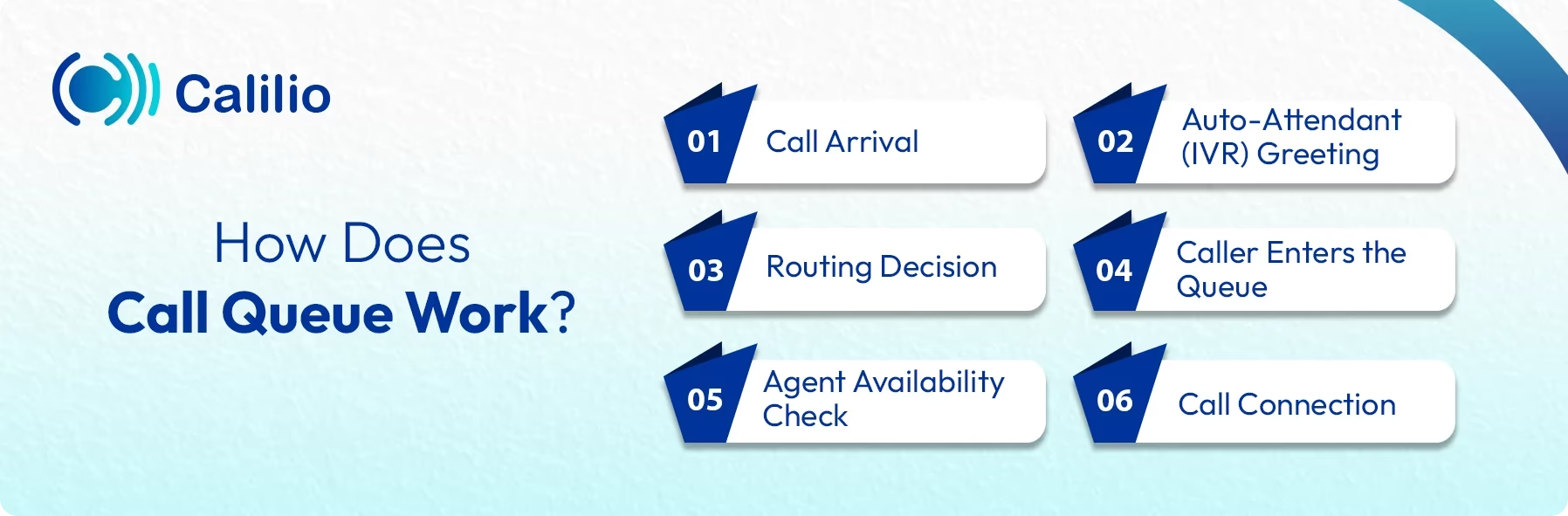
- Call Arrival: A customer calls your business number.
- Auto-Attendant (IVR) Greeting: The caller is greeted by an auto-attendant or IVR (Interactive Voice Response) system. This menu may ask them to select their language and choose the purpose of their call (e.g., “Press 1 for Sales, Press 2 for Support”).
- Routing Decision: Based on the caller’s IVR selection and real-time agent availability, the Automatic Call Distribution (ACD) system decides which queue the caller should join.
- Caller Enters the Queue: If all agents in that department are busy, the caller is placed into a virtual waiting line. During this time, they may hear welcome messages, music on hold, or useful announcements. Some systems even offer a callback option, so callers don’t have to wait on hold.
- Agent Availability Check: The system constantly checks for agent availability. As soon as an agent finishes their current call and switches to or is “Available,” the ACD selects the next caller waiting in the queue, usually following a first-come-first-served approach or another routing rule.
- Call Connection: The next caller in line is automatically connected to the newly available agent. The cycle repeats until all callers have been assisted, ensuring every call is handled fairly and efficiently.
Key Benefits of a Call Queue
Call queue improves customer service by keeping callers informed, reducing frustration, and offering options like estimated wait times or callbacks. At the same time, it boosts operational efficiency by helping agents stay focused, lowering missed-call rates, and providing insights that allow businesses to allocate staff more effectively during busy periods.
1. Increases Agent’s Efficiency
Call queues can help businesses manage high call volumes without the risk of missing or dropping calls. They also ensure every customer gets their turn, enabling agents to focus more on providing excellent services rather than worrying about whose calls to accept next.
2. Improved Customer Experience
No customers like to be ignored or have their calls hung up. Hence, the call queue helps them stay informed while put on hold. It provides information like wait times or customers’ positions in the queue, which automatically improves the customer experience.
3. Better Resource Allocation
A call queue system gives you valuable insights into call patterns. By analyzing such patterns from customers, it can become easy for you to allocate agents more efficiently. For instance, if you notice high call volumes during certain hours, you can allocate your staff according to that time frame.
4. Reduces Abandonment Rate
Customers can hang up phone calls due to frustration over long wait times, which can be a loss for any business. Call queues reduce the chances of losing customers during mid-calls by providing features like call-back options and real-time updates during calls. This helps maintain high customer retention and low abandonment rates.
Types of Call Queues
The common types of call queues include linear queues, circular queues, priority-based queues, and skills-based queues, each designed to handle calls in different ways.
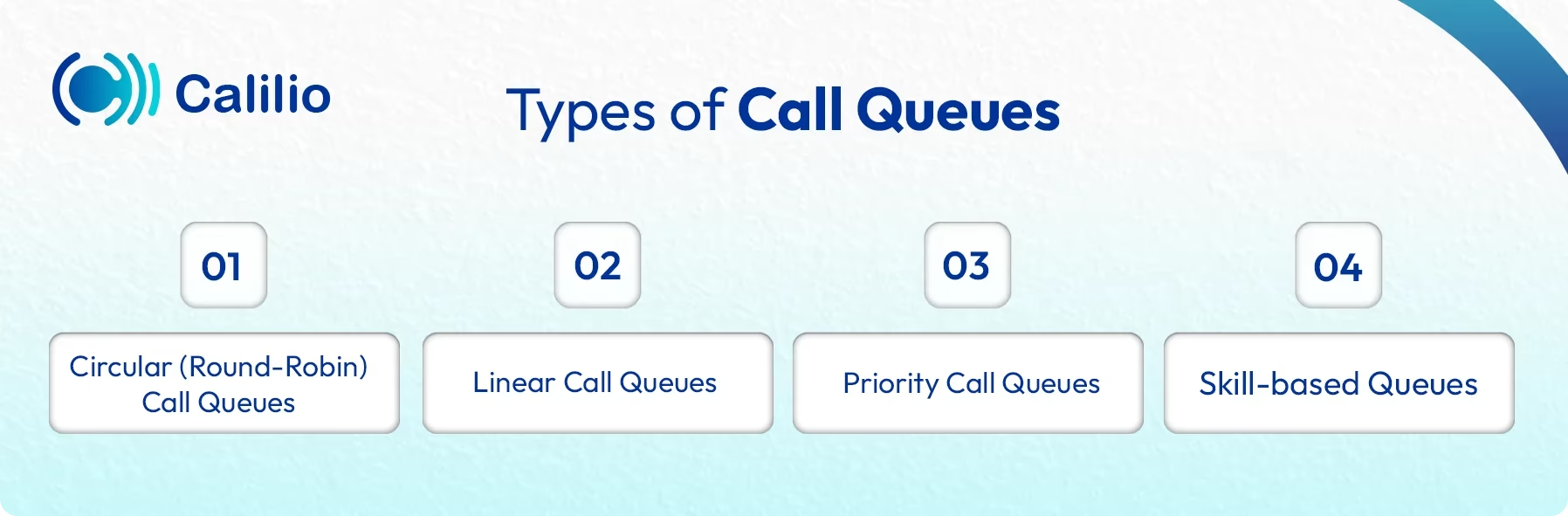
- Circular (Round-Robin) Call Queues: Calls are distributed to available agents sequentially in a fixed, rotating order. Once the system reaches the end of the agent list, it starts over from the beginning.
- Linear Call Queues: Calls are always routed starting with the first agent on a pre-set list, then moving to the second, and so on, until an agent answers.
- Priority Call Queues: Certain callers (e.g., VIP customers, high-value accounts, or callers who have been waiting for a long time) are automatically moved to the front of the queue, regardless of their arrival time.
- Skill-based Queues: Calls are routed to the available agent whose skills best match the caller's request (often determined by their IVR selection, e.g., "Press 1 for Billing," "Press 2 for Technical Support").
How to Set Up a Call Queue?
Creating a call queue starts with selecting a suitable phone system, setting operating hours, designing IVR menus, and defining how calls should be distributed among agents. Once agents are added, thorough testing helps confirm that calls are routed correctly and the queue works smoothly for both callers and staff.
- Step 1 - Understand Your Requirements: Identify the types of calls you receive, expected call volume, and the teams responsible for handling them. Consider business hours, agent availability, and priority callers to design an efficient queue.
- Step 2 - Choose a Phone System with Call Queue and IVR Functionality: Select a cloud-based or PBX phone system that supports call queues and IVR and fits your business needs. After choosing a provider, sign up for a plan and obtain a phone number to begin setup.
- Step 3 - Define Business Hours and Non-Working Hours: Set operating hours for when the call queue is active. For after-hours call handling, configure options like voicemail, closed announcements, call forwarding, or self-service IVR.
- Step 4 - Configure the IVR: Create a simple IVR menu to guide callers to the right department, such as “Press 1 for Sales” or “Press 2 for Support.” This helps route callers to the correct queue when agents are unavailable.
Note: Setting up an IVR is optional, but having one improves the caller experience and helps route calls more efficiently. - Step 5 - Create the Agent Group and Choose the Queuing Strategy: Select the agents who will handle incoming calls for the queue and organize them into an agent group based on roles, skills, or departments. Then, choose a queuing strategy that defines how calls are distributed among these agents. For example, a linear queue sends calls to agents in a fixed order, while a circular queue rotates calls evenly among agents to ensure fair distribution.
- Step 6 - Choose Hold Music: Select suitable music or recorded messages to play while callers wait in the queue. Using professional music on hold, informative announcements, or estimated wait times helps keep callers engaged and improves their waiting experience.
- Step 7 - Set Wait Limits and Fallback Options: Define how long callers can remain in the queue before the system activates a fallback option if no agent is available or the queue reaches its limit. These fallback actions, such as sending callers to voicemail, offering a callback, or redirecting to another queue, ensure calls are not dropped, and callers are still assisted.
- Step 8 - Test the Call Queue: Perform test calls to verify the IVR routes correctly, calls enter the queue properly, agents receive calls, and overflow or after-hours actions work as expected. Testing ensures the system functions correctly before live customer use.
Things to Consider While Setting Up a Call Queue System
If you are considering setting up call queue systems in your organization, you must identify your business needs, and configure the right call routing rules.
Assess Business Needs
Consider your business needs before implementing a call queue in your phone system. What amount of call volumes will you handle? What kind of query will be shared? How many available agents will you have? Analyzing such questions will help you to get the right solution for your business.
Choose Appropriate Softwares
Choose the system that perfectly integrates with your current call queue system and offers the needed features. Integrate appropriate CRM software, real-time monitoring, and call-back options with your call systems.
Configure Call Routing Rules
Set up smart routing rules that direct calls to the most appropriate agents. You can set those rules using skill-based, priority-based, or appropriate call queue types that match your needs to improve efficiency and customer satisfaction.
Customize the Queue Experience
Personalize the on-hold experience by playing promotional content, offering real-time updates, or providing self-service options to enhance customer satisfaction while they wait.
Test and Monitor
After implementing, test your call queue system regularly to ensure it matches your business’s evolving needs. Monitor key metrics like average wait times and call abandonment rates to spot areas that need improvement.
Best Practices for Effective Call Queue Management
Regularly optimize routing rules and monitor key performance metrics to keep your call queue efficient. Using self-service options and virtual queues with call-back features reduces wait times and improves customer satisfaction.
- Regularly Optimize Routing Rules: Your business needs will change over time. Review and update your call routing rules regularly to ensure they are still effective and relevant to your current operations.
- Monitor Performance Metrics: Track parameters like call volume, average hold time, and agent performance. Use this data to make informed decisions about staffing, training, and system updates.
- Offer Self-Service Options: Provide customers with self-service options with automated IVR systems and encourage them to solve simple problems independently. This reduces the load on your call queue and improves efficiency.
- Implement Virtual Queues: Offer callers a call-back option rather than only putting them on hold. One way to do this is by implementing a virtual queue. It is a way to hold customers in queue, guaranteeing they’ll be serviced when their turn comes. This also helps reduce frustration, improve satisfaction, and lower the abandonment rate.
Conclusion
A call queue plays an important role in managing inbound calls, especially during busy periods. By placing callers in an organized waiting line and routing them to available agents, it helps reduce missed calls, balance workloads, and improve response times.
For businesses that receive a high volume of calls, using a phone system with a call queue feature can make call handling more structured and reliable. When implemented correctly, call queues help ensure every caller is attended to in a timely manner, even during peak hours, leading to a more consistent and professional customer experience.
Summarize this blog with:
Frequently asked questions
What does it mean if a call is queued?
If a call is queued, the caller is waiting to be connected because all agents are busy. The system holds the call in line until an agent becomes available. The caller is typically informed of their place in the queue or estimated wait time.
What are the most common call queue challenges businesses face?
What is an example of a queue?
What is the purpose of the in-queue call flow?
How much does a call queue cost?

Still have questions?
Can’t find the answer you’re looking for? Please chat with our friendly team.
Stay in the loop
Get the latest call insights, trends, and updates delivered straight to your inbox.
By subscribing, you agree to receive updates from Calilio.
You can unsubscribe anytime.
Enter the World of AI Business Phone System with Calilio
Improve your business operation with Calilio's advanced virtual phone system. Join today for a better way to connect.