- Partners
- Contact Us
- Log in
What Happens When You Send Texts to a Landline Number?

Most people assume that any phone number can send and receive text messages. However, traditional landline numbers were originally built for voice calls only, not SMS.
This often leads to confusion when a text sent to a landline fails to deliver. What many people don’t realize is that texting a landline can work very differently depending on the carrier and supporting technology.
In this article, we’ll explain what happens when you text a landline number and how texting a landline actually works. You’ll also learn the available options for enabling SMS capabilities on a landline so that you can avoid missed messages.
Highlights:
Texting a landline usually doesn’t work, but if the recipient has enabled the carrier’s Text-to-Landline feature, the message is delivered as a voice call.
If the recipient’s carrier supports a landline texting API (Application Programming Interface), messages sent to that number are delivered to a custom app or IT system. The recipient can then read the message and respond to it.
When you send a message to a VoIP (Voice over Internet Protocol) landline number, the SMS is delivered to the VoIP service’s app or online dashboard, where the recipient can read and reply just like a regular text message.
By enabling text messages on landline phone numbers, businesses can use one established number for calls and texts to simplify communication while saving costs.
You can enable texting on your landline number by porting it to a VoIP service for two-way SMS/MMS, or by using a text-to-landline service to receive incoming texts only. This way, you can keep your existing landline number.
What Happens If You Text a Landline Phone Number?
When you text a landline number, the message either gets lost (if the landline isn’t set up for texting) or, more commonly, it gets converted into a voice recording. That recording is then played to the recipient as a phone call, or sent to their voicemail if they don’t answer.
Some carriers provide another option through a landline texting API. In this case, when you text a landline number, the message is not sent to the phone but is delivered to the recipient's custom app or IT system. This allows them to read your message and even respond or send new texts using that same landline number.
Moreover, if the landline number operates through a VoIP technology, the SMS will be delivered normally. But the recipient can view it only through a web dashboard or mobile app, not the physical landline phone itself.
How Does Text-to-Landline Messaging Work?
Text-to-Landline messaging works by converting incoming text messages into voice recordings, delivered via phone calls or voicemails. Alternatively, with VoIP or API-based systems, messages are sent digitally and can be accessed through a web dashboard or mobile app, allowing for seamless two-way communication.
1. Converting Incoming Text Messages Into Audio Recordings
If you send a text message to a landline number that supports text-to-voice services, your message will be delivered as a voice call or voicemail.
Here is how it works:
- You send a text message from your mobile phone to a landline number.
- If the landline supports Text-to-Landline service, your text is converted into a voice recording.
- The system then places a phone call to the landline number.
- When the call is answered, the listener hears a prompt asking if they want to hear a message sent from a wireless number at no charge.
- If they choose to listen, the recorded version of your text message is played.
- If no one answers and the call goes to voicemail or an answering machine, the recording is saved there as a voicemail.
- Common abbreviations in your text are read as full words, while unclear ones may be spoken as written or spelled out letter by letter.
2. Delivering Texts Through a Custom App or IT System
When you send a message to a landline number registered in a landline texting API service, your text message won’t go to a physical phone; it will be delivered directly into the recipient’s custom app or IT system.
Here is how it operates:
- You send a text message to a landline number that supports a texting API service.
- The recipient receives your message in their custom app or IT system.
- They can reply to your text or send new messages to you using that same landline number.
3. Receiving Texts Through VoIP-based Landline Services
Texting a landline number that operates on VoIP technology allows messages to be delivered digitally rather than through the physical landline phone. The recipient can access your text on their web dashboard or mobile app, making communication smoother and more flexible.
Here is how it works:
- You send a text message to a VoIP-based landline number.
- The recipient can view your text in real-time using their VoIP service’s web dashboard or mobile app.
- They can reply immediately, continuing the conversation over the internet using the same landline number.
Why Businesses Should Enable Text Messaging on Landline Numbers?
Enabling text messaging on landline numbers helps businesses communicate more effectively, as many customers prefer texting over calling. It also allows companies to use one established number for both calls and texts, simplifying communication and reducing costs while improving engagement.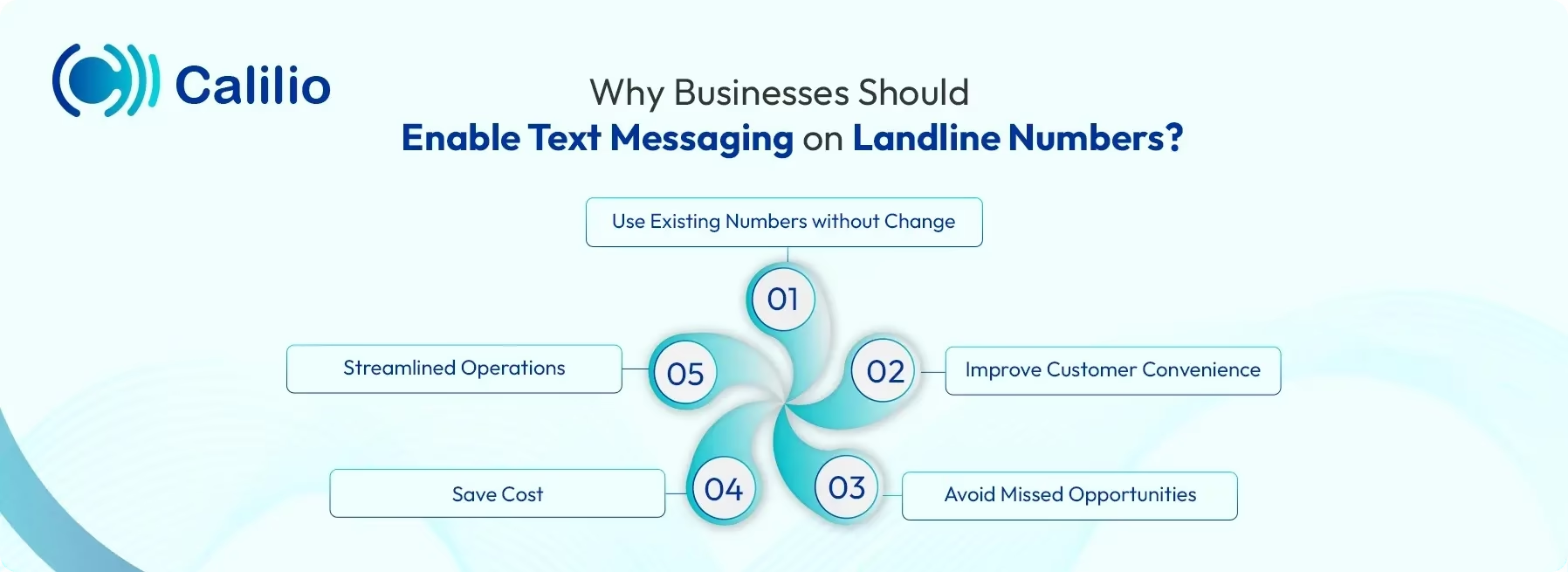
- Use Existing Numbers without Change: Businesses don’t need a new phone number to start texting. Enabling texts on the existing landline keeps communication consistent and familiar for customers.
- Improve Customer Convenience: Many customers prefer texting over calling. Enabling landline texting lets them reach your business in the way they find most comfortable and convenient.
- Avoid Missed Opportunities: Calls can be missed, but text messages stay in the system until someone responds. This ensures inquiries, orders, and service requests never slip through the cracks.
- Save Cost: Enabling texting on existing landlines eliminates the need to purchase additional phone numbers or separate messaging services. This helps businesses reduce communication expenses while still offering a modern, convenient way for customers to reach them.
- Streamlined Operations: Texting allows businesses to manage customer inquiries more efficiently. Multiple team members can access and respond to messages, ensuring no customer is left unattended.
How to Enable Texting on a Landline?
You can enable texting on your landline either by porting your number to a VoIP service or registering with a Landline Texting API service for full two-way SMS/MMS capabilities. You can also sign up for a Text-to-Landline service for limited text functionality.
All of the options allow you to modernize communication without losing your existing phone number, giving people a more convenient way to reach you.
1. Porting Your Landline Number to VoIP Service
Porting your landline number to a VoIP provider allows you to add VoIP texting capabilities to a number that previously supported only voice calls. Once the number is moved to a VoIP service, you can easily send and receive SMS and MMS through a web dashboard or mobile app, giving you full two-way messaging capabilities. You can also get advanced call management features such as call routing, Interactive Voice Response (IVR), call recording, and voicemail-to-email.
Here are the steps to port your landline number to a VoIP service:
- Choose a VoIP provider that supports landline number porting, then verify your number’s portability status using the provider’s porting tool or by contacting their support team.
- Submit the porting request with the required account details and keep your existing landline service active until the transfer is complete.
- Once the number is successfully ported, enable texting on the VoIP service and test both calls and messages to confirm everything is working correctly.
If you prefer not to port your landline, you also have the option to purchase a new VoIP landline number that comes with texting and advanced calling features.
2. Registering with a Text-to-Landline Service
If you prefer to keep your traditional landline setup, you can still enable receiving messages by registering your number with a carrier’s Text-to-Landline service. With this setup, incoming text messages are delivered to you as voice calls or voicemails. In many cases, you may only be able to reply to the texts you receive.
Here is how to get the Text-to-Landline service:
- Reach out to the provider that currently manages your landline service.
- Ask them to activate Text-to-Landline for your phone number.
- Provide any details the carrier requires, such as your account number, service address, or the name on the account, to complete the request.
- Once activated, you will begin receiving text messages sent to your landline number.
3. Registering with a Landline Texting API Service
Another way to enable texting on your landline is by implementing a Landline Texting API service, which allows your existing number to support two-way SMS without changing it. After registration, you can send and receive messages through a mobile app or integrate the API directly into your business systems.
Here are the steps to register with a Landline Texting API service:
- Contact your current landline carrier and confirm they offer a texting API service.
- Request registration of your landline number for texting and complete any required verification.
- Access the carrier’s messaging interface or API and connect it to your business software if needed.
- Test sending and receiving messages to ensure texting is fully enabled on your landline number.
Conclusion
Generally, you can’t send text messages to a traditional landline. However, some carriers make this possible by converting your text into a voice message and delivering it through a phone call or voicemail. Furthermore, if the recipient uses a virtual landline number, your text can be delivered directly to their online dashboard or mobile app.
If you want your landline number to support texting like a mobile number, you can enable a Text-to-Landline service or use a Landline Texting API. However, not all carriers fully support these features, and many only allow you to receive messages, not send.
For two-way texting, the most reliable option is to port your number to Calilio, a VoIP service that provides complete SMS capabilities. Porting is simple, and our support team is available 24/7 to guide you through the process. Once your number is transferred, you gain access to advanced features such as two-way SMS/MMS, call routing, IVR, voicemail-to-email, analytics, and more, all while keeping your original phone number.



Summarize this blog with:
Frequently Asked Questions
What is a text-to-landline service?
A Text-to-Landline service is a feature offered by phone carriers that enables you to receive messages on landline numbers.
Can you send a text message to a landline phone?
How do I retrieve a text message on my landline?
Is there a subscription fee for the Text-to-Landline service?
How to reply to a text sent to a landline?
How much does it cost to send a text to a landline phone?
How to send text messages to a landline phone?

Still have questions?
Can’t find the answer you’re looking for? Please chat with our friendly team.
Stay in the loop
Get the latest call insights, trends, and updates delivered straight to your inbox.
By subscribing, you agree to receive updates from Calilio.
You can unsubscribe anytime.
Enter the World of AI Business Phone System with Calilio
Improve your business operation with Calilio's advanced virtual phone system. Join today for a better way to connect.