
Top Call Center Analytics Software in 2026

Call center analytics software helps teams understand what happens in customer conversations, how agents perform, and where call handling needs improvement. The right platform turns call data, recordings, transcripts, queue activity, sentiment, and QA results into clear decisions for staffing, coaching, compliance, and customer experience.
A small team may only need a simple call analytics dashboard with recordings and AI summaries. A larger contact center may need speech analytics, workforce management, quality assurance, omnichannel reporting, and predictive insights.
Key Highlights:
Call center analytics software helps teams track call volume, missed calls, wait time, agent activity, customer sentiment, and call outcomes.
The best platform depends on team size, call volume, reporting depth, AI needs, compliance requirements, and budget.
Calilio, CloudTalk, Dialpad Support, RingCX, Five9, NICE CXone, Talkdesk, Genesys Cloud CX, Calabrio ONE, Observe.AI, CallMiner, and AmplifAI are strong options for different use cases.
What Is Call Center Analytics Software?
Call center analytics software collects, measures, and analyzes customer interaction data. It helps managers see call volume, wait time, missed calls, agent performance, customer sentiment, common issues, and service quality from one place.
Basic analytics tools show call reports and performance dashboards. Advanced tools use AI, speech analytics, transcripts, QA scorecards, and predictive insights to explain why problems happen and what teams should improve next.
Why Call Analysis Matters in Call Centers?
Call center analytics software matters because call centers cannot improve what they cannot measure. Clear analytics help teams reduce missed calls, improve response time, coach agents better, and understand customer problems before they become bigger issues.
- Managers can spot high call volume, long wait time, and missed call patterns faster.
- Supervisors can coach agents using real calls, transcripts, QA scores, and sentiment trends.
- Support teams can find repeated customer issues and fix the root cause.
- Sales teams can track call outcomes, follow-up quality, and conversion patterns.
- Leaders can connect call center activity with customer experience, revenue, and retention.
Types of Call Center Analytics to Look For
Call center analytics is not one single feature. A useful platform should match the type of insight your team needs, whether that is call reporting, speech analytics, conversation intelligence, QA, or forecasting.
Analytics type | What does it tell you | Useful for |
| Call reporting analytics | Call volume, missed calls, answered calls, wait time, queue activity, and agent activity. | Daily operations and staffing decisions. |
| Speech analytics | What customers and agents say during calls, including topics, keywords, emotions, and compliance risk. | QA, compliance, customer issue discovery, and coaching. |
| Conversation analytics | Insights across calls, chats, SMS, emails, and other customer interactions. | Omnichannel support and customer journey analysis. |
| Predictive analytics | Expected call demand, customer risk, churn signals, and likely outcomes. | Forecasting, staffing, retention, and proactive support. |
| Agent performance analytics | Agent productivity, QA scores, coaching needs, handling time, and customer outcomes. | Supervisor coaching and performance management. |
| Customer experience analytics | Sentiment, satisfaction signals, complaint patterns, and recurring service issues. | CX improvement and root-cause analysis. |
Key Features to Look for in Call Center Analytics Software
The best call center analytics software should give managers useful answers without forcing them to dig through spreadsheets. Strong tools combine real-time visibility, AI insights, call review, coaching, and reporting in a way teams can actually use every day.
- Call recording for reviewing customer conversations and training agents.
- AI call transcription for turning calls into searchable text.
- AI call reports for summaries, reasons, conclusions, and action points.
- Sentiment analysis for spotting customer frustration, satisfaction, or risk signals.
- Live call monitoring for supervisor visibility during active calls.
- IVR and call queue data for understanding routing and wait-time problems.
- Power dialer analytics for outbound sales and follow-up performance.
- QA scorecards for structured call evaluation.
- Custom dashboards for teams, agents, channels, and campaigns.
- CRM integrations for connecting call data with deals, tickets, or customer records.
Best Call Center Analytics Software
Below are listed best call analytics software that serve different teams in a business. Some platforms offer analytics as part of a complete contact center system, while others focus mainly on speech analytics, QA, conversation intelligence, or agent performance.
Software | Category | Analytics features | Starting price | Public rating |
| 1. Calilio | Cloud phone system + analytics | AI Call Reports, Call Dashboard, Recordings, Sentiment Analysis | $15/user/month; $12/user/month when billed annually | G2: 4.7/5 |
| 2. CloudTalk | Cloud contact center | Real-time Analytics, Call Recording, AI add-on, Routing | $25/user/month when billed annually | G2: 4.4/5 |
| 3. Dialpad | AI contact center | Live Sentiment, AI Scorecards, Transcripts and Coaching | $80/user/month when billed annually | G2: 4.4/5 |
| 4. RingCX | AI contact center | Conversation Analytics, Scorecards, Real-time Coaching | $65/agent/month when billed annually | G2: 4.5/5 |
| 5. Level AI | Conversation Intelligence | Conversation Intelligence with CSAT scoring. | Custom quote | G2: 4.6/5 |
| 6. NICE CXone | Enterprise CX platform | WEM, Interaction Analytics, Sentiment Analysis, Forecasting | From $94/user/month | G2: 4.3/5 |
| 7. Talkdesk | AI contact center | Business Intelligence, QA, Real-time Dashboards | From $85/user/month | G2: 4.4/5 |
| 8. Genesys Cloud CXz | Enterprise CCaaS | Journey Analytics, WEM, AI Routing | From $75/user/month annually | G2: 4.4/5 |
| 9. Calabrio ONE | Workforce engagement analytics | Speech Analytics, QA, WFM, Reporting | Custom quote | G2: 4.5/5 |
| 10. Observe.AI | Conversation intelligence | Auto QA, Transcripts, Sentiment Analysis, Coaching | Custom quote | G2: 4.6/5 |
| 11. CallMiner Eureka | Speech analytics | Sentiment Analysis, Compliance, Topic Detection, QA | Custom quote | G2: 4.5/5 |
| 12. AmplifAI | AI coaching + performance analytics | Coaching Workflows, Leader Insights, Performance Trends | Custom quote | G2: 4.7/5 |
| 13. Five9 | Enterprise contact center | Interaction Analytics, AI, Routing | $119/seat/month | G2: 4.1/5 |
1. Calilio
Calilio is a practical option for teams that want call analytics inside their cloud phone system instead of buying a separate enterprise analytics suite.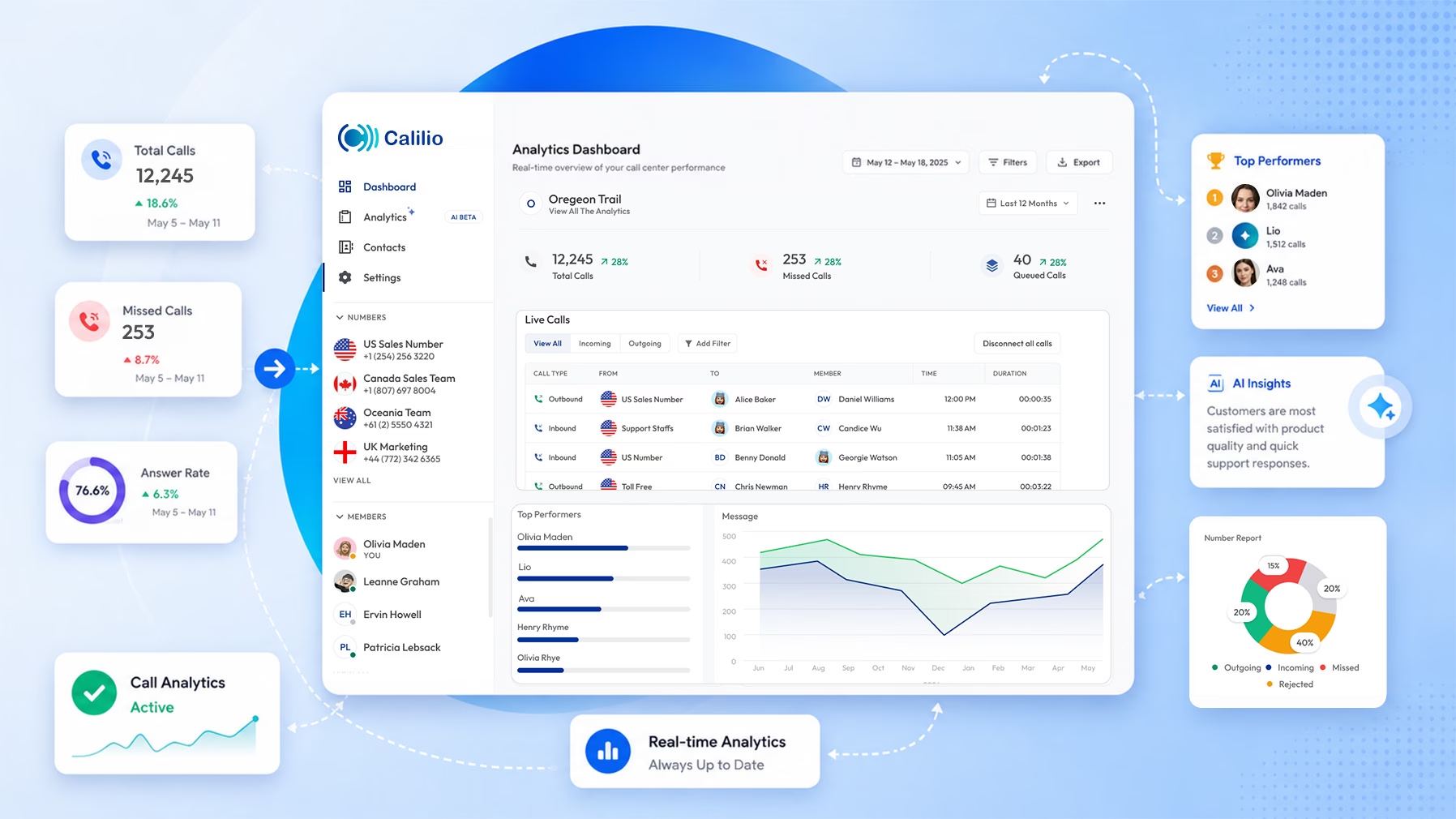 Its call center analytics dashboard helps your team track call volume, missed calls, answer rates, team activity, and AI-powered conversation insights from one dashboard.
Key features:
- Call activity dashboard with missed calls, answered calls, and team performance data.
- AI call reports with summaries, transcripts, call reasons, conclusions, and sentiment.
- Virtual phone numbers from 100+ countries for local and international teams.
- Call recording, call history, call notes, and team activity tracking.
- Inbound and outbound call management for sales and support teams.
Pricing:
- Standard: $15/user/month or $12/user/month (when billed annually)
- Premium: $35/user/month or $28/user/month (when billed annually)
- Enterprise: custom pricing for larger teams.
Rating:
- G2: 4.7/5
Turn Call Data Into Clear Team Actions with Calilio
Calilio helps sales and support teams review calls, spot patterns, and understand customer conversations without adding a heavy analytics suite.
2. CloudTalk
CloudTalk is a cloud contact center platform with strong reporting, call routing, and optional AI conversation intelligence. It works well for sales and support teams that need call performance data, call recordings, and CRM-connected workflows.
Key features:
- Real-time analytics dashboard for call activity and agent performance.
- AI Conversation Intelligence add-on for summaries, notes, searchable transcripts, sentiment, and call scoring.
- Call routing, IVR, queue management, and smart dialing tools.
- International numbers and CRM integrations.
- Call recordings and reporting for coaching and quality checks.
Pricing:
- Lite: $27/user/month or $19/user/month (when billed annually)
- Starter: $34/user/month or $25/user/month (when billed annually)
- Essential: $39/user/month or $29/user/month (when billed annually)
- Expert: $69/user/month or $49/user/month (when billed annually)
- AI Conversation Intelligence add-on: $9/user/month (when billed annually)
Rating:
- G2: 4.4/5
3. Dialpad
Dialpad combines contact center features with strong AI analytics. The platform is especially useful when teams want live sentiment, real-time transcripts, AI scorecards, and coaching insights during and after customer calls.
Key features:
- Real-time transcription for customer calls.
- Live sentiment analysis for supervisors.
- AI CSAT and AI scorecards for quality checks.
- AI live coaching and speech coaching.
- Real-time dashboards, call monitoring, and scheduled reporting.
Pricing:
- Support Essentials: $95/user/month or $80/user/month (when billed annually)
- Support Advanced: $135/user/month or $115/user/month (when billed annually)
- Support Premium: $170/user/month or $150/user/month (when billed annually)
Rating:
- G2: 4.4/5
4. RingCX
RingCX is RingCentral’s AI contact center platform. It supports voice and digital channels, conversation intelligence, automated scorecards, and supervisor coaching in one contact center environment.
Key features:
- AI conversation analytics for customer interactions.
- Automated scorecards for quality management.
- Real-time coaching and supervisor support.
- Voice and digital customer engagement across 20+ channels.
- Integrations and APIs for CRM and workflow connections.
Pricing:
- Core: $30/user/month, or $20/user/month (when billed annually)
- Advanced: $35/user/month, or $25/user/month (when billed annually)
- Ultra: $45/user/month, or $35/user/month (when billed annually)
- RingCX: Starts at $65/user/month (when billed annually)
Rating:
- G2: 4.5/5
5. Level AI
Level AI is an AI-powered analytics platform built for the omnichannel contact center, turning every call, chat, and email into structured, actionable insights. It runs on a shared generative AI and semantic intelligence engine, giving QA, insights, and coaching teams a single source of truth from the same conversation data. The platform analyzes 100% of interactions — not a manual sample — to surface sentiment, root causes, and performance trends in real time. Brands like Wayfair, FedEx, Affirm, and Chime use it to replace slow, survey-based analytics with continuous, automated visibility.
Key Features:
- Conversation Intelligence that categorizes every interaction by reason, resolution, effort, and sentiment
- Voice of the Customer (VoC) Insights with automated CSAT scoring across calls, emails,
SMS, and chat — no surveys needed - Sentiment & Emotion Analysis that detects anger, worry, happiness, and gratitude with
temporal weighting - Semantic Intelligence using pre-trained or custom intent tags, with zero keyword/legacy
setup - Custom analytics dashboards tracking volume, trends, QA performance, and AHT by
category - Auto-QA scoring 100% of interactions with over 90% agreement with expert human QA
reviewers
Pricing: Custom pricing based on business needs.
Rating:
G2 Rating: 4.6/5
6. NICE CXone
NICE CXone is an enterprise CX platform with deep analytics, workforce engagement, quality management, and AI. It serves larger contact centers that need detailed performance visibility across teams and channels.
Key features:
- Interaction analytics and customer sentiment insights.
- Workforce engagement management and forecasting.
- Quality management and coaching workflows.
- AI-powered customer experience intelligence.
- Omnichannel dashboards and reporting.
Pricing:
- Voice Agent: $94/user/month
- Omnichannel Agent: $110/user/month
- Essential Suite: $135/user/month
- Core Suite: $169/user/month
- Complete Suite: $209/user/month
- Ultimate/CXone Mpower plans: $249/user/month
Rating:
- G2: 4.3/5
7. Talkdesk
Talkdesk offers contact center analytics through dashboards, quality management, AI, and business intelligence tools. It gives teams a structured way to monitor service quality, agent activity, and customer experience.
Key features:
- Business intelligence dashboards for contact center performance.
- Real-time reporting for operations teams.
- Quality management for review and coaching.
- AI tools for automation and agent assistance.
- Voice and digital engagement features.
Pricing:
- Digital Essentials: $85/user/month.
- Voice Essentials: $105/user/month.
- Elite: $165/user/month.
- Industry Experience Clouds: around $225/user/month.
Rating:
- G2: 4.4/5
8. Genesys Cloud CX
Genesys Cloud CX is an enterprise-grade contact center platform with analytics, AI routing, journey orchestration, and workforce engagement. It is built for teams that need to manage customer experience across many channels.
Key features:
- Journey analytics and customer experience reporting.
- AI-powered routing and automation.
- Workforce engagement and quality management.
- Speech and text analytics through higher plans and add-ons.
- Omnichannel dashboards for service operations.
Pricing:
- Genesys Cloud CX 1: $75/user/month (when billed annually)
- Genesys Cloud CX 2: $115/user/month (when billed annually)
- Genesys Cloud CX 3: $155/user/month (when billed annually)
- Genesys Cloud CX 4: $240/user/month (when billed annually)
Rating:
- G2: 4.4/5
9. Calabrio ONE
Calabrio ONE focuses on workforce engagement, quality management, reporting, and interaction analytics. It helps call centers connect customer conversations with agent performance and workforce planning.
Key features:
- Speech analytics for customer calls.
- Quality management and agent evaluation.
- Workforce management and forecasting.
- Reporting dashboards for supervisors.
- Trend, emotion, and interaction analysis.
Pricing:
- Custom quote.
Rating:
- G2: 4.5/5
Why it made the list:
Calabrio is useful for teams that care heavily about workforce planning, QA, and analytics in one WEM platform.
10. Observe.AI
Observe.AI is a conversation intelligence and automated QA platform for contact centers. It helps quality teams review more calls, detect coaching moments, and understand customer issues at scale.
Key features:
- Automated QA for call reviews.
- Conversation intelligence from transcripts and call data.
- Sentiment, intent, and topic detection.
- Agent coaching workflows.
- Compliance monitoring and redaction support.
Pricing:
- Custom quote based on seats, usage, and product scope.
Rating:
- G2: 4.6/5
11. CallMiner Eureka
CallMiner Eureka is a speech and interaction analytics platform built for larger contact centers. It helps teams analyze conversations, spot trends, track compliance risk, and improve customer experience.
Key features:
- Speech analytics for phone conversations.
- Sentiment and emotion analysis.
- Topic detection and conversation categorization.
- Automated quality monitoring.
- Compliance and risk analytics.
Pricing:
- Custom quote based on interaction volume, selected features, and deployment size.
Rating:
- G2: 4.5/5
12. AmplifAI
AmplifAI turns contact center data into coaching, performance management, and leader action plans. It is less of a basic reporting tool and more of a performance intelligence platform for CX teams.
Key features:
- Unified contact center data from multiple systems.
- Coaching workflows for agents and supervisors.Performance dashboards for leaders.
- Gamification and behavior-based improvement plans.
- Outcome tracking for business and customer experience goals.
Pricing:
- Custom subscription pricing based on users, agents, and deployment scope.
Rating:
- G2: 4.7/5
13. Five9
Five9 is an enterprise contact center platform with AI, routing, reporting, and workforce tools. It suits larger teams that need deeper analytics across digital and voice channels.
Key features:
- Interaction analytics for customer conversations.
- AI assistance and automation through Five9 Genius AI.
- Predictive and progressive dialing for outbound teams.
- Omnichannel routing for voice and digital channels.
- Dashboards for performance, queue, and agent visibility.
Pricing:
- Digital: $119/seat/month
- Core: $159/seat/month
- Plus: Contact Sales
- Pro: Contact Sales
- Enterprise: Contact Sales
Rating:
- G2: 4.1/5
How to Choose the Right Call Center Analytics Software?
The right call center analytics software should match your team size, call volume, reporting needs, and coaching process. A simple dashboard may be enough for a small business, while an enterprise contact center may need AI QA, workforce management, compliance monitoring, and omnichannel journey analytics.
- Start with the problem you want to solve: missed calls, poor coaching, long wait time, low conversion, low CSAT, or compliance risk.
- Choose a tool that fits your team size instead of buying enterprise software too early.
- Check whether analytics are built in or sold as an add-on.
- Compare actual pricing by user, agent, seat, module, or interaction volume.
- Review integration options for CRM, helpdesk, ticketing, and workforce systems.
- Look for clean dashboards that managers can understand without a data analyst.
- Prioritize AI features that give usable insights, not just flashy summaries.
- Make sure reporting supports both daily operations and long-term performance reviews.
Call Center Metrics that Businesses Commonly Track
Call center analytics become useful when teams track the right metrics. The best metrics show customer experience, team efficiency, service quality, and business outcomes together.
Metrics | What it means | Why it matters |
| Call volume | Total inbound or outbound calls in a period. | Shows demand and staffing needs. |
| Missed call rate | Percentage of calls not answered. | Highlights lost opportunities and service gaps. |
| Average handle time | Average time agents spend on calls and after-call work. | Helps improve efficiency without rushing customers. |
| First call resolution | Percentage of issues solved on the first call. | Shows support quality and reduces repeat calls. |
| Abandonment rate | Percentage of callers who hang up before reaching help. | Signals queue and wait-time problems. |
| Service level | Percentage of calls answered within a target time. | Tracks whether the team meets customer response goals. |
| QA score | Score from call reviews or automated evaluation. | Supports coaching and quality improvement. |
| Sentiment trend | Customer emotion or tone across calls. | Helps find frustration, satisfaction, and churn risk. |
| Conversion rate | Percentage of calls that lead to a sale, booking, or next step. | Useful for sales and outbound teams. |
Mistakes to Avoid When Buying Call Center Analytics Software
Many teams buy analytics software because the demo looks impressive, then struggle because the tool does not match their workflow. A good buying decision should focus on usable insights, clean setup, and real manager adoption.
- Do not buy an enterprise suite if your team only needs basic call reporting and AI summaries.
- Do not judge a platform only by AI features; check dashboards, recordings, QA, routing, and integrations too.
- Do not ignore pricing structure because some tools charge by user, seat, channel, module, or usage volume.
- Do not choose a tool without checking how supervisors will use the data for coaching.
- Do not go for the tool with the dashboards that show numbers but fail to explain what action the team should take next.
Final Verdict
The best call center analytics software is the one that gives your team clear answers from customer conversations and call activity. Small teams may prefer Calilio or CloudTalk for simple call visibility and AI insights, while larger contact centers may compare Dialpad Support, RingCX, Five9, NICE CXone, Talkdesk, or Genesys Cloud CX for deeper contact center analytics.
Specialist tools like Calabrio ONE, Observe.AI, CallMiner, and AmplifAI are more suitable when a team already has calling infrastructure but needs stronger QA, speech analytics, coaching, or performance intelligence. The safest choice is the platform that matches your call volume, team size, reporting needs, coaching process, and budget.
Summarize this blog with:
Frequently asked questions
What is call center analytics software?
Call center analytics software collects and analyzes call data, recordings, transcripts, agent activity, customer sentiment, and service metrics. It helps managers understand call performance, customer issues, coaching needs, and operational bottlenecks.
What is the best call center analytics software for small businesses?
What is the difference between call center analytics and call center reporting?
What is the difference between speech analytics and conversation analytics?
How much does call center analytics software cost?
Which call center metrics should teams track?
Can call center analytics improve agent coaching?
Do small teams need AI call analytics?

Still have questions?
Can’t find the answer you’re looking for? Please chat with our friendly team.
Stay in the loop
Get the latest call insights, trends, and updates delivered straight to your inbox.
By subscribing, you agree to receive updates from Calilio.
You can unsubscribe anytime.
Enter the World of AI Business Phone System with Calilio
Improve your business operation with Calilio's advanced virtual phone system. Join today for a better way to connect.