
VoIP Cell Phones for Business: Benefits, Setup & Limitations

Using a personal cell phone for business calls may feel easy at first. But it can quickly become hard to manage. Customer calls mix with private ones, follow-ups slip through, and your call history stays with one person instead of the whole business.
The problem grows when your sales reps, support agents, or remote teams handle calls from different locations. A regular cell phone can make and receive calls, but it does not give you business features like shared numbers, call routing, business hours, call recording, voicemail control, or team-level call reports.
A VoIP cell phone setup solves this problem. It turns a regular smartphone into a proper business calling tool. Calls run through the internet using a mobile app or a cloud phone system. So your team can answer business calls from anywhere, use the same company number, send SMS, and keep work calls completely separate from personal ones.
Below, we'll cover what VoIP cell phones are, how they work, their benefits, setup steps, and potential drawbacks in detail.
Key Highlights:
A VoIP cell phone is a normal smartphone that uses an internet-based calling app to make and receive calls.
VoIP cell phones help businesses protect personal numbers, reduce extra device needs, and manage team calling better.
Setting up VoIP on a cell phone usually involves choosing a provider, installing the app, signing in, allowing permissions, and testing calls.
VoIP cell phones are useful, but weak internet, battery use, public Wi-Fi risks, emergency calling limits, and app issues can affect performance.
What are VoIP Cell Phones?
VoIP cell phones are regular smartphones that make and receive calls through the internet using VoIP calling apps instead of relying only on the standard mobile voice network. The device stays the same, but the call runs through Wi-Fi or mobile data.
A VoIP cell phone is useful when someone wants to call from a mobile device without using a personal cell phone number. For example, a business owner can use one smartphone for personal calls and still make client calls from a company number through the VoIP app.
How Do VoIP Cell Phones Work?
VoIP cell phones work by sending your voice through the internet instead of a traditional mobile network. When you speak into the phone, the VoIP app converts your voice into small digital data packets and sends them through Wi-Fi or mobile data.
Here's how a VoIP cell phone works step by step: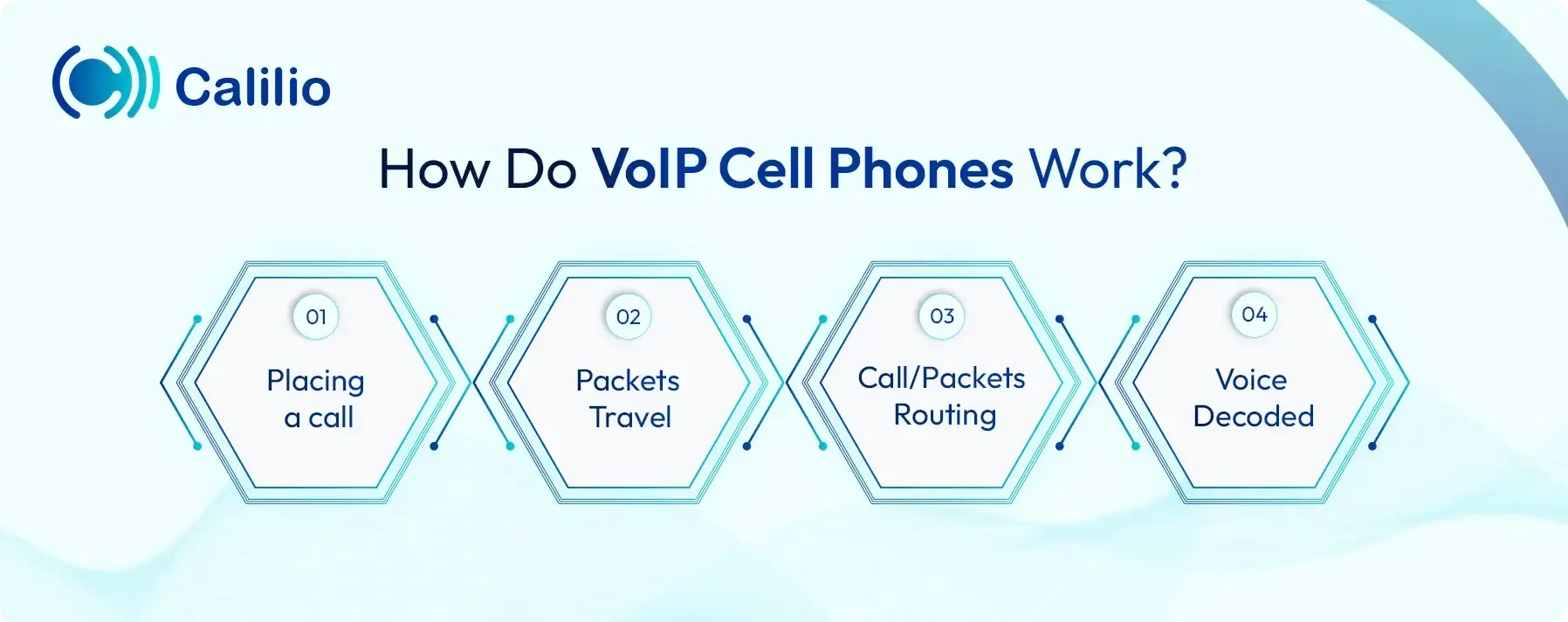
- Placing a call: You dial a number and speak into the phone. The VoIP app captures your voice and encodes it into small digital data packets ready for transmission.
- Packets Travel: These packets travel through your Wi-Fi or mobile data connection (4G, 5G, or LTE) at high speed toward the VoIP provider's network.
- Call/Packets Routing: The VoIP provider's network identifies the recipient's address and directs each packet along the fastest available path to reach them.
- Voice Decoded: Once the packets arrive, they are reassembled in the correct order and decoded back into audio, so the receiver hears your voice clearly and in real time.
What are the Benefits of Using VoIP Cell Phones?
A VoIP cell phone helps businesses handle work calls from regular smartphones while keeping their personal numbers private. It also provides business calling features such as call routing, voicemail, and shared number access. Since calls and messages run through the VoIP system, you can reduce calling costs, manage communication more securely, and handle customer conversations from one place.
Keep Personal Numbers Private
A VoIP cell phone lets your staff use a business number on the same mobile device. So, there is no need to share a personal cell number with customers, leads, or coworkers. This means your team can take work calls during business hours and simply stop receiving them after hours without switching devices.
Business Calling Features
Regular mobile calling is limited to personal use. You can make and receive calls, but there is no way to share a number across your team, route incoming calls, or monitor how your staff handles customer conversations. A VoIP cell phone service can offer features such as call transfer, IVR (Interactive Voice Response), call recording, voicemail, call notes, call analytics, and call summaries.
Lower Calling Costs
VoIP service providers often offer lower calling rates compared to traditional mobile carriers, especially for long-distance and international calls. This means your team can stay connected with clients across different regions without worrying about per-minute charges or expensive roaming fees. Beyond call costs, it also cuts down on hardware expenses since your team can use existing smartphones instead of purchasing separate business phones.
Secure Communication
Business calls and messages often include customer details. A reliable VoIP provider can help protect communication through secure systems, account controls, and protected call records. This gives businesses more control than using personal mobile numbers for work.
Support Team Collaboration
Many VoIP services allow multiple team members to use one shared business number. Your sales, support, or service teams can answer calls, review conversation history, and continue customer interactions without any disruption—all from the same system. No customer interaction gets lost between team members.
How Do You Set Up VoIP on a Cell Phone?
To set up VoIP on a cell phone, install a VoIP app, connect it with a business number, allow the required permissions, and test calls over Wi-Fi or mobile data. Once the setup is complete, the smartphone can make and receive calls through the VoIP service.
- Step 1: Download the VoIP App
Install the VoIP provider’s mobile app on your iPhone or Android device. - Step 2: Sign Up or Log In
Open the app and create a new account or log in with your existing account details. - Step 3: Allow Required Permissions
Allow access to the microphone, contacts, and notifications so the app can handle calls, saved contacts, and alerts. - Step 4: Choose or Connect a Phone Number
Select a new VoIP number inside the app, or connect an existing number if the provider supports it. - Step 5: Configure Call and Message Settings
Set up caller ID, voicemail, call forwarding, notifications, and messaging preferences. - Step 6: Test Calls and Messages
Make a test call to check voice quality and incoming call alerts. Send a test message if SMS is available.
Turn Personal Cell Phones Into Business Calling Tools with the Calilio Mobile App!
What are the Potential Drawbacks of VoIP Cell Phones?
Since calls run through the internet and a mobile app, weak connections, faster battery drain, public Wi-Fi risks, emergency calling limits, shared bandwidth, and app compatibility issues can affect the calling experience.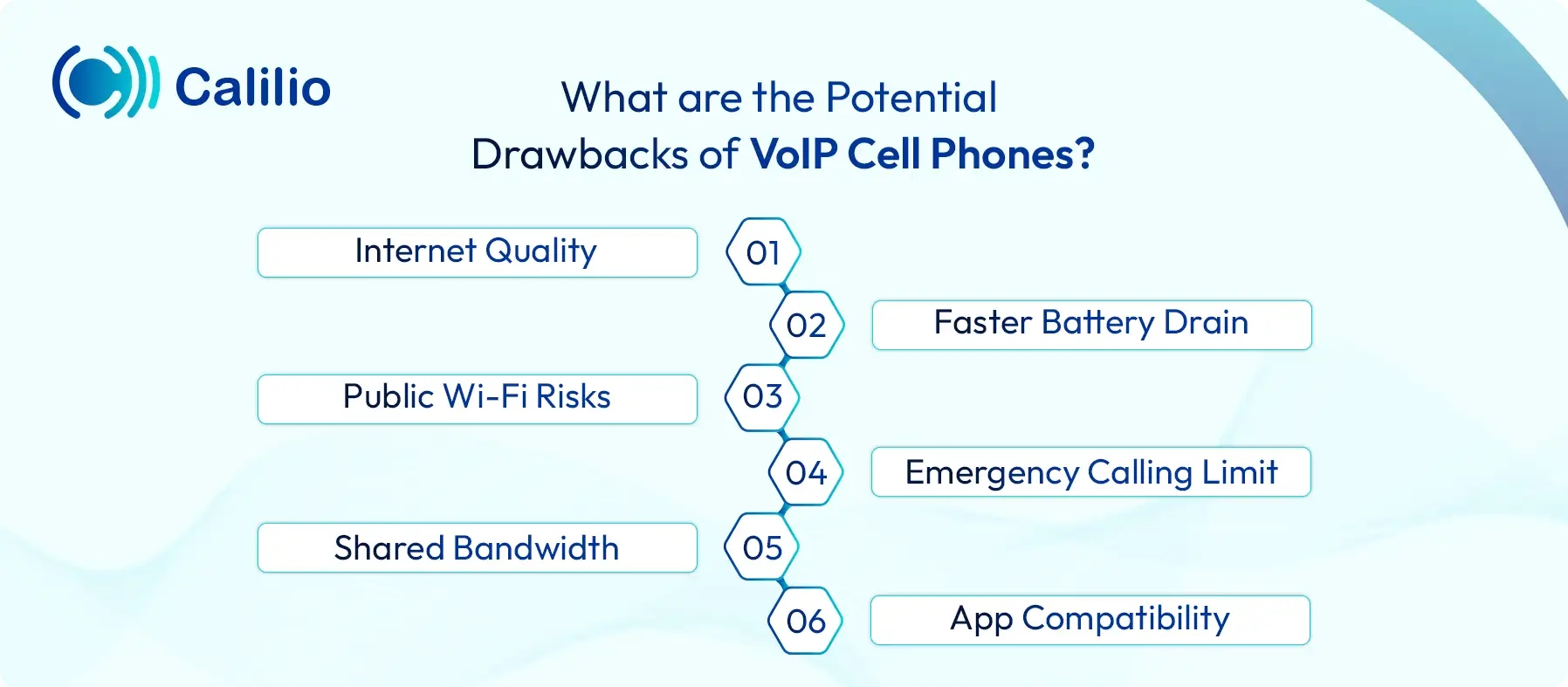
- Internet Quality: VoIP calls on cell phones depend on Wi-Fi or mobile data. Weak 4G, 5G, LTE, or Wi-Fi signals can cause call drops, audio delays, and unclear voice quality.
- Faster Battery Drain: A VoIP app needs internet access, notifications, and background activity to receive calls. As a result, long calls and frequent alerts reduce battery life faster than basic mobile use.
- Public Wi-Fi Risks: Public Wi-Fi networks can expose VoIP calls and messages to security threats. Business users should avoid handling sensitive customer conversations on unknown or unsecured networks.
- Emergency Calling Limit: Regular cellular calls can share location details more reliably during emergency calls. Some VoIP services do not provide the same level of location accuracy. Some services may not support E911 at all.
- Shared Bandwidth: VoIP call quality drops when the same internet connection handles heavy activity, such as video meetings, streaming, or downloads.
- App Compatibility: VoIP apps need to stay compatible with the latest iPhone and Android updates. If the app falls behind, it can cause missed alerts, login issues, or call performance problems.
Conclusion
VoIP cell phones give businesses a practical way to handle calls from regular smartphones. They help teams use a business number for work calls, keep personal numbers private, and stay reachable without depending on a desk phone.
However, a good mobile VoIP experience does not come from the app alone. It also depends on the quality of the provider behind it. Businesses need a service that keeps calls clear, protects communication, supports mobile users properly, and gives teams enough control over daily call handling.
Calilio is an AI-powered cloud phone system that lets your team make and receive business calls directly from their iPhone or Android device. It supports calls and SMS through virtual numbers from 100+ countries, lets you customize business hours, and manages inbound calls through IVR; all from the same mobile app. Similarly, AI-powered features, including sentiment analysis, call summaries, and transcriptions, help your team review call outcomes and follow up with full context.
Summarize this blog with:
Frequently asked questions
Can a regular cell phone be used as a VoIP phone?
Yes. A regular cell phone can be used as a VoIP phone by installing a VoIP app from a service provider. The phone still works for normal mobile calls, but calls made through the VoIP app use Wi-Fi or mobile data instead of the standard mobile voice network.
Is VoIP cheaper than regular mobile phone service?
Can businesses send SMS using VoIP on cell phones?
How can teams use the same VoIP number on different cell phones?
Is VoIP on cell phones right for your business?

Still have questions?
Can’t find the answer you’re looking for? Please chat with our friendly team.
Stay in the loop
Get the latest call insights, trends, and updates delivered straight to your inbox.
By subscribing, you agree to receive updates from Calilio.
You can unsubscribe anytime.
Enter the World of AI Business Phone System with Calilio
Improve your business operation with Calilio's advanced virtual phone system. Join today for a better way to connect.