
Hold Callers in LineNot on a Busy Tone
When every agent is on a call, Calilio Call Queue keeps your callers on the line with music or a custom announcement, then connects each one to the next available agent.
- Callers wait in line instead of hearing a busy tone or getting cut off.
- Hold music, custom announcements and queue position updates.
- Set a queue limit and a maximum wait time, with a fallback if no one answers.
Busy agents should not mean lost customers
Without a waiting line, a busy team means busy tones, dropped calls and customers who call a competitor instead.
Without a call queue
What callers experience today- Callers hear a busy tone when agents are on calls.
- Calls can disconnect automatically.
- Customers keep calling back, and important leads are lost.
- Missed-call rates climb and your team feels overloaded.
With Calilio Call Queue
What callers experience instead- Callers are placed in a waiting line automatically.
- They hear hold music or your own announcement.
- Each caller connects to the next available agent.
- Fewer missed calls and a more professional first impression.
From busy line to connected call
Callers are served in the order they arrive, and no one is left guessing.
- STEP 1
Call comes in
A customer calls your Calilio number.
- STEP 2
Agents busy?
Calilio checks who is free. If someone is, the call connects at once.
- STEP 3
Caller waits
Everyone else is held in the queue with music or an announcement.
- STEP 4
Next agent answers
The next available agent gets the call, in the order callers arrived.
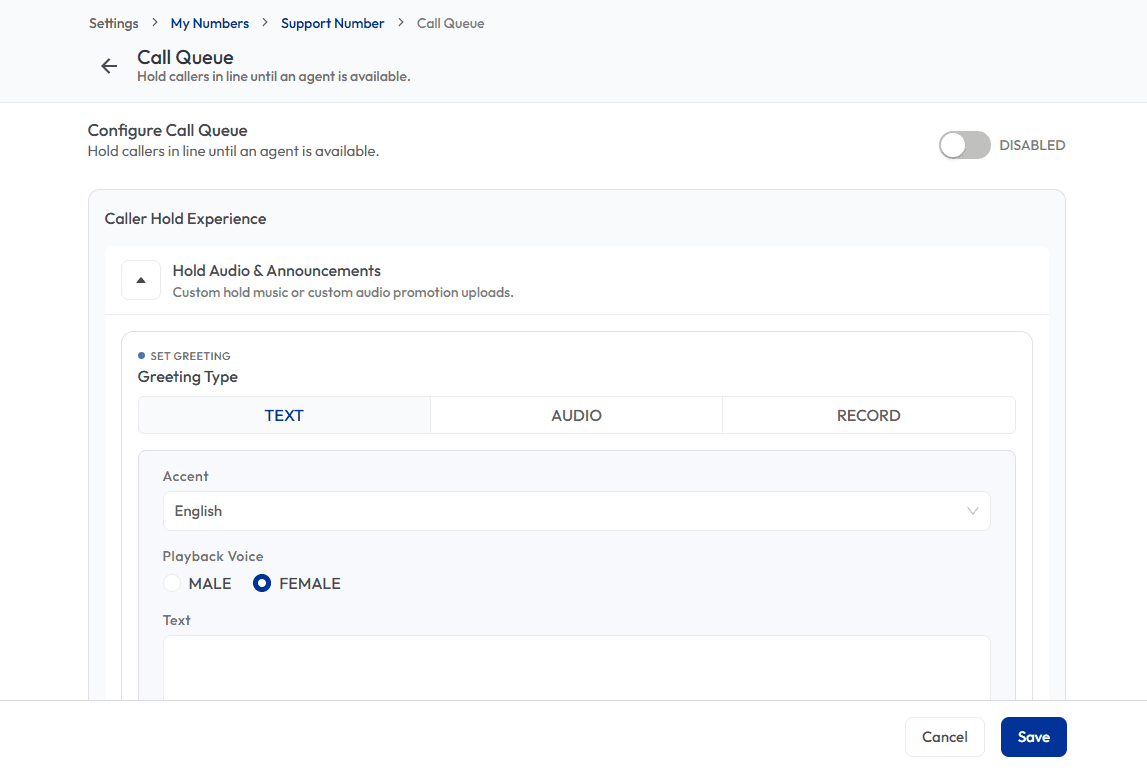
Give waiting callers something to listen to
Choose what callers hear while they wait. Type a message and let Calilio turn it into audio, upload your own file, or record it yourself.
- Text greeting with a choice of accent and a male or female voice.
- Upload hold music or promotional audio, or record a message.
- Greetings of up to 200 characters, generated as audio in one click.
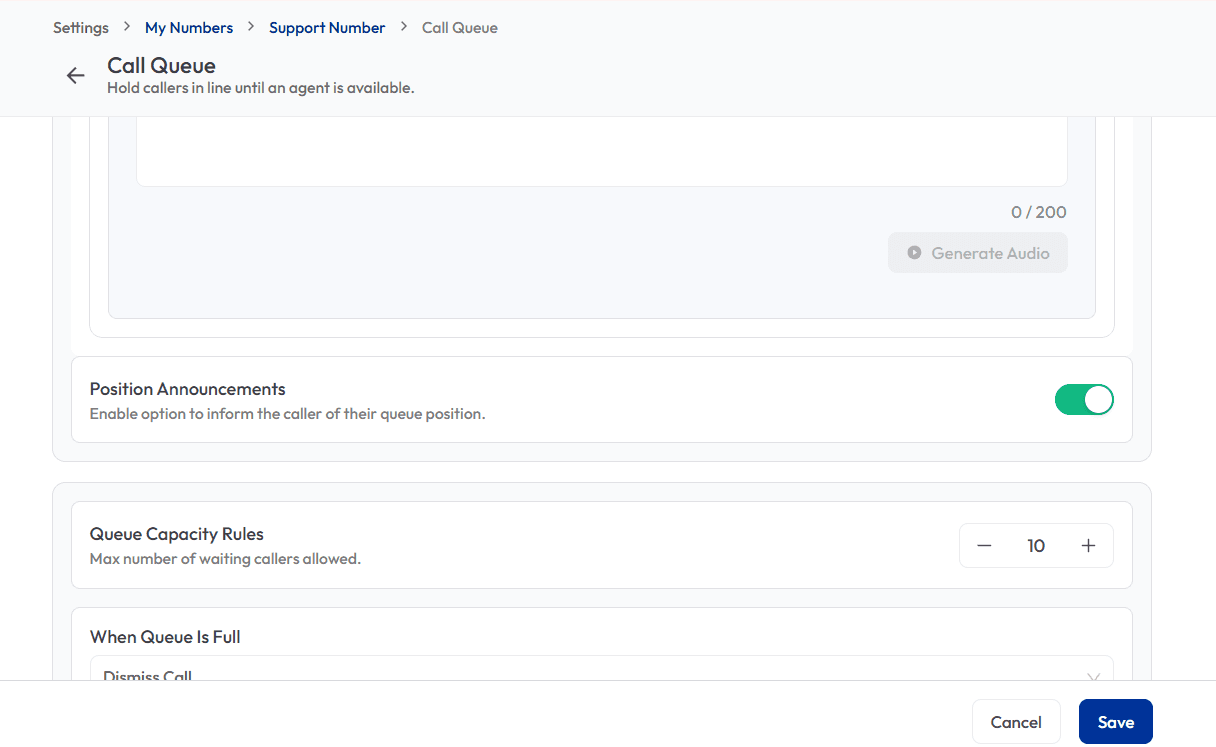
Tell callers where they stand
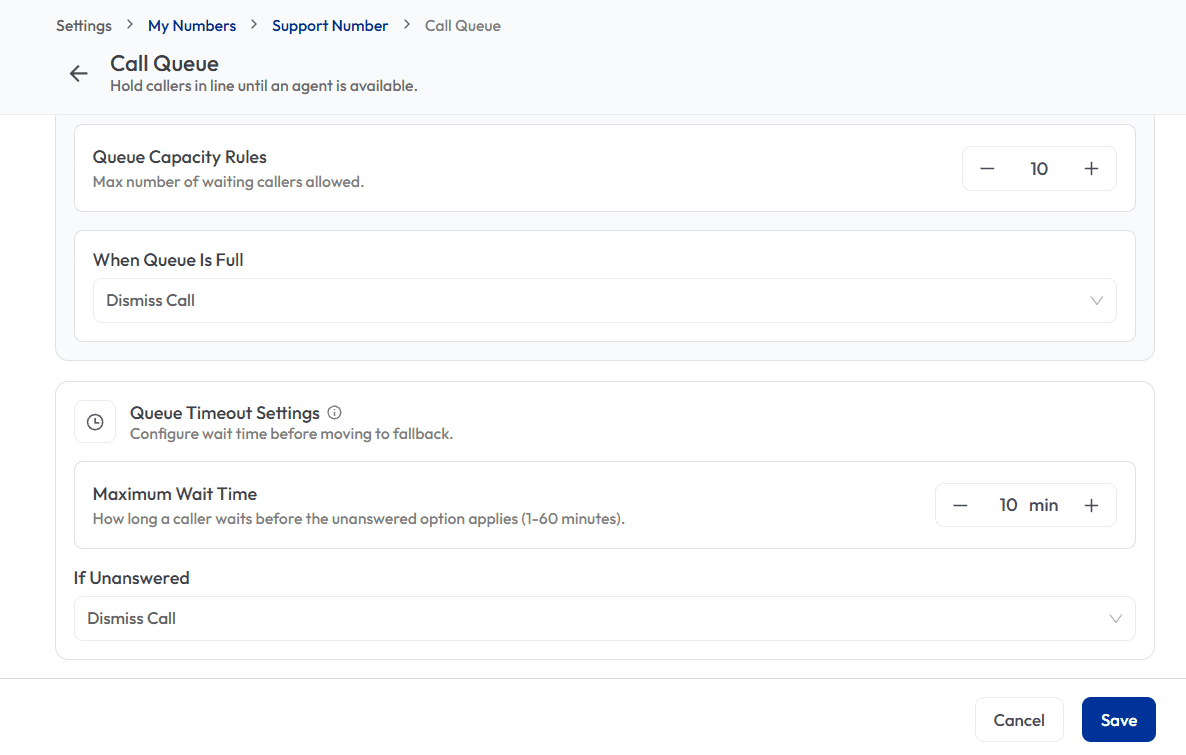
Switch on position announcements and callers hear their place in line. Then cap the queue so it never grows beyond what your team can handle.
- One toggle turns queue position announcements on.
- Set the maximum number of callers allowed to wait.
- Choose what happens to the next caller when the queue is full.
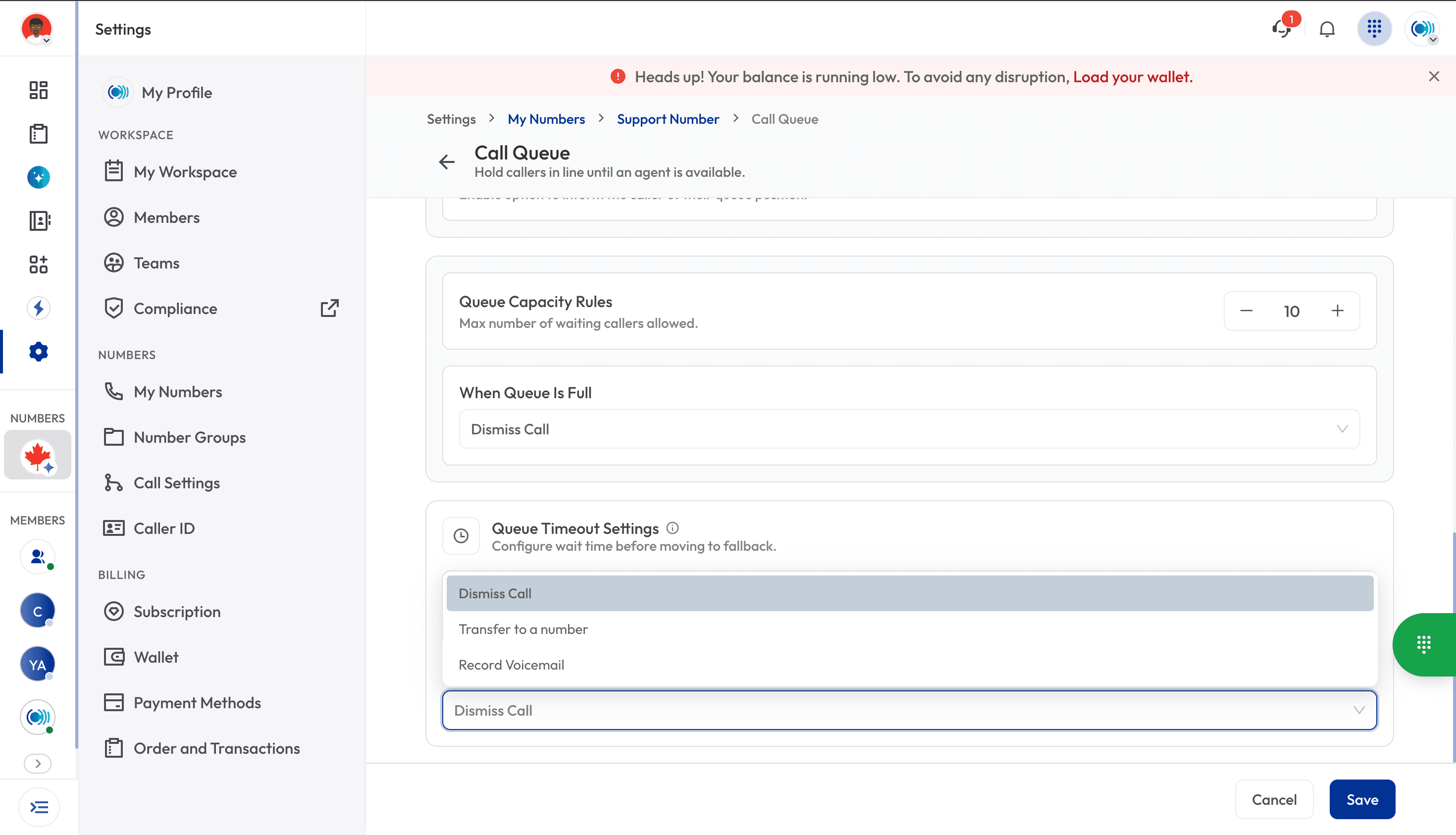
Never leave a caller waiting forever
Set how long a caller waits before the unanswered option applies, from 1 to 60 minutes. Then decide where they go next.
- Maximum wait time from 1 to 60 minutes.
- Dismiss the call, transfer to another number or record a voicemail.
- Callers always end up somewhere useful, even after hours or at peak times.
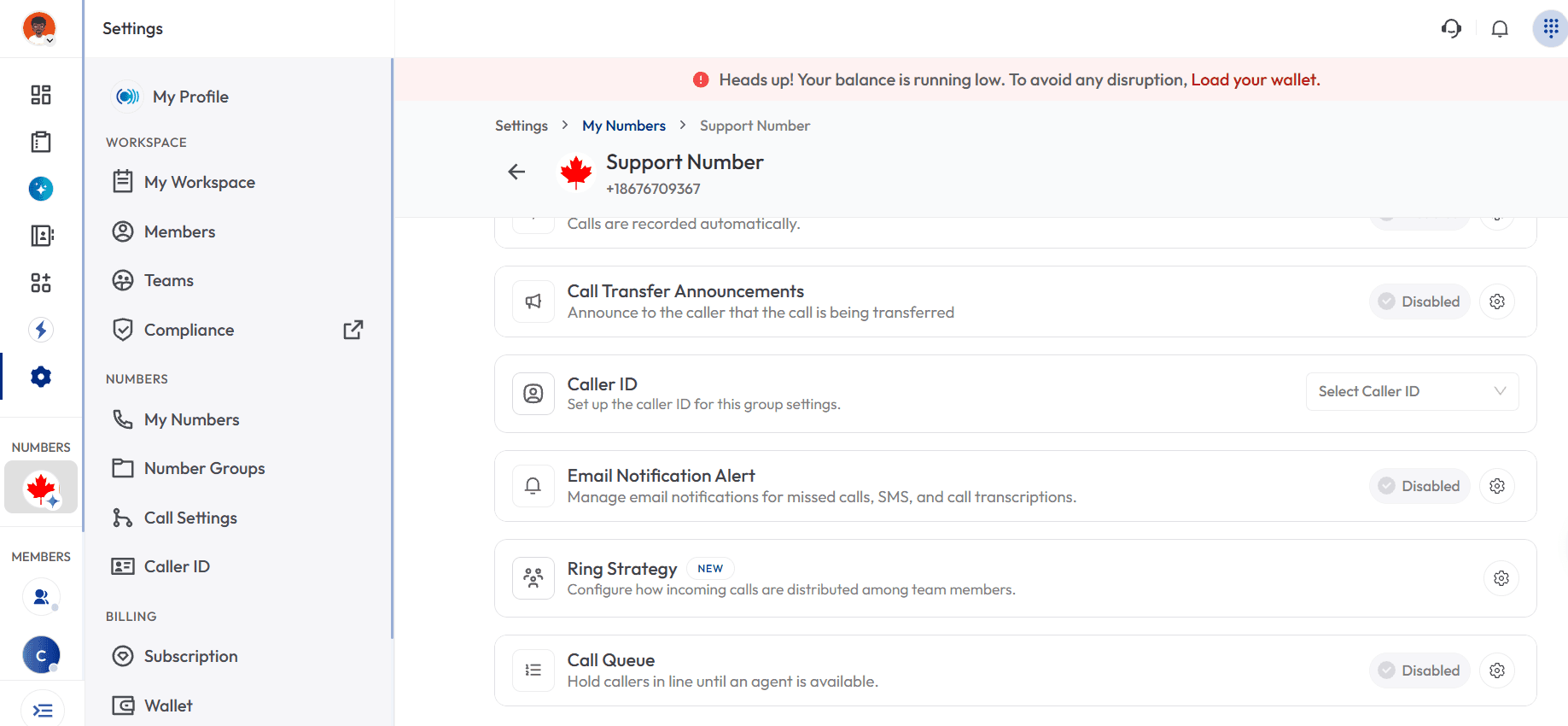
Turn it on from your number’s settings
Call Queue sits in Call Settings next to Ring Strategy, Caller ID and other call handling options. Open a number, switch Call Queue on and adjust the rules.
- Set up per number, so each line can have its own rules.
- Pairs with Ring Strategy to decide how calls are shared between team members.
- Change greetings, limits and timeouts whenever you need.
What you get with Call Queue
Every part of the waiting experience, from the first ring to the next agent.
Automatic queueing
Callers are placed in line automatically when every agent is busy.
Hold music & announcements
Music, text-to-speech greetings, uploaded audio or your own recording.
Queue position updates
Let callers know where they stand in line.
Queue limits
Set the maximum number of callers that can wait.
Maximum wait time
Choose how long callers wait, from 1 to 60 minutes.
Overflow options
Dismiss the call, transfer to a number or record a voicemail.
Next available agent
Queued calls go to the next agent who is free, in arrival order.
Multiple queues
Run separate queues for different numbers or departments.
See your queue as it happens
Owners and admins can watch the line in real time and review queue reports to staff for the busiest hours.
- Live view of waiting callers and average wait time.
- Abandonment rate and peak hours in your reports.
- Agent availability at a glance.
The right access for every role
Owners and admins manage the queue. Agents just take the calls.
Build a complete call flow
Ring Strategy
Decide how calls are shared between team members.
IVR
Let callers choose a menu option before they reach the queue.
Business Hours
Send callers elsewhere when you are closed.
Voicemail
Let callers leave a message if no one answers.
Call Recording
Review calls that were handled through the queue.
Call Queue Questions, Answered
How the queue works and how to set it up. Can’t find your answer? Contact us.
A call queue holds incoming callers in a waiting line when all your agents are busy. Callers hear music or an announcement and are connected to the next available agent, in the order they called.
You choose. Type a greeting and let Calilio generate the audio, upload your own hold music or promotional audio, or record a message. You can also turn on queue position announcements.
You set the limit. When the number of waiting callers reaches it, you decide what happens next: dismiss the call, transfer it to another number or let the caller record a voicemail.
Set a maximum wait time from 1 to 60 minutes. When it runs out, the unanswered option applies. You can dismiss the call, transfer it to a number or record a voicemail.
Open the number in My Numbers, go to Call Settings, and switch on Call Queue. From there you can set the greeting, queue position announcements, capacity and timeout.
Stop Losing Callers to Busy Lines
Set up Call Queue on your Calilio number and keep every caller on the line.