
- Partners
- Contact Us
- Log in
10 Automated Phone Systems for Small Businesses

Key Highlights:
Automated phone systems use features like auto attendants, IVR, call queues, call routing, voicemail, call forwarding, recording, and AI summaries to reduce manual call handling.
Calilio is a strong option for businesses that want inbound call automation, outbound call automation, virtual numbers, call dispositions, and AI-powered call reports in one platform.
Simple tools like Grasshopper and Ooma work well for solo users and small offices, while RingCentral, Nextiva, Dialpad, Aircall, CloudTalk, Zoom Phone, and GoTo Connect support broader communication workflows.
The best automated phone system should help callers reach the right person faster and help teams track what happened after every call.
Small businesses cannot afford missed calls or slow responses. When customers call, they expect quick answers, smooth routing, and a professional experience.
An automated phone system helps small businesses manage calls without hiring extra receptionists or relying on manual follow-ups. It can answer calls, route customers to the right person, record conversations, send voicemails, support SMS, and help teams stay organized from one place.
To help you choose the right option, we compared the best automated phone systems for small businesses based on call automation features, ease of use, pricing, scalability, and support for sales and customer service teams.
What Is an Automated Phone System?
An automated phone system is a cloud-based or VoIP phone system that manages calls through preset rules instead of manual call handling. It can greet callers, route calls by department, send calls to queues, forward calls to another number, take voicemail, record conversations, and create reports for managers.
Small businesses use automated phone systems to avoid missed calls, reduce receptionist workload, and create a more professional caller experience. The best systems do more than answer calls; they help teams organize conversations, reduce wait times, and follow up with the right context.
10 Best Automated Phone Systems for Small Businesses
Below, we have listed the top automated phone systems based on how they help businesses answer calls, route callers, reduce missed calls, manage follow-ups, and review call performance. Each tool solves a different level of automation need, from simple call forwarding to AI-powered call management.
| Software | Key Automation Features | Pricing (When Billed Annually) | Rating |
| Calilio | IVR, call routing, voicemail, call forwarding, call recording, virtual numbers, AI call reports | Standard: $12/user/mo; Premium: $28/user/mo; Enterprise: Custom | G2: 4.7/5 Capterra: 4.3/5 |
| RingCentral | Auto attendant, call queues, call routing, SMS, video, analytics, integrations | Core: $20/user/mo; Advanced: $25/user/mo; Ultra: $35/user/mo | G2: 4.6/5 Capterra: 4.4/5 |
| Nextiva | Auto attendant, call routing, SMS, video, team chat, call analytics, AI receptionist add-on | Core: $15/user/mo; Engage: $25/user/mo; Power Suite CX: $75/user/mo | G2: 4.5/5 Capterra: 4.6/5 |
| Dialpad | AI transcription, call routing, voicemail, call recording, analytics, SMS, team messaging | Standard: $15/user/mo; Pro: $25/user/mo; Enterprise: Custom | G2: 4.4/5 Capterra: 4.2/5 |
| Aircall | IVR, call recording, click-to-dial, SMS/MMS, routing, analytics, CRM/helpdesk integrations | Essentials: $30/license/mo; Professional: $50/user/mo; Custom: Talk to Sales | G2: 4.4/5 Capterra: 4.2/5 |
| CloudTalk | Call flow designer, IVR, queues, call recording, AI voice agents, CRM integrations | Lite: $19/user/mo; Starter: $25/user/mo; Essential: $29/user/mo; Expert: $49/user/mo | G2: 4.4/5 Capterra: 4.4/5 |
| Ooma Office | Virtual receptionist, call forwarding, voicemail, SMS on higher plans, video, analytics | Essentials: $19.95/user/mo; Pro: $24.95/user/mo; Pro Plus: $29.95/user/mo | G2: 4.5/5 Capterra: 4.5/5 |
| Grasshopper | Business number, extensions, call forwarding, voicemail transcription, business texting | True Solo: $14/mo; Solo Plus: $25/mo; Small Business: $80/user/mo | G2: 4.0/5 Capterra: 4.3/5 |
| Zoom Phone | Auto receptionist, call routing, voicemail transcription, SMS, call recording, Zoom ecosystem | US & CA Metered: $10.5/user/mo; US & CA Unlimited: $16/user/mo; Pro Plus: $20.5/user/mo; Business Plus: $24.5/user/mo | G2: 4.6/5 Capterra: 4.5/5 |
| GoTo Connect | Unlimited auto attendants, call queues, dial plans, meetings, messaging, international calling | Phone System: $26/user/mo; Connect CX: $34/user/mo; Contact Center: $80/user/mo | G2: 4.4/5 Capterra: 4.5/5 |
1. Calilio
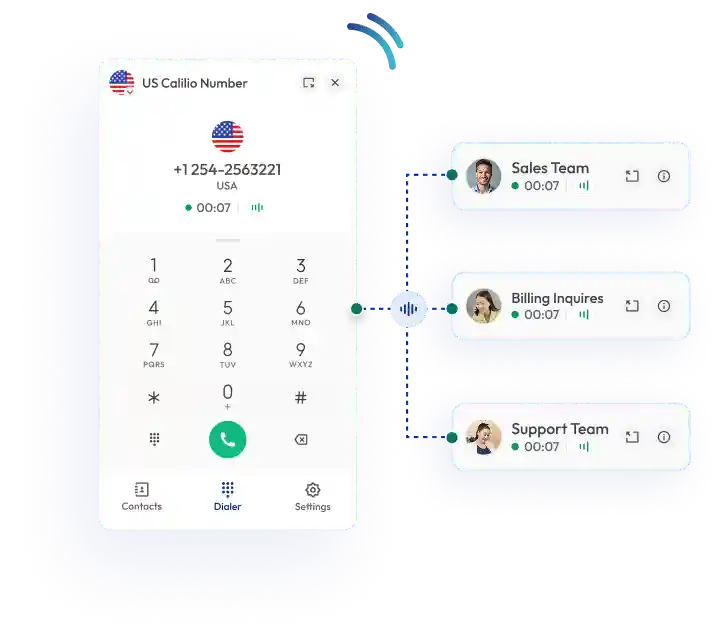
Calilio helps businesses automate inbound and outbound calls from one cloud-based phone platform. Its IVR guides callers to the right department, call queues keep callers organized when agents are busy, and smart routing sends calls to available team members without manual transfer.
For outbound teams, Calilio’s power dialer reduces manual dialing by moving agents through uploaded contact lists automatically. Reps can use call dispositions to label outcomes such as “Interested,” “Not Answered,” or “Appointment Set,” while AI call reports summarise conversations, show sentiment, and help teams plan the next step after every call.
Calilio also supports virtual phone numbers from 100+ countries, number sharing, business hours, voicemail, call notes, tags, recordings, and browser-based calling. That makes it useful for small businesses that want automation without managing separate tools for inbound calls, sales outreach, and call reviews.
Key automation features
- IVR, call queues, and routing for inbound call automation
- Power dialer and bulk contact import for outbound campaigns
- Call dispositions to record call outcomes
- AI call summaries, transcription, sentiment, reason, and conclusion
- Voicemail, business hours, call recording, call notes, tags, and shared callbox
Best for: Small businesses, sales teams, support teams, and remote teams that need automated inbound routing and outbound call workflows in one phone system.
Pricing
- Standard: $12 per user/month (When billed annually)
- Premium: $28 per user/month (When billed annually)
- Enterprise: custom pricing
2. RingCentral
RingCentral’s automation strength is in structured inbound call handling. Its auto attendant can greet callers, route them to a department, extension, voicemail inbox, or outside-office-hours destination without a live receptionist handling every call.
For teams with more complex call volume, RingCentral supports call queues, forwarding rules, shared lines, and multi-level call paths. A business can set different flows for sales, support, billing, suppliers, and after-hours calls so callers do not rely on one person to transfer them manually.
RingCentral also offers AI receptionist capabilities and broader communication tools for SMS, fax, meetings, and team messaging. This makes it a strong choice for growing teams that want automated call routing as part of a larger business communication suite, not only a basic virtual number.
Key automation features
- Auto attendant for greetings, menus, extensions, and voicemail routing
- Call queues, forwarding rules, and shared line options
- Custom handling for office hours, after-hours calls, and specific caller needs
- Business SMS, fax, meetings, and team messaging in the same suite
- AI receptionist capabilities for businesses that need more automated front-desk coverage
Best for: Growing businesses that want automated call management plus messaging, video, integrations, and team collaboration.
Pricing
- Core: $20 per user/month (When billed annually)
- Advanced: $25 per user/month (When billed annually)
- Ultra: $35 per user/month (When billed annually)
3. Nextiva
Nextiva’s automation works well for small businesses that need dependable call routing without building a heavy call center setup. Its auto attendant can direct sales and support calls to the right team members, while routing rules help businesses avoid sending every call to one main line.
Nextiva also adds voicemail transcription, call recording, business SMS, video, and mobile access around its phone system. These features automate the smaller tasks that slow teams down, such as checking voicemail manually, losing missed-call context, or switching between channels to continue a customer conversation.
For businesses that need more than basic phone automation, Nextiva’s customer experience packages and AI receptionist add-ons can support stronger routing, customer journey visibility, and service workflows.
Key automation features
- Auto attendant to route callers to sales, support, users, or departments
- Call routing rules for everyday inbound call handling
- Voicemail transcription to review missed messages faster
- Call recording for training and call review
- Customer experience and AI receptionist add-ons for higher automation needs
Best for: Small businesses that want a reliable phone system with room to grow into customer experience tools.
Pricing
- Core: $15 per user/month (When billed annually)
- Engage: $25 per user/month (When billed annually)
- Power Suite CX: $75 per user/month (When billed annually)
4. Dialpad
Dialpad is a good option when a business wants to automate what happens after a call. Its AI transcription turns calls and meetings into searchable text, while summaries and action items help teams understand the conversation without replaying the full recording.
This is important for sales and support teams because manual note-taking often creates missed details and weak follow-up. Dialpad reduces that problem by capturing conversation records, surfacing important moments, and helping reps move from call to next step faster.
Dialpad also supports routing, ring groups, voicemail, voicemail transcription, call recording, and analytics. Its best fit is not only “call answering automation”; it is AI-led call intelligence for teams that want automatic notes, searchable conversations, and better visibility into customer interactions.
Key automation features
- AI call transcription and searchable transcripts
- AI summaries, moments, and action items for follow-up
- Call routing and ring groups for inbound automation
- Voicemail and voicemail transcription for missed-call review
- Call recording, analytics, and integrations for visibility across conversations
Best for: Teams that want an AI-first phone system for automated notes, summaries, and call visibility.
Pricing
- Standard: $15 per user/month (When billed annually)
- Pro: $25 per user/month (When billed annually)
- Enterprise: custom pricing
5. Aircall
Aircall is built for teams that want automation connected to sales and support tools. Its phone system can route calls through IVR and queues, while call tagging, recordings, analytics, and integrations help teams organize every conversation after the call ends.
The platform becomes more automation-focused when teams connect Aircall with CRM and helpdesk tools. Call activity can sync into customer records, AI Assist can capture notes and insights, and follow-up work can move into the systems sales and support teams already use.
For outbound teams, Aircall’s power dialer and voicemail drop help reps complete calling sessions with less manual work. Instead of dialing numbers one by one or repeating the same voicemail, reps can move through lists faster and keep call outcomes cleaner through tags and synced records.
Key automation features
- IVR, queues, routing, and call workflows for inbound teams
- Power dialer and voicemail drop for outbound calling sessions
- Call tagging, call recording, and analytics for structured review
- AI Assist for transcription, insights, notes, and follow-up support
- CRM and helpdesk integrations that sync conversations and customer data
Best for: Sales and support teams that need call workflows, CRM sync, analytics, and outbound productivity tools.
Pricing
- Essentials: $30 per license/month (When billed annually)
- Professional: $50 per license/month (When billed annually)
- Custom: Quote-based
6. CloudTalk
CloudTalk’s main automation strength is its Call Flow Designer. Admins can build phone trees that decide what happens when a caller selects a menu option, calls outside business hours, reaches a busy team, or needs a specific agent group.
Its skill-based routing is useful when callers need different types of help, such as sales, technical support, billing, language support, or priority service. Instead of sending every caller into the same queue, CloudTalk can route calls based on IVR choices, caller details, or agent skills.
CloudTalk also supports queues, voicemail, recordings, analytics, dialing tools, and CRM integrations. It fits teams that need more structure than simple call forwarding and want repeatable inbound and outbound workflows that managers can monitor and improve.
Key automation features
- Call Flow Designer for custom phone trees and routing paths
- IVR, business hours, voicemail, and fallback routing
- Skill-based routing for callers with different needs
- Call queues, recordings, analytics, and live monitoring
- Dialing tools and CRM integrations for sales and support workflows
Best for: Sales, support, and call center teams that need structured call flows and performance visibility.
Pricing
- Starter: $25 per user/month (When billed annually)
- Essential: $29 per user/month (When billed annually)
- Expert: $49 per user/month (When billed annually)
7. Ooma Office
Ooma Office focuses on simple front-desk automation for small businesses. Its virtual receptionist can answer calls, play greetings, share menu options, and send callers to an extension, department, or voicemail based on the schedule and keypress choice.
This is useful for local businesses that do not need a complex call center. A clinic, repair company, small office, or service team can route callers during business hours, send after-hours calls to voicemail, and let employees answer through mobile or desktop apps when they are away from the desk.
Ooma can also support multi-level virtual receptionist setups as the business grows. It does not offer the same depth of AI reporting or CRM workflow automation as more advanced platforms, but its automation is easy to understand and practical for teams that mainly need better call answering and routing.
Key automation features
- Virtual receptionist with greetings, menus, and keypress routing
- Schedules for business hours and after-hours call handling
- Extension dialing and voicemail routing
- Mobile and desktop apps for remote call handling
- Multi-level virtual receptionist options for growing small businesses
Best for: Local businesses, small offices, clinics, and service teams that need easy automated answering without complex setup.
Pricing
- Essentials: $19.95 per user/month (When billed annually)
- Pro: $24.95 per user/month (When billed annually)
- Pro Plus: $29.95 per user/month (When billed annually)
8. Grasshopper
Grasshopper is best for simple automation on existing phones. It gives solopreneurs and very small teams a business number, custom greetings, extensions, call forwarding, voicemail, voicemail transcription, and business texting without requiring a full office phone setup.
Its most useful automation feature is Instant Response. When a business misses a call, Grasshopper can automatically send a text reply from the business number, helping the caller know the business received the call and can respond later.
Grasshopper does not fit teams that need advanced queues, AI call summaries, outbound dialers, or contact-center reporting. Its value is in basic automation: route calls through extensions, forward them to the right mobile phone, capture voicemail, and send quick missed-call responses.
Key automation features
- Custom greetings, extensions, and call forwarding
- Instant Response for automatic missed-call text replies
- Voicemail and voicemail transcription
- Business texting from the same number
- Mobile and desktop apps for answering calls on existing devices
Best for: Solopreneurs and very small teams that need a professional phone presence on existing devices.
Pricing
- True Solo: $14/month (When billed annually)
- Solo Plus: $25/month (When billed annually)
- Small Business: $80/month (When billed annually)
9. Zoom Phone
Zoom Phone automates call handling inside the Zoom workspace. Its auto receptionist can greet callers and route them to phone users, call queues, shared line groups, external contacts, voicemail, or other routing destinations based on the setup.
Call queues help businesses manage busy lines by sending callers to the next available team member automatically. Voicemail and voicemail transcription also help teams review missed messages faster without switching to a separate phone tool.
Zoom Phone is strongest for businesses already using Zoom Meetings, Team Chat, or Zoom Workplace. It keeps phone automation inside a familiar environment.
Key automation features
- Auto receptionist for greetings and call routing
- Call queues and shared line groups for team-based answering
- Voicemail and voicemail transcription for missed-call handling
- Call recording and admin controls
- Native fit with Zoom Meetings, Team Chat, and Zoom Contact Center workflows
Best for: Teams already using Zoom that want phone automation inside the same workspace.
Pricing
- US & Canada Metered: $10/user/month (When billed annually)
- US & Canada Unlimited: $15/user/month (When billed annually)
- Global Select: $20/user/month (When billed annually)
10. GoTo Connect
GoTo Connect is strong for businesses that want to see and control call automation visually. Its custom auto attendants can play greetings, use pre-recorded menu prompts, route callers to the right endpoint, and keep callers updated while they wait in queues.
The platform’s visual dial plan editor is the key automation feature. Admins can build call flows for sales, support, billing, after-hours calls, overflow calls, and voicemail without relying on manual transfers or scattered phone settings.
GoTo Connect fits remote and hybrid teams that want phone, meetings, messaging, and call flow management in one place. It is especially useful when a business has different call paths for departments, business hours, and backup routing.
Key automation features
- Custom auto attendants with recorded menus and directories
- Visual dial plan editor for building call flows
- Call queues with in-queue updates
- Ring groups and voicemail boxes
- Meetings, messaging, and contact center options
Best for: Remote and hybrid teams that need flexible call routing and visual call flow control.
Pricing
- Phone System: $26 per user/month (basic communication)
- Connect CX: $34 per user/month (enhanced customer engagement tools)
- Contact Center: $80 per user/month (contact center features and analytics)
Automate your business calls with Calilio
Route callers faster, reduce manual dialing, and review every conversation with AI-powered call reports from one cloud phone system
How to Choose an Automated Phone System for a Small Business?
Choose an automated phone system by mapping how calls should move through your business. The right tool should reduce missed calls, guide callers to the right team, support follow-ups, and give managers enough visibility to improve call performance.
Map Your Call Flow First
Write down what should happen when someone calls during business hours, after hours, when all lines are busy, or when a call is missed. This helps you choose software based on your real call path, not a feature list that looks impressive but does not match your workflow.
Check Inbound Automation Depth
A small business may only need greetings, voicemail, and forwarding. A busier sales or support team should look for IVR, queues, routing rules, hold music, business hours, callback options, and fallback destinations.
Review Outbound Automation Needs
Teams that make many calls should check for power dialers, click-to-call, bulk contact upload, call dispositions, voicemail drop, and CRM sync. These features reduce manual work and make follow-up easier after each call.
Compare Reporting and AI Features
Call logs show what happened, but analytics and AI reports explain patterns. Look for missed-call reports, answer rates, wait times, call recordings, summaries, sentiment, and call outcomes if managers need coaching and performance data.
Calculate the Real Monthly Cost
The lowest plan may exclude IVR, call recording, analytics, AI summaries, integrations, toll-free minutes, or international numbers. Compare user fees, phone number costs, SMS fees, add-ons, taxes, and contract terms before choosing.
Choose a System that can Grow
A phone system should let you add users, numbers, departments, queues, routing rules, and reports as your team expands. Switching providers later can disrupt calls, number porting, staff training, and customer workflows.
Key Features to Look for in an Automated Phone System
The best automated phone system should improve both sides of the call experience. Callers should reach the right place faster, and your team should get enough context to follow up properly.
Auto Attendant
An auto attendant greets callers and gives them simple menu options such as sales, support, billing, or voicemail. It creates a professional first impression and reduces the need for a receptionist to answer every call.
IVR
IVR lets callers interact with menu options through keypad input or voice prompts. A strong IVR setup can route callers, collect simple information, and answer common questions before an agent joins the call.
Call Routing
Call routing sends calls to the right person, team, device, or voicemail based on rules. Small businesses should check routing by business hours, department, user availability, location, and unanswered calls.
Call Queues
Call queues keep callers in line when all agents are busy. A good queue can play greetings, estimate wait time, offer voicemail, and help managers see when call demand is higher than staffing.
Call Forwarding
Call forwarding redirects calls to another number or device when the main line is busy, unanswered, unreachable, or outside business hours. It helps small teams stay reachable without keeping everyone tied to one desk phone.
Voicemail and Voicemail Transcription
Voicemail ensures callers can still leave a message when no one answers. Voicemail transcription helps teams read missed messages quickly and respond without playing every audio file.
Call Recording
Call recording helps with training, dispute resolution, quality checks, and customer context. Businesses should review local consent rules before recording calls in any country or state where they operate.
AI Call Summaries
AI summaries reduce manual note-taking after calls. Sales and support teams can review the reason for the call, outcome, sentiment, and next step without listening to the full recording.
Analytics and Reporting
Call reports show missed calls, answer rates, wait time, call duration, and team activity. These numbers help owners improve staffing, call flows, follow-ups, and customer response times.
Mobile and Desktop Access
Mobile and desktop apps let teams answer business calls from the office, home, or while traveling. This is essential for remote, hybrid, and field-based teams.
CRM and Workflow Integrations
CRM integrations connect call activity with customer records. They help teams see previous conversations, follow up faster, and avoid asking customers to repeat details.
How Much Does an Automated Phone System Cost?
An automated phone system for a small business usually costs from $10 to $80+ per user/month, depending on the provider, plan, country, and feature depth. Basic plans usually cover calling, voicemail, and simple routing, while advanced plans add IVR, queues, recording, analytics, AI tools, integrations, and contact center features.
- Solo or micro-business plans often cost $10 to $25 per month or per user/month.
- Standard small business VoIP plans often cost $15 to $35 per user/month.
- Advanced sales, support, or contact center plans often cost $50 to $100+ per user/month.
- Extra costs may include additional phone numbers, toll-free minutes, international calls, SMS registration, call recording storage, AI add-ons, hardware, onboarding, and taxes.
Final Recommendation
The best automated phone system is the one that matches how your business actually handles calls. A solo business may only need a business number, greetings, forwarding, and voicemail. A growing sales or support team usually needs IVR, queues, call recording, analytics, AI summaries, CRM integration, and stronger routing controls.
Calilio is a strong choice for businesses that want both inbound and outbound automation in one cloud-based phone system. Its IVR, call queues, smart routing, power dialer, call dispositions, virtual numbers, and AI call reports help teams answer, route, call, tag, and review conversations with less manual work.
Summarize this blog with:
Frequently asked questions
What is the best automated phone system for a small business?
The best automated phone system depends on call volume, budget, setup needs, and workflow. Calilio is a strong option for small businesses that need inbound routing, outbound dialing, call dispositions, virtual numbers, and AI call reports, while simpler tools like Grasshopper or Ooma may suit solo users with basic call forwarding needs.
Can I use an automated phone system without desk phones?
Can I keep my current business phone number?
Is an auto attendant the same as IVR?
Do automated phone systems work after business hours?
How can I stop an automated phone menu from annoying callers?
Are automated phone systems good for solo businesses?

Still have questions?
Can’t find the answer you’re looking for? Please chat with our friendly team.
Stay in the loop
Get the latest call insights, trends, and updates delivered straight to your inbox.
By subscribing, you agree to receive updates from Calilio.
You can unsubscribe anytime.
Enter the World of AI Business Phone System with Calilio
Improve your business operation with Calilio's advanced virtual phone system. Join today for a better way to connect.