
Blog8 Best Inbound Call Center Software in 2026

Inbound call center software has one job: make sure a caller reaches the right person quickly. Everything else — the menus, the queues, the dashboards — exists to serve that.

The problem when you shop for it is that every vendor lists the same features, then puts the ones inbound teams actually need two tiers above the price they advertise. We checked eight platforms and wrote down which plan each feature really sits on, so you can compare the cost of what you need rather than the cost of getting started.

Quick Answer

Most inbound teams fit one of these three profiles:

You run a real contact center with 20+ agents
Five9 and Genesys Cloud handle skills-based routing, workforce management and omnichannel queues properly. Expect $150-200 per user a month and a genuine implementation project.
You have a support team of 5-20 and need queues
CloudTalk and Zoom Contact Center give you queues, IVR and reporting from around $50-60 per user a month without an enterprise contract.
Your problem is missed calls, not hold times
If callers are not stacking up but calls do go unanswered, ring strategies plus AI answering solve it for less. Calilio covers this from $35 per user a month, with no queues.

What inbound call center software does

Five jobs, in the order a call passes through them. When you compare platforms, compare them one job at a time.

1

Answer and greet
An IVR menu or auto attendant picks up, tells the caller where they are, and finds out what they need before any agent is involved.

2

Route to the right person
The core of inbound. Round robin spreads calls evenly, simultaneous ring gets the fastest pickup, skills-based routing sends callers to whoever is qualified.

3

Hold callers when everyone is busy
Queues with position announcements, hold music and callback options. This is the feature that separates cheap plans from contact-center plans.

4

Let supervisors help in real time
Listening in on a live call, whispering advice only the agent hears, or barging in to take over. Essential once you have agents who are still learning.

5

Show what happened afterwards
Recordings, transcripts, call summaries and reports on wait times and abandonment. Without this you are managing on anecdote.
Inbound vs outbound

Inbound software is built around receiving calls, so routing and queueing matter most. Outbound software is built around placing them, so dialers and connect rates matter most. Most vendors sell both, but almost none are equally strong at each — check which half the platform was originally built for.

How we compared them

We started with 16 platforms and kept 8. Each had to answer the same five questions.

Routing depth: Whether you get simple ring groups, ring strategies like round robin, or full skills-based routing.
Queue handling: Whether callers can wait with position announcements and callbacks, and what tier that costs.
Supervisor tools: Live listening, whispering and barging, and whether they are included or an upgrade.
AI on inbound calls: Whether AI answers calls, or only transcribes them after the fact.
The plan it really costs: The price of the tier that includes inbound essentials, not the advertised entry price.
Why you should trust this comparison

Prices and plan inclusions come from each vendor's own pricing page as of September 2026, and we read through G2 and Capterra reviews to catch what pricing pages leave out — setup effort, support quality, and features that need a sales call to switch on. Nobody paid to appear here and there are no affiliate links.

Calilio is our own product, so we compete in this list. We say plainly what it does not do — including the fact that it has no call queues — and we point to other platforms where they are the better fit.

The 8 best inbound call center software platforms

The plan shown is the cheapest one that includes real inbound routing and supervisor tools, not the vendor's entry tier.

#

Platform

Best For

Plan for Inbound

Queues

Live Monitoring

Rating

1Five9Large contact centers with complex routingDigital/Core from ~$119/user/moYes, advancedYesG2: 4.1/5
Capterra: 4.2/5
2Genesys CloudEnterprise omnichannel operationsCX 1 from ~$75/user/moYes, advancedYesG2: 4.4/5
Capterra: 4.3/5
3TalkdeskMid-size teams wanting AI without enterprise rolloutVoice Essentials ~$105/user/moYesYesG2: 4.4/5
Capterra: 4.5/5
4NextivaPhones plus support tooling in one placeContact centre tiers, from ~$75/user/moYesHigher tiersG2: 4.5/5
Capterra: 4.6/5
5CloudTalkQueues and IVR without a big contractExpert ~$50/user/mo annualYesYes, on ExpertG2: 4.4/5
Capterra: 4.4/5
6Zoom Contact CenterTeams already standardised on ZoomFrom ~$69/agent/moYesYesG2: 4.3/5
Capterra: 4.4/5
7CalilioSmall teams whose problem is missed callsPremium $35/user/mo ($28 annual)NoYes, on PremiumG2: 4.7/5
Capterra: 4.3/5
8AircallSales-led teams that also take inboundProfessional $70/user/mo ($50 annual)YesYes, on ProfessionalG2: 4.4/5
Capterra: 4.2/5

Ratings from G2 and Capterra, September 2026. Contact-center vendors move features between tiers frequently — confirm on the pricing page before committing.

1. Five9

The routing engine large contact centers standardise on

Five9 is built for operations where routing rules get complicated: skills-based distribution across dozens of queues, priority handling, overflow between teams, and workforce management to schedule it all. Its AI layer is genuinely deep too, with real-time agent assist that surfaces answers mid-call and quality scoring across every conversation.

This is not a platform you switch on over a weekend. Reviewers consistently mention implementation timelines measured in weeks and admin complexity that needs a dedicated owner. Pricing starts around $175 per user a month for the tiers most inbound teams need, and voice-only options do not save much.

What works
Deepest skills-based routing on this list
Workforce management and quality scoring included at higher tiers
Real-time agent assist during live calls
Handles very high call volumes reliably
What to watch
Around $175/user/mo for practical inbound tiers
Implementation is a project, not a setup
Admin console needs a dedicated owner
Far too much for teams under 20 agents

Plans:

Digital: from ~$119/user/mo
Pro and Enterprise add WFM and analytics
Annual contracts standard
Quote-based at scale

Verdict:

The right call for a large, complex inbound operation with the resources to run it.

2. Genesys Cloud

Enterprise omnichannel, with a lower entry point than you expect

Genesys handles voice, email, chat, SMS and social in one routing engine, so a customer who calls after emailing lands with context attached. Its CX 1 tier starts around $75 per user a month for voice, which is notably cheaper than Five9, and the platform scales to thousands of agents without changing vendors.

The trade-off is that most of what makes Genesys powerful sits in CX 2 and CX 3, and the gap between tiers is significant. Reviewers also note that the breadth of configuration options makes small changes slower than they should be, and that professional services are effectively expected on larger deployments.

What works
True omnichannel routing across voice and digital
CX 1 entry at ~$75/user/mo is competitive
Scales to thousands of agents
Strong reporting and forecasting
What to watch
Key features sit in CX 2 and CX 3 tiers
Configuration depth slows down simple changes
Professional services expected at scale
Overkill for voice-only teams

Plans:

CX 1: from ~$75/user/mo (voice)
CX 2: adds digital channels
CX 3: adds full WEM and analytics
Concurrent-user pricing available

Verdict:

Pick it when inbound spans several channels and you need one routing engine behind all of them.

3. Talkdesk

Contact-center capability without an enterprise-length rollout

Talkdesk sits deliberately between the enterprise platforms and the SMB tools. You get skills-based routing, queues with callbacks, live monitoring and AI-powered summaries, but the admin experience is built for someone who is not a full-time telephony specialist. Reviewers routinely single out ease of setup as the reason they chose it over Five9.

Pricing starts around $85 per user a month, and several of the AI features are add-ons on top of that rather than tier inclusions, so the quoted figure and the final figure often differ. Very large deployments also report hitting customisation limits that Genesys and Five9 would absorb.

What works
Much faster to set up than enterprise rivals
Skills-based routing and callbacks included
AI call summaries built in
Well-regarded support
What to watch
AI features often priced as add-ons
~$85/user/mo entry for inbound tiers
Customisation limits at very large scale
Annual commitment for best pricing

Plans:

Voice Essentials: ~$105/user/mo
Elite add AI and WEM
AI add-ons priced separately
Annual billing standard

Verdict:

The sensible middle option for a 20-100 agent inbound team that wants capability without a rollout project.

4. Nextiva

Inbound calls and support inboxes managed from one place

Nextiva has repositioned around customer experience, which suits inbound teams that handle calls alongside email and chat. Its contact-centre tiers cover queues, IVR, routing and reporting, and because the phone system and shared inboxes come from the same vendor, an agent sees the caller's previous emails without a second tab.

Nextiva changes its packaging more often than most vendors on this list, and contact-centre pricing is quote-based rather than published, so you cannot compare it on paper. Live call monitoring also sits in higher tiers, which is worth pinning down before you sign.

What works
Calls and support inboxes in one platform
Solid routing and IVR at contact-centre tiers
Good support reputation on review sites
Reduces the number of vendors you manage
What to watch
Contact-centre pricing is quote-based only
Packaging changes frequently
Live monitoring sits in higher tiers
Annual commitment for advertised rates

Plans:

Contact centre tiers: from ~$75/agent/mo
UCaaS plans from ~$15/user/mo
Higher tiers add analytics and WEM
Confirm current packaging directly

Verdict:

Worth a quote if you want your inbound calls and written support handled by one vendor.

5. CloudTalk

The cheapest way to get real queues and IVR

CloudTalk gives smaller teams the features that usually require a contact-center contract. Its Expert tier, around $50 per user a month billed annually, includes call queues, IVR, skills-based routing, live monitoring with whisper and barge, and a decent set of CRM integrations. For a support team of five to twenty, that is a lot of capability per pound.

The reporting is thinner than the enterprise platforms, and reviewers occasionally report call quality inconsistency on longer international routes. AI features are also newer and less mature here than at Talkdesk or Five9, so treat them as a bonus rather than a reason to buy.

What works
Queues, IVR and monitoring from ~$50/user/mo
Skills-based routing at a mid-market price
Wide CRM integration library
Straightforward to set up
What to watch
Reporting is basic next to enterprise rivals
Occasional international call quality reports
AI features less mature
Best pricing requires annual billing

Plans:

Starter: ~$25/user/mo
Essential: ~$30/user/mo
Expert: ~$50/user/mo annual
Live monitoring on Expert

Verdict:

The best value on this list if you genuinely need queues but not enterprise reporting.

6. Zoom Contact Center

A capable inbound centre for teams already living in Zoom

Zoom Contact Center is a separate product from Zoom Phone and a much more serious inbound tool: queues, IVR, skills-based routing, supervisor monitoring and a live dashboard, all inside the admin console your IT team already uses. At roughly $69 per agent a month it undercuts Talkdesk while covering most of the same inbound ground.

It is newer than everything else here, and the gaps show in workforce management and advanced analytics. Reviewers also point out that video-first design decisions occasionally surface in odd places for a voice team. If Zoom is not already your standard, there is less reason to pick it.

What works
Queues and skills-based routing at ~$69/agent/mo
Same admin console as the rest of Zoom
Clear live supervisor dashboard
Quick to deploy for existing Zoom customers
What to watch
Workforce management is thin
Analytics behind older competitors
Video-first heritage shows occasionally
Less compelling if you do not use Zoom

Plans:

From ~$69/agent/mo
Higher tiers add digital channels
Separate product from Zoom Phone
Annual billing for best rate

Verdict:

A strong, cheaper alternative to Talkdesk if your company already runs on Zoom.

7. Calilio

Ring strategies, monitoring and AI answering, without queues

Calilio approaches inbound from the other direction. Instead of holding callers in a queue, it focuses on getting the call answered first time: a call flow per number with a business-hours check, an IVR menu on Premium, and a ring strategy of simultaneous ring, sequential ringing or round robin routing. Supervisors on Premium get live call monitoring with listening, whispering and barging, and AI call reports afterwards give the summary, call reason and sentiment.
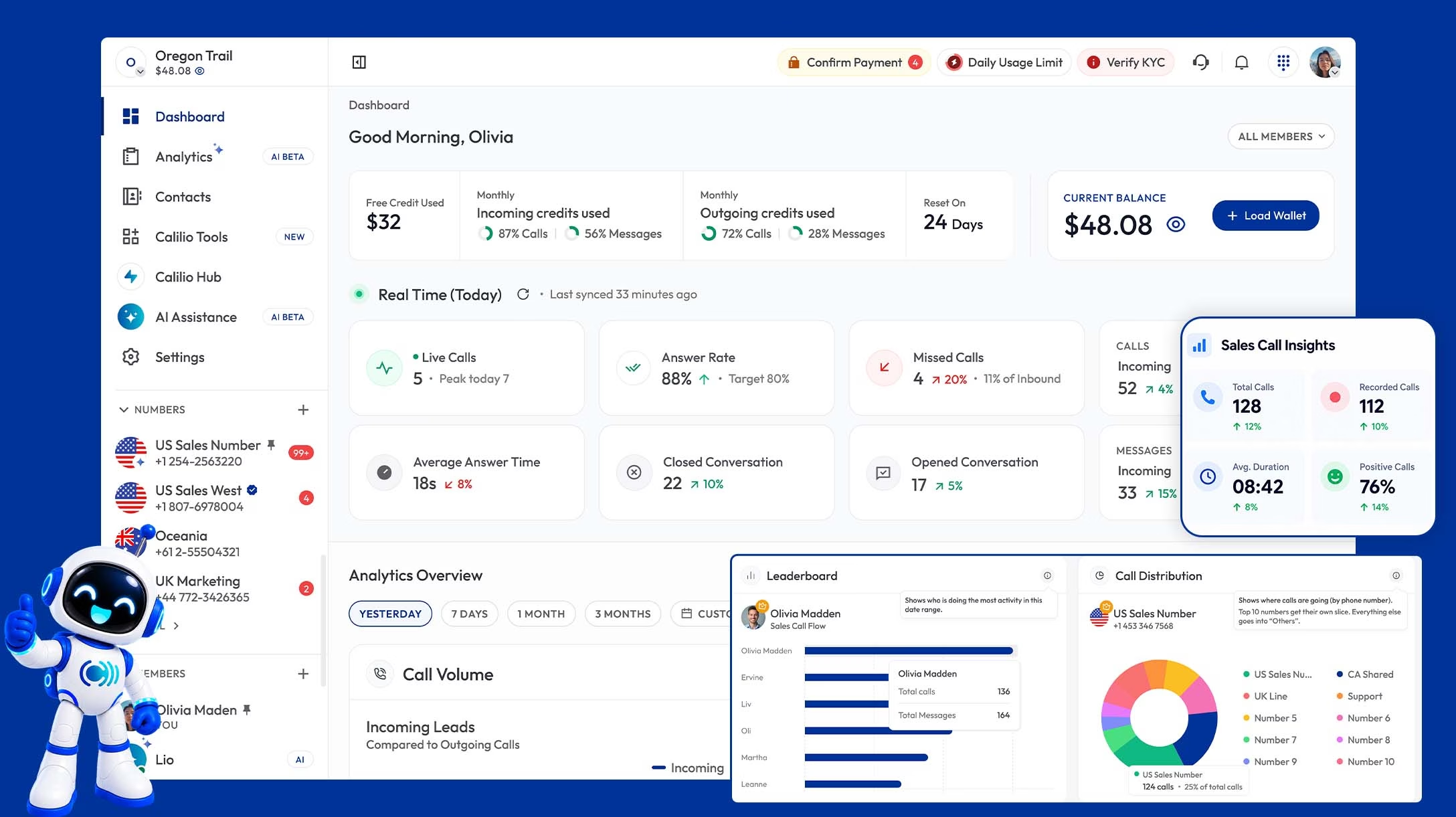
The honest limitation is that Calilio has no call queues, so if callers regularly arrive faster than your team can answer, this is not the platform for that. What it has instead is an AI Voice Agent on both plans that answers incoming calls in normal conversation and covers the ones nobody can reach. One agent handles five calls at once. Standard includes 10 free AI minutes per user a month then $0.035 a minute; Premium includes 100 minutes then $0.025 a minute.

What works
Round robin, simultaneous and sequential ringing included
Live monitoring with listen, whisper and barge on Premium
AI Voice Agent on both plans with free minutes
Around a third the cost of contact-centre tiers
What to watch
No call queues, so overflow-heavy teams should look elsewhere
IVR menu and live monitoring need the Premium plan
IVR is single level, with no submenus
AI agent handles incoming calls only

Plans:

Standard: $15/user/mo ($12 annual)
Premium: $35/user/mo ($28 annual)
IVR and live monitoring: Premium
AI Voice Agent: both plans

Verdict:

Right when the problem is calls going unanswered rather than callers waiting on hold.

8. Aircall

Built for sales teams, workable for inbound support

Aircall is the most polished product on this list and the easiest to hand to a non-technical team. Its Professional plan covers queues, live monitoring, IVR and a large integration library, and the interface makes day-to-day agent work genuinely pleasant. Inbound teams that also do outbound get a power dialer in the same plan.

It is priced at $70 per user a month, or $50 billed annually, and there is a three-seat minimum, so a very small team pays more than the per-user figure suggests. The routing is also shallower than the contact-centre platforms — good ring groups and queues, but no real skills-based distribution.

What works
Easiest interface for non-technical agents
Queues, IVR and monitoring on Professional
Large integration library
Power dialer included for outbound work
What to watch
No true skills-based routing
$70/user/mo monthly, $50 annual
Three-seat minimum
Analytics thinner than contact-centre rivals

Plans:

Essentials: $40/user/mo ($30 annual)
Professional: $70/user/mo ($50 annual)
Custom: quote based
Queues and monitoring on Professional

Verdict:

A good pick for a blended sales and support team that values usability over routing depth.

Do you actually need call queues?

Queues are the feature that pushes teams onto expensive contact-center plans, and plenty of teams buy them before they need them. The honest test is whether callers arrive faster than your team can answer.

You need queues if…
Callers regularly hear a busy signal or hit voicemail during working hours.
You can see a consistent gap between calls arriving and agents free to take them.
Callers accept waiting — support lines and helpdesks usually qualify.
You need to report on wait times and abandonment rates to manage staffing.
Ring strategies are enough if…
Calls are usually answered within a few rings, just not always by the right person.
Your team is small enough that spreading calls evenly solves most of it.
Callers would rather be called back than hold — a voicemail or AI agent covers this.
Missed calls happen outside hours, when nobody is there to staff a queue anyway.

How to choose

If this is you
You run 20 or more agents with complex routing rules.
Start with
Five9 or Genesys Cloud
Both handle skills-based routing, workforce management and high volume. Budget for implementation as well as licences.
If this is you
You have a 5-20 person support team and callers do wait.
Start with
CloudTalk or Zoom Contact Center
Queues, IVR and supervisor monitoring from roughly $50-69 per user a month, without an enterprise contract.
If this is you
Your team takes inbound and makes outbound calls equally.
Start with
Aircall
Queues and a power dialer on the same plan, with the easiest interface for agents who split their day.
If this is you
Calls go unanswered, but nobody is stacking up on hold.
Start with
Calilio
Ring strategies, live monitoring and an AI Voice Agent that answers when nobody is free, at $35 per user a month.

The Verdict

For a proper contact center running dozens of agents across channels, Five9 and Genesys Cloud are the serious options, and you should expect a serious implementation to match. A step down, Talkdesk and Nextiva give you skills-based routing and workforce tools without an enterprise rollout, while CloudTalk and Zoom Contact Center are the value picks if you want queues without a five-figure commitment.

Where Calilio sits is narrower and worth being clear about. It has no call queues, so a team with constant overflow should look elsewhere on this list. What it does have is the layer beneath queues — round robin routing, simultaneous ring, business-hours call flows, live monitoring and an AI Voice Agent that answers when nobody is free — at roughly a third of what a contact-center plan costs.

Answer more inbound calls without a contact-center bill

Spread calls across the team with round robin or simultaneous ring, listen in on live calls, and let the AI Voice Agent pick up the ones nobody can reach.
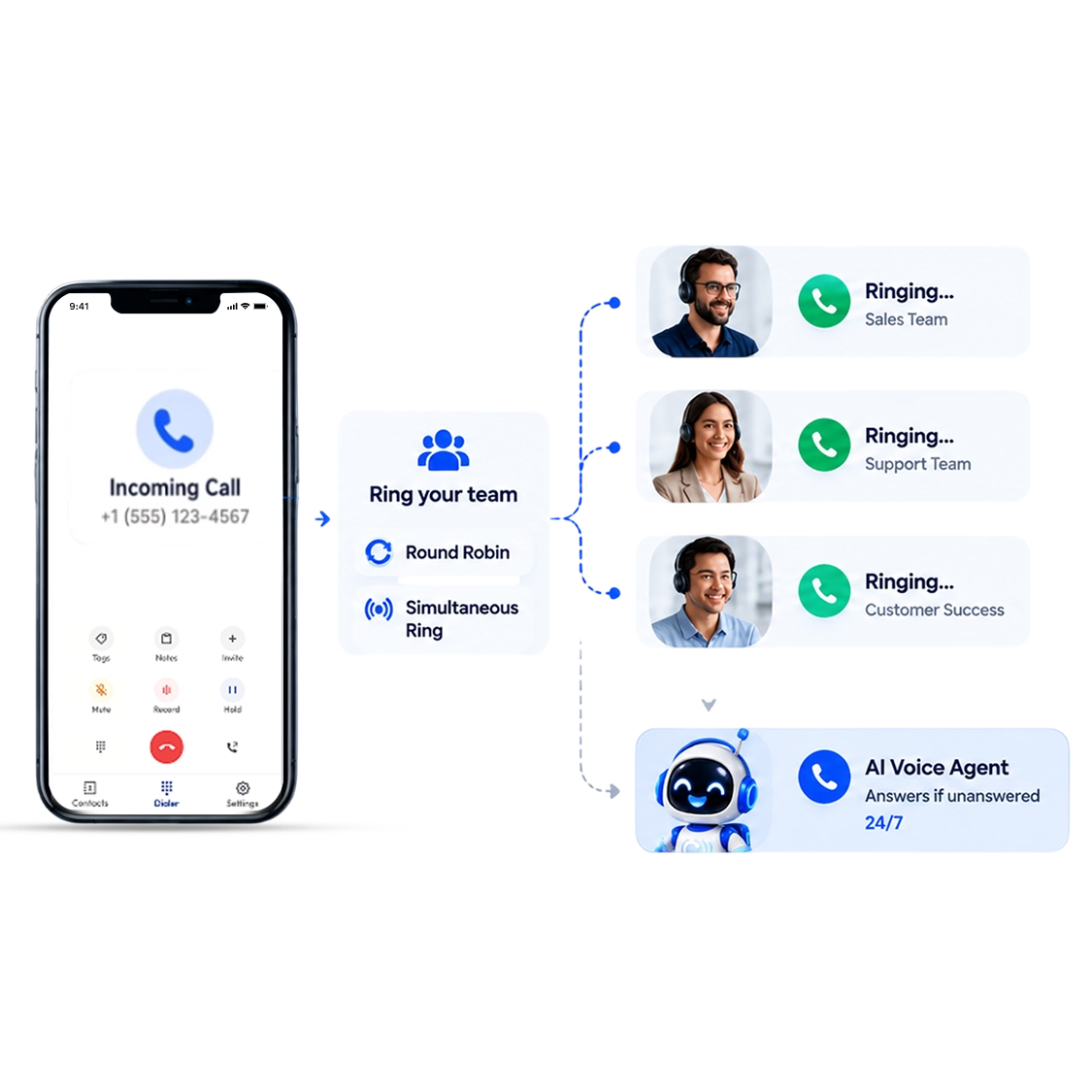
Support Line · Live
Round robin → 4 agents available
Supervisor listening · call 2 of 3
No answer → AI Voice Agent picks up

Frequently Asked Questions

What is inbound call center software?
It is software for handling calls coming into your business. It answers the call, sends it to the right agent or team, holds callers in a queue when everyone is busy, and gives supervisors tools to listen in and review calls afterwards. Outbound tools like power dialers do the opposite job, which is why many vendors sell both in one platform.
How much does inbound call center software cost?
Entry plans run from about $15 to $30 per user a month, but the features inbound teams actually need — queues, skills-based routing and live monitoring — usually sit at $50 to $90 per user a month. Enterprise platforms like Five9 start nearer $175. Calilio includes live monitoring, IVR and AI answering on its Premium plan at $35 per user a month, or $28 billed annually, without queues.
What is the difference between inbound and outbound call center software?
Inbound software is built around receiving calls, so it focuses on routing, queues, IVR menus and agent availability. Outbound software is built around placing calls, so it focuses on dialers, contact lists and connect rates. Most platforms do both, but they are rarely equally good at each.
Do I need call queues for an inbound call center?
Only if callers arrive faster than your team can answer. Below that point, ring strategies like simultaneous ring or round robin routing spread calls across the team without making anyone hold. Queues become essential once you have consistent overflow and need to report on wait times.
What is skills-based routing?
It sends a caller to the agent best qualified to help, based on tags like language, product knowledge or seniority, rather than simply whoever is free. It is worth paying for once your team has genuine specialisms, and unnecessary when every agent can handle every call.
Can AI handle inbound calls instead of an agent?
For routine calls, yes. An AI voice agent can answer, respond to common questions from information you give it, take a message or transfer the call to a person. It works well as the first layer and as cover when nobody is free. Calilio includes one on both plans, handling incoming calls only, with one agent taking five calls at once.
Do I need a full contact center platform for a small team?
Usually not. Contact-centre platforms are priced for queue management, workforce scheduling and deep analytics. A team of three to ten people that mainly needs calls answered and routed can get there for a third of the cost with a business phone system that includes ring strategies and monitoring.

Summarize this blog with:

Avatar Group

Still have questions?

Can’t find the answer you’re looking for? Please chat with our friendly team.

Stay in the loop

Get the latest call insights, trends, and updates delivered straight to your inbox.

By subscribing, you agree to receive updates from Calilio.
You can unsubscribe anytime.

Enter the World of AI Business Phone System with Calilio

Improve your business operation with Calilio's advanced virtual phone system. Join today for a better way to connect.

4.6
125+ Reviews16+ Badges