- Partners
- Contact Us
- Log in
Automated Self-Service in Business: Features, Benefits, & Use Cases

Customers today expect fast, effortless support. But when every inquiry is handled manually, response times slow down, leading to frustration and poor customer experiences.
Self-service automation solves this problem by allowing customers to get answers, complete tasks, and troubleshoot issues on their own. With tools like AI chatbots, automated voice systems, and self-service portals, businesses can deliver instant support while reducing the workload on their teams.
In this guide, we’ll break down what self-service automation is and how it works. You’ll also learn about its key features, benefits, real-world use cases, and best practices to help you implement an effective automated self-service system.
Key Highlights:
Self-service automation allows customers to solve problems and complete tasks on their own without needing to talk to a human agent.
Its key features include AI chatbots for quick responses, IVR systems for phone-based help, and knowledge bases for easy access to information.
Self-service automation provides faster service, reduces costs, and improves efficiency by handling routine tasks.
To implement self-service automation successfully, design a user-friendly system, ensure strong data security, integrate human support options when needed, and regularly act on user feedback to continuously improve the system.
What is Self-service Automation?
Self-service automation is a technology-driven solution that enables customers to handle tasks and resolve issues on their own, without needing to speak to an agent. It uses technologies like AI-powered chatbots, automated voice systems, and self-service portals to guide customers through solutions, provide information, or complete transactions, all without human intervention.
For businesses, self-service automation means lower operational costs and better scalability. It frees up agents to handle more complex issues and gives customers the convenience of solving problems on their own, anytime, anywhere.
How Does Automated Self-service Work?
Automated self-service works by using AI and NLP (Natural Language Processing) to understand the customer request and trigger an automatic response. If the request is simple, the system provides an instant solution. For more complex issues, it escalates to a human agent with all the necessary details.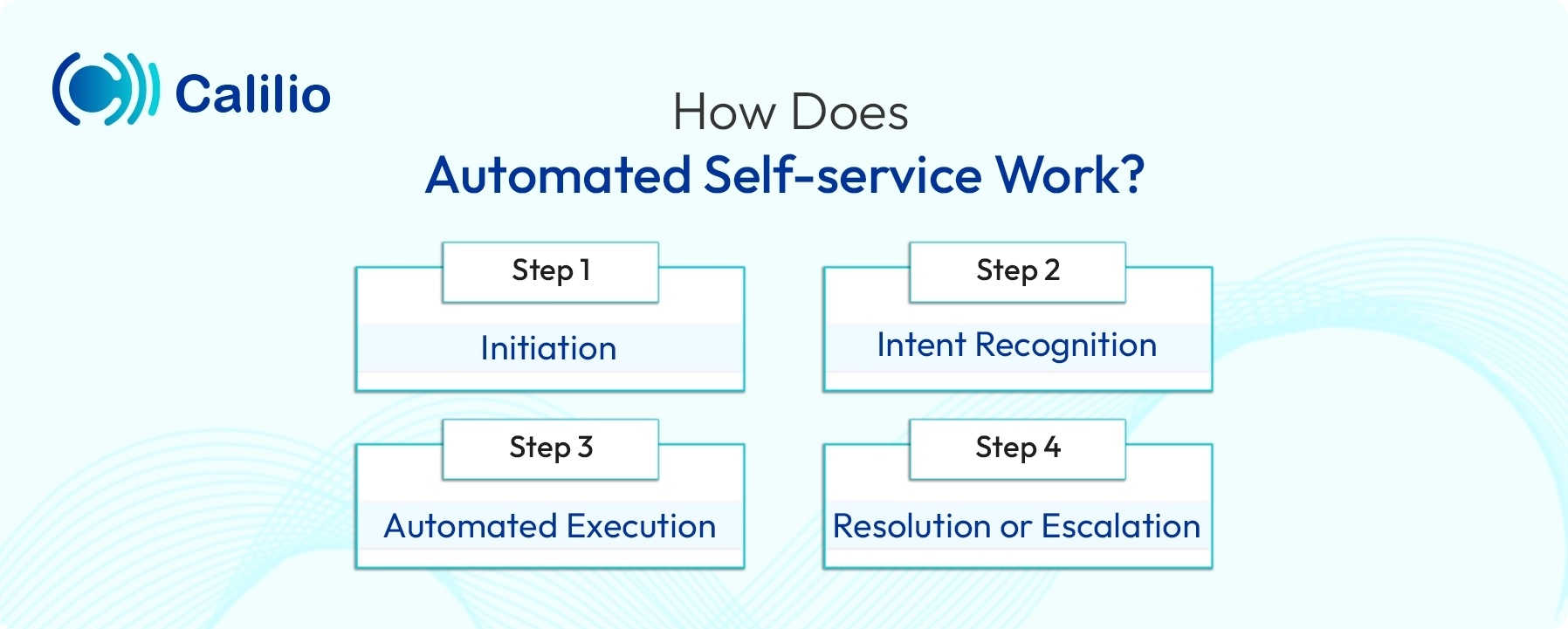
Step 1: Initiation
The process begins when the customer accesses a self-service channel, such as a website, mobile app, or IVR system. They submit a specific request, like checking an account balance or asking FAQs.
Step 2: Intent Recognition
AI and NLP analyze the customer’s input to accurately determine their core need.
Step 3: Automated Execution
Once the intent is recognized, the system automatically triggers a predefined workflow or searches the knowledge base. It then provides the most relevant response, whether it’s a direct answer, a troubleshooting guide, or a link to more detailed information.
Step 4: Resolution or Escalation
If the system successfully completes the task, the process ends here. However, if the request requires more complex support, the system seamlessly transfers the call to a human agent. It also passes all relevant context, so the customer doesn’t have to repeat themselves.
Automated Self-service: Key Features
Automated self-service includes key features like AI chatbots, Interactive Voice Response (IVR), knowledge base access, automated ticketing, analytics/reporting, and multichannel integrations.
- AI-powered Chatbots: Provide instant answers and guidance to customers, handling routine queries and tasks without human intervention.
- Interactive Voice Response (IVR): Enable customers to resolve issues over the phone by interacting with automated menus, such as checking account balances or scheduling appointments.
- Knowledge Base Access: Customers can access self-help articles, FAQs, and troubleshooting guides, allowing them to find solutions quickly on their own.
- Automated Ticketing System: Create and route support tickets to the appropriate team for follow-up when issues cannot be fully resolved through automation.
- Multichannel Integration: Available across various channels, such as websites, mobile apps, and phone systems, offering a consistent experience for users everywhere.
- Analytics and Reporting: Track customer interactions and provide insights into common issues and performance, enabling continuous improvement of the self-service experience.
Why is Automated Self-service Important for Businesses?
Self-service automation improves customer service by reducing resolution times and operational costs. It can help handle high volumes of requests without extra staff, minimize human errors, and improve overall business efficiency.
- Faster Resolution Times: Automated systems provide immediate responses, allowing customers to resolve issues quickly without waiting for an agent.
- Increased Availability: Self-service automation can be made available 24/7, ensuring that customers can access help anytime, regardless of time zones or business hours.
- Cost-effective for Routine Tasks: Automating routine tasks, such as checking order statuses or resetting passwords, reduces the need for human agents to handle these simple inquiries. This cuts operational costs and allows staff to focus on more complex tasks.
- Supports High Volumes: During peak times or seasonal surges, self-service automation can manage a large volume of calls without the need for extra staff. This helps maintain consistent service quality, even during busy periods.
- Reduces Human Error: Automated systems provide consistent and accurate information, reducing the risk of human error. Customers receive reliable service every time, which builds trust in the brand.
- Improves Operational Efficiency: By automating repetitive tasks, businesses can streamline processes, reduce response times, and enhance overall efficiency. This enables companies to scale their operations without compromising service quality.
Automate Your Customer Service with an Advanced IVR System
Self-service Automation: Industry-based Use Cases
Here are some key industry-based use cases for self-service automation:
Industry | Self-service Use Case | Automated User Action |
E-commerce & Retail | Order Management | Customers track shipment status, initiate returns/exchanges, or check product stock and pricing. |
Financial Services | Account Maintenance | Users check balances, transfer funds, reset PINs, or request transaction histories. |
IT & Tech Support | Access and Credentials | Employees reset passwords, unlock accounts, or submit requests for software access. |
Telecommunications | Billing and Usage | Subscribers view bills, check data/minutes usage, pay bills, or modify subscription features. |
Travel & Hospitality | Booking and Check-in | Travelers check in for flights/hotels, select seats/rooms, or view real-time booking status. |
Human Resources (HR) | Employee Self-service | Employees request time off and update contact information. |
How to Implement Self-service Automation in Your Business?
To implement automated self-service for your business, first identify repetitive tasks to automate, choose the right tools, design an intuitive customer journey, and build a helpful knowledge base. Finally, test the system before launch to ensure accuracy.
Here’s a step-by-step implementation guide: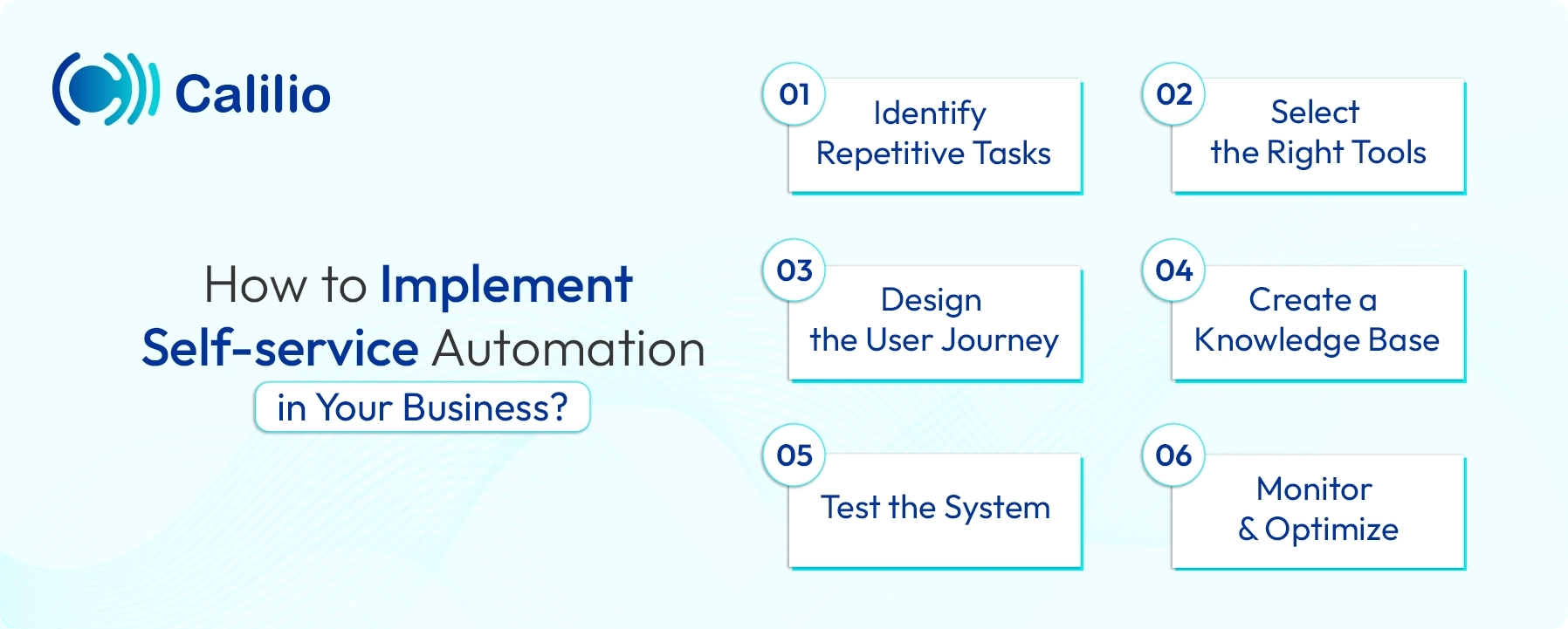
1. Identify Repetitive Tasks
Begin with pinpointing the tasks that are repetitive and simple, such as answering common questions, processing orders, or resetting passwords.
2. Select the Right Tools
Choose automation tools that fit your business needs, such as AI-powered chatbots, IVR systems, or self-service portals. Ensure the tools you choose can easily integrate with your existing systems, like CRM or helpdesk software.
3. Design the User Journey
Map out the steps customers will take to use the self-service system. Make sure the flow is simple and intuitive, guiding users to the information or solution they need with minimal effort.
4. Create a Knowledge Base
Set up a comprehensive knowledge base filled with FAQs, how-to guides, and troubleshooting tips.
5. Test the System
Before going live, test the system thoroughly. Simulate different customer scenarios to make sure the system works as expected and addresses all possible issues.
6. Monitor and Optimize
After implementation, continuously monitor the system’s performance. Use customer feedback and system data to identify areas for improvement and make necessary adjustments to keep the system efficient.
Self-service Automation Best Practices: Dos and Don'ts
Implementing self-service automation successfully requires following best practices to ensure a smooth, efficient, and user-friendly experience. Here are some key dos and don'ts to keep in mind:
Dos
- Provide a User-friendly Interface: Ensure the platform is easy to navigate, making it simple for users to find what they need.
- Give Clear Instructions: Provide clear, step-by-step guidance to help users understand how to use the system.
- Enable Personalization: Offer personalized experiences based on user history and preferences.
- Offer Multi-channel Integration: Ensure the self-service system works seamlessly across all channels, including web, mobile, and chat.
- Enforce Data Security: Prioritize user data security to ensure safe interactions throughout the process.
- Implement User Feedback Loop: Collect user feedback regularly to improve the system.
- Maintain 24/7 Availability: Make sure the self-service platform is available at all times.
- Enable Integration with Human Support: Allow easy handoff to human agents when necessary.
- Utilize Performance Analytics: Use analytics to monitor performance and identify areas for improvement.
- Ensure Scalability: Design the system to scale as your user base grows.
Don’ts
- Use Overly Complex Processes: Avoid complicated workflows that may confuse users.
- Ignore User Feedback: Don’t neglect user feedback; use it to improve the system.
- Lack Human Touch: Don’t replace human support completely. Instead, provide options for escalation when needed.
- Use Isolated Platforms: Don’t operate the self-service platform in isolation; integrate it with other support channels.
- Rely Solely on Automation: Don’t depend entirely on automation; always have a backup plan to connect callers to the live agents.
- Use Excessive Jargon: Avoid technical language; use clear, simple language instead.
Conclusion
Self-service automation is a powerful tool that enables businesses to meet growing customer demands while reducing costs and improving operational efficiency. By implementing automated systems, businesses can streamline routine tasks, offer 24/7 customer support, achieve faster resolution, and improve overall customer satisfaction.
If you’re looking for a platform to implement such a system, Calilio is the solution for you. With Calilio, businesses can easily integrate self-service automation into their customer support strategy. Its IVR system allows businesses to automate phone interactions, guiding customers through menus to resolve common issues.
In addition to IVR, Calilio offers other key tools such as AI-powered insights and automated call reports to help agents provide a seamless customer experience.



Summarize this blog with:
Frequently asked questions
Which industries benefit the most from self-service automation?
Industries like retail, telecommunications, healthcare, banking, and travel benefit the most from self-service automation. These industries deal with high volumes of customer inquiries that can be easily handled through automation, like checking balances, booking appointments, and tracking orders.
How secure is self-service automation?
What types of tasks can be automated?
What if a customer needs human support?

Still have questions?
Can’t find the answer you’re looking for? Please chat with our friendly team.
Stay in the loop
Get the latest call insights, trends, and updates delivered straight to your inbox.
By subscribing, you agree to receive updates from Calilio.
You can unsubscribe anytime.
Enter the World of AI Business Phone System with Calilio
Improve your business operation with Calilio's advanced virtual phone system. Join today for a better way to connect.