
Top 10 Call Forwarding Services of 2026

A missed business call can mean a lost lead, a delayed support request, or a frustrated customer. A good business phone system with call forwarding helps you send incoming calls to the right person, device, team, or voicemail when the main line is busy, unanswered, unreachable, or outside working hours.
The best call forwarding services do more than move calls from one number to another. They help businesses manage call routing, work hours, voicemail, team coverage, call history, and customer follow-ups from one place.
Highlights:
A call forwarding service redirects incoming business calls to another number, device, teammate, department, or voicemail.
The best business call forwarding service should support conditional forwarding, business hours, voicemail, call routing, and team-level control.
Small businesses may only need simple forwarding and voicemail, while larger teams may need IVR, call queues, analytics, and CRM integrations.
Most business call forwarding tools start from around $12-$30 per user/month, but contact center platforms can cost much more.
Calilio, Dialpad, RingCentral, Nextiva, Grasshopper, Vonage, CloudTalk, Quo, Talkdesk, and Plivo are strong options for business call forwarding in 2026.
Best Call Forwarding Services for Business: Quick Comparison
The table below gives a quick comparison of popular business call forwarding services.
Service | Starting Price (When Billed Annually) | Rating | Key Features | Notes |
| Calilio | $12/user/month | 4.8/5 | Conditional forwarding, unconditional forwarding, virtual numbers, call routing, AI call reports | Affordable business phone system with forwarding included |
| Dialpad | $15/user/month | 4.5/5 | Call forwarding, AI transcription, ring groups, voicemail, analytics | Good AI-first option for modern teams |
| RingCentral | $20/user/month | 4.1/5 | Call forwarding, multi-level IVR, call routing, voicemail, analytics | Strong unified communications platform |
| Nextiva | $15/user/month | 4.5/5 | Call forwarding, auto attendant, voicemail, SMS, team communication | Good fit for phone plus customer communication |
| Grasshopper | $14/month | 3.9/5 | Call forwarding, extensions, voicemail transcription, texting, mobile apps | Simple option for solo users and small teams |
| Vonage | $13.99/line/month | 4.3/5 | Follow Me, simultaneous ring, call forwarding, voicemail, business apps | Traditional business communications provider |
| CloudTalk | $25/user/month | 4.4/5 | Call flow designer, call forwarding, IVR, ring groups, analytics | Useful for support and sales call routing |
| Quo | $15/user/month | 4.7/5 | Call forwarding, shared numbers, voicemail, AI summaries, team inbox | App-first phone system for small teams |
| Talkdesk | $85/user/month | 4.4/5 | Forward-to-phone, ACD, IVR, routing, contact center tools | Advanced contact center platform |
| Plivo | Pay as you go from $10 | 4.4/5 | Voice API, programmable forwarding, global numbers, routing rules | Developer-friendly voice API |
What Is a Call Forwarding Service?
Call forwarding service is a phone feature that redirects incoming calls from one number to another number, device, extension, team, or voicemail. Businesses use call forwarding to stay reachable when staff are busy, away from the desk, working remotely, or unavailable after hours.
Modern call forwarding software often works through VoIP. That means your team can manage calls from a desktop app, mobile app, or web dashboard instead of depending only on desk phones or carrier settings.
How Does Business Call Forwarding Work?
Business call forwarding works by checking a forwarding rule before or during an incoming call. The system then sends the call to the selected number, user, ring group, voicemail, or call flow based on the condition you set.
- Always forward: every incoming call goes to another number immediately.
- Forward when busy: calls move to another person or voicemail when the line is already in use.
- Forward when unanswered: calls move after a set number of rings.
- Forward when unreachable: calls move when the main device is offline or unavailable.
- Scheduled forwarding: calls move based on working hours, holidays, or team shifts.
10 Best Call Forwarding Services for Businesses in 2026
The following top call forwarding services cover different needs, from simple small-business forwarding to advanced contact center routing.
1. Calilio
Calilio is a cloud-based business phone system that helps teams make, receive, and forward calls over the internet. It supports both conditional and unconditional forwarding, so a business can route calls when the main line is busy, unanswered, unreachable, or outside working hours.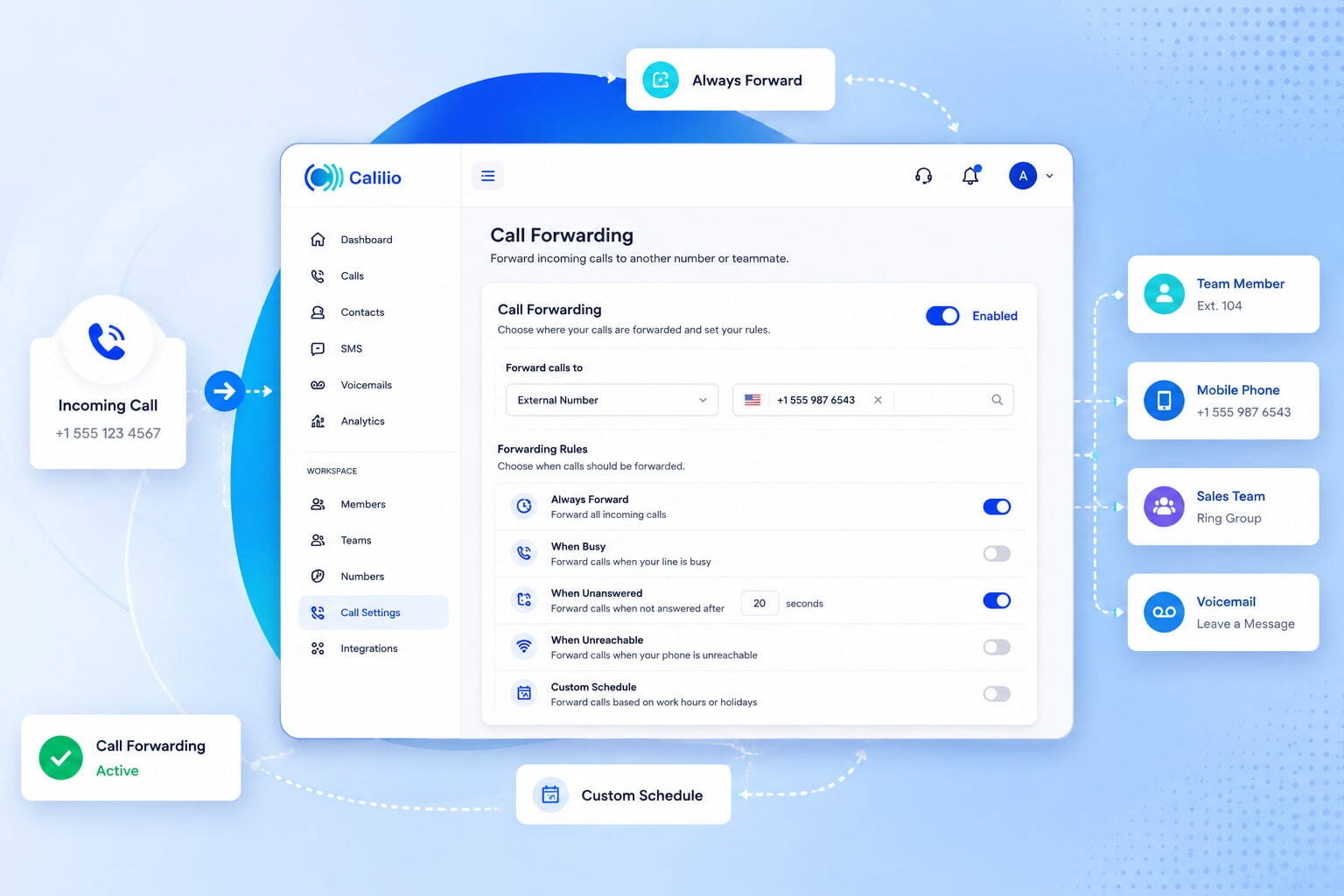 Calilio is useful for small businesses, startups, remote teams, and growing support or sales teams that want call forwarding with virtual numbers, call routing, SMS, and AI-powered call insights in one place.
Key Features:
- Conditional call forwarding
- Unconditional call forwarding
- Local, mobile, and toll-free virtual numbers
- Number porting
- Call routing and call strategy settings
- Business hours
- Voicemail and voicemail transcription
- Call recording
- Call notes and tags
- AI call reports with summaries, transcription, sentiment analysis, reason for call, and conclusion
Pricing plans:
- Standard: $15 monthly or $12/user/month (When billed annually)
- Premium: $35 monthly or $28/user/month (When billed annually)
- Enterprise: custom pricing
Quick note: Calilio keeps call forwarding simple for smaller teams while still giving room to grow into advanced call management. The strongest advantage is that forwarding connects with calling, SMS, virtual numbers, and AI reports rather than working as a standalone feature.
2. Dialpad
Dialpad is an AI-powered business communications platform with call forwarding, voicemail, messaging, meetings, and contact center tools. Teams can forward calls to colleagues, departments, mobile devices, or external numbers, which helps distributed teams stay reachable.
Dialpad also adds useful AI features, such as call transcription and summaries. That makes it helpful for teams that want call forwarding plus better call review and coaching tools.
Key Features:
- Forward calls to external numbers
- Ring groups
- Voicemail and voicemail transcription
- AI call transcription
- AI call summaries
- Call recording
- Analytics
- Desktop and mobile apps
- Google Workspace and Microsoft 365 integrations
Pricing plans:
- Standard: $15/user/month (When billed annually)
- Pro: $25/user/month (When billed annually)
- Enterprise: custom pricing
Quick note: Dialpad is a good choice when AI features matter as much as basic forwarding. However, smaller teams should first check whether the lower plan includes all routing and support features they need.
3. RingCentral
RingCentral is a well-known unified communications platform with phone, messaging, video, routing, and analytics features. Its call forwarding tools help teams send calls to voicemail, extensions, external numbers, or call flows based on rules.
RingCentral works well for companies that need a larger communication suite instead of a simple forwarding app. The platform may feel more advanced than needed for very small teams, but it offers strong scalability.
Key Features:
- Call forwarding
- Call routing
- Multi-level IVR
- Voicemail
- Call queues
- Team messaging
- Video meetings
- Analytics
- CRM integrations
- Mobile and desktop apps
Pricing plans:
- Core: $30 monthly or $20/user/month (When billed annually)
- Advanced: $35 monthly or $25/user/month (When billed annually)
- Ultra: $45 monthly or $35/user/month (When billed annually)
Quick note: RingCentral gives businesses a broad communication system. However, its tradeoff is that teams may pay for more features than they need if they only want simple call forwarding.
4. Nextiva
Nextiva combines business phone service, customer communication tools, texting, and routing features. Its call forwarding options help users redirect calls when they are busy, unavailable, unanswered, or outside normal working hours.
Nextiva is useful for teams that want phone service and customer communication tools in one platform. Its newer pricing structure also makes the entry plan more competitive for small teams.
Key Features:
- Call forwarding
- Auto attendant
- Voicemail
- SMS
- Call routing
- Team collaboration
- Customer communication tools
- Analytics on higher plans
- Mobile and desktop access
Pricing plans:
- Core: $15/user/month (When billed annually)
- Engage: $25/user/month (When billed annually)
- Scale: $75/user/month (When billed annually)
Quick note: Nextiva is a strong all-in-one option when teams want phone service plus customer engagement tools. Businesses should check which call management features are included in each plan before choosing.
5. Grasshopper
Grasshopper is a simple virtual phone system built mainly for entrepreneurs, solopreneurs, and small businesses. Its call forwarding feature can send calls to mobile phones, landlines, voicemail, or different extensions based on schedule and availability.
Grasshopper is easy to understand and does not require a heavy setup. It is less suited for teams that need advanced analytics, deep integrations, or complex call center workflows.
Key Features:
- Call forwarding
- Custom extensions
- Simultaneous ring
- Custom greetings
- Voicemail transcription
- Business texting
- Mobile and desktop apps
- Local, toll-free, and vanity numbers
Pricing plans:
- True Solo: $18 monthly or $14/month (When billed annually)
- Solo Plus: $32 monthly or $25/month (When billed annually)
- Small Business: $70 monthly or $55/month (When billed annually)
Quick note:Grasshopper is simple and practical for small teams that want a business number with forwarding. Larger teams may outgrow it if they need advanced routing or reporting.
6. Vonage
Vonage offers business communications with call forwarding, follow-me routing, simultaneous ring, voicemail, and team calling features. Businesses can send calls to desk phones, mobile devices, extensions, or external numbers based on the forwarding setup.
Vonage is helpful for companies that want a traditional business communications provider with flexible call handling.
Key Features:
- Call forwarding
- Follow Me routing
- Simultaneous ring
- Voicemail
- Call groups
- Desktop and mobile apps
- Business inbox
- Admin controls
- Integrations on selected plans
Pricing plans:
- Mobile: $13.99/line/month (When billed annually)
- Premium: $20.99/line/month (When billed annually)
- Advanced: $27.99/line/month (When billed annually)
Quick note: Vonage gives businesses reliable forwarding options and a familiar communications setup. Teams should compare included features and add-ons before committing.
7. CloudTalk
CloudTalk is a cloud phone and call center platform for sales and support teams. Its call forwarding and call flow tools help teams route calls by business hours, agent availability, IVR input, ring groups, or custom routing paths.
CloudTalk is useful when forwarding is part of a larger inbound call management process. However, it may be more than necessary for very small teams that only need basic forwarding.
Key Features:
- Call forwarding
- Call Flow Designer
- IVR
- Ring groups
- Business hours
- Call queues
- Call recording
- Analytics
- CRM integrations
- International numbers
Pricing plans:
- Lite: $34 monthly or $25/user/month (When billed annually)
- Essential: $39 monthly or $29/user/month (When billed annually)
- Expert: $69 monthly or $49/user/month (When billed annually)
- Custom: custom pricing
Quick note: CloudTalk is strong for teams that need visual call flow control and support-focused routing.
8. Quo
Quo, formerly OpenPhone, is an app-first business phone system for small teams, startups, and remote businesses. It supports call forwarding, shared numbers, voicemail, AI summaries, and team collaboration inside a simple shared inbox experience.
Quo is useful for businesses that want calling and texting to feel more like a team messaging app. It suits modern teams that want easy setup and shared visibility across customer conversations.
Key Features:
- Call forwarding
- Shared phone numbers
- Voicemail
- AI call summaries
- Call transcripts
- Team comments
- Business texting
- Auto-replies
- Mobile and desktop apps
- CRM integrations on selected plans
Pricing plans:
- Starter: $19 monthly or $15/user/month (When billed annually)
- Business: $33 monthly or $23/user/month (When billed annually)
- Scale: $47 monthly or $35/user/month (When billed annually)
Quick note: Quo is easy to use and strong for shared team communication. However, it may not be the best choice for businesses that need advanced call routing or high-volume call handling.
9. Talkdesk
Talkdesk is a contact center platform with call forwarding, automatic call distribution, IVR, workforce tools, and customer service automation. Its Forward-to-Phone feature can redirect calls to mobile phones, landlines, or softphones when agents need flexibility.
Talkdesk is better suited for customer service teams than very small businesses. It gives deeper routing control, but its pricing is much higher than most of the basic business phone systems.
Key Features:
- Forward-to-Phone
- Automatic call distribution
- IVR
- Call routing
- Skills-based routing
- Call recording
- Analytics
- Quality management
- Workforce tools
- CRM and helpdesk integrations
Pricing plans:
- CX Cloud Digital Essentials: $85/user/month (When billed annually)
- CX Cloud Voice Essentials: $105/user/month (When billed annually)
- CX Cloud Elite: $165/user/month (When billed annually)
Quick note: Talkdesk is a powerful contact center option, but it is not the most cost-friendly choice for teams that only need simple call forwarding.
10. Plivo
Plivo is a communications API platform that lets businesses build custom call forwarding workflows using the Voice API. Developers can create routing rules based on caller ID, location, time, agent availability, or business logic.
Plivo is not the easiest option for non-technical teams, but it gives strong control for companies that want custom call handling inside their own apps or systems.
Key Features:
- Programmable call forwarding
- Voice API
- Global numbers
- IVR flows
- Call recording
- Caller ID-based routing
- Time-based routing
- Failover routing
- Pay-as-you-go calling
- Developer documentation
Pricing plans:
- Pay-as-you-go pricing based on usage
Quick note: Plivo is flexible for developers and global teams that want custom workflows. Non-technical teams may prefer a ready-to-use business phone system instead
Never miss an important business call.
Use Calilio’s call forwarding to route calls to mobiles, landlines, or multiple team members, and keep customers connected even when your main line is busy.
How to Choose the Right Call Forwarding Service for Your Business?
The right call forwarding service should match how your business receives calls, who answers them, and what happens when nobody is available. A small team may need simple forwarding and voicemail, while a busy support team may need IVR, call queues, routing rules, and reporting.
- Check the forwarding rules
Choose a service that supports the conditions you actually need, such as always forward, busy, unanswered, unreachable, after-hours, or holiday routing. - Look at the number options
A service with a local, toll-free, or mobile virtual phone number can help your business look professional while forwarding calls to the right person. - Review business hours and schedules
Business hours help you control where calls go during open hours, after hours, weekends, and holidays. - Check team routing features
Teams that handle many calls should look for IVR, call queue, ring groups, call transfer, and voicemail so calls do not depend on one person. - Compare pricing beyond the first plan
The cheapest plan may not include the routing, recording, analytics, or integrations you need. Compare the actual feature limits, not only the starting price. - Test the setup process
A good call forwarding system should be easy to configure from the web or mobile app without needing constant technical help. - Check reporting and call history
Call logs, recordings, analytics, and notes help managers understand missed calls, call volume, and response quality.
Conclusion
The best call forwarding service for business should keep your team reachable without making call management complicated. A good platform should route calls based on availability, business hours, caller needs, and team structure, while also giving you call history, voicemail, and enough control to avoid missed opportunities.
Calilio, Dialpad, RingCentral, Nextiva, Grasshopper, Vonage, CloudTalk, Quo, Talkdesk, and Plivo all offer useful call forwarding options. The right choice depends on your budget, call volume, team size, technical needs, and whether you want a simple phone system or a full contact center platform.
Calilio helps teams forward calls, manage virtual numbers, track conversations, and review call insights from one cloud phone system. It is a practical option for businesses that want flexible call forwarding without extra phone hardware.
Summarize this blog with:
Frequently Asked Questions
Everything you need to know about Calilio. Can't find your answer? .
The best call forwarding service for small businesses should be affordable, easy to set up, and flexible enough to route calls to mobiles, landlines, voicemail, or teammates. Calilio, Grasshopper, Quo, and Dialpad are strong options for small teams as they combine call forwarding with business phone features.
Stay in the loop
Get the latest call insights, trends, and updates delivered straight to your inbox.
By subscribing, you agree to receive updates from Calilio.
You can unsubscribe anytime.
Enter the World of AI Business Phone System with Calilio
Improve your business operation with Calilio's advanced virtual phone system. Join today for a better way to connect.