- Partners
- Contact Us
- Log in
10 Best Text Message Apps for Computers

Texting is a vital part of daily communication, whether you’re chatting with friends, keeping in touch with family, or handling customer conversations at work.
But using your computer while texting, either for personal or professional work, slows you down. This is because typing long messages or juggling between your phone and keyboard can break your focus and waste time.
That’s where texting from your computer makes life easier. With a larger screen, full keyboard, and faster navigation, you can reply, manage conversations, and multitask without ever picking up your phone.
So, let’s discover the best texting apps for computers, carefully chosen for both personal and business use. You’ll learn what features to look for, which tools offer the best experience, and how each app can make communication smoother, faster, and more organized.
[We carefully researched and tested a range of texting apps, evaluating their key features, pricing, and ease of use. We also assessed their security, reliability, and user feedback. After this thorough review, we selected the top 10 texting apps for computers that deliver the best combination of performance, value, and convenience.]
Key Highlights:
A texting app for computers allows users to send and receive messages seamlessly from their desktop or laptop.
Select a computer texting app that’s secure, easy to use, and syncs messages across all your devices for a seamless texting experience.
Leading texting apps for computers in 2026 include Google Voice, MightyText, MySMS, Signal, TextMagic, SimpleTexting, EZ Texting, Textedly, SlickText, and AirDroid.
Key Factors to Consider While Choosing a Texting App for Computers
When choosing a texting app for your computer, look for one that runs smoothly on your operating system and offers key tools like group messaging and media sharing. Further, it should be secure, easy to navigate, and allow message syncing across devices. Also, check user reviews, pricing, and customer support for dependable performance.
- App Compatibility: Ensure compatibility with your OS, whether Windows, macOS, or Linux.
- Available Features: Look for essential features, like MMS, group messaging, and bulk SMS, which are useful for both personal and business communication.
- Cost: Compare pricing plans based on the features you require and choose one that fits within your budget. Make sure you’re paying for tools you truly need.
- Reliable Customer Support: Choose the provider with reliable customer support, providing round-the-clock service through chat, email, or a help center.
- User Review and Ratings: Check user reviews and ratings to evaluate the app’s reliability and performance.
- Ease of Use: Choose an app with a clean and simple interface. It should be easy to set up, send messages, and manage chats.
- Security and Privacy: Pick an app that uses strong encryption and secure logins. This ensures your data is protected from hackers and unauthorized access.
- Cross-device Syncing: When you send or receive a text on your computer, it should instantly reflect on your phone too. This consistency makes communication seamless.
10 Best Texting Apps for Computer
Google Voice, MightyText, mysms, Signal, Textmagic, SimpleTexting, and EZ Texting are some of the top texting apps for computers in 2025.
1. Google Voice
Google Voice lets you send and receive text messages directly from your computer using a free US phone number linked to your Google Account. Likewise, you can access it through any web browser or mobile app, making it easy to stay connected across devices. Plus, messages, calls, and voicemails sync automatically, and you can also enjoy free calls within the US and Canada. The clean, Gmail-like interface is simple to use and integrates with your Google Contacts for smooth communication. It’s perfect for personal use, especially if you want a separate number for texting or calling without sharing your primary phone line.
Key Features:
- Web Application
- Unlimited text messages within the US
- SIP link
- Google Meet integration
Pros | Cons |
|
|
2. MightyText
MightyText is one of the best texting apps for computers and uses your existing phone number. It comes with a free plan that is limited to 15 messages per month. You can upgrade to MightyText Pro to access advanced features and unlimited SMS and MMS messaging. The pro plan, which offers an ad-free experience, costs $7.49 per month or $89.99 annually. Moreover, MightyText supports Windows and macOS to access and manage SMS and MMS on your computer.
Key Features:
- Photo and Video Syncing
- Schedule Messages
- Battery and Call Alerts
- Send Web Pages and Files
Pros | Cons |
|
|
3. MySMS
MySMS is a cross-platform texting app that syncs your SMS messages across your smartphone, tablet, and computer. It supports both SMS and instant messaging between MySMS users, making it versatile for everyday communication. Moreover, the app also integrates with services like Google Drive, Dropbox, and Evernote, allowing you to back up and manage your messages easily. With support for Android, iOS, Windows, and macOS, MySMS provides a simple and consistent texting experience across all your devices.
Key Features:
- Free Text Messaging
- Call Notifications
- Sync SMS
- Message History
Pros | Cons |
|
|
4. Signal
Signal is a free online texting app for a computer introduced by a non-profit organization - the Signal Foundation. Its mission is to provide secure and private communication, rather than earning profit. Signal is a free Wi-Fi texting app, which means you must have a strong internet connection to avoid disruption. It provides an ad-free, tracking-free experience, making it an ideal choice for those seeking private communication. It doesn’t support bulk messaging, though.
Key Features:
- Data Encryption
- Set and Manage Disappearing Messages
- View Message Details
- Archiving or Unarchiving Chats
Pros | Cons |
|
|
5. TextMagic
TextMagic is a web app suited for small service-based businesses that lets you schedule messages and monitor SMS delivery status rates through your computer. Upon receiving SMS, it sorts incoming messages into chats, while providing notifications via desktop alerts, email, or mobile app. With no setup charges and account fees, its pricing is based on the pay-as-you-go model, which costs $0.049 per text. The app supports regular as well as virtual phone numbers for texting.
Key Features:
- Omnichannel
- SMS API
- Automation
- SMS Marketing
Pros | Cons |
|
|
6. SimpleTexting
SimpleTexting is a leading computer texting app that allows you to send messages directly from your PC in seconds. For texting, you can either get a new number for $10 or port your existing one to the platform.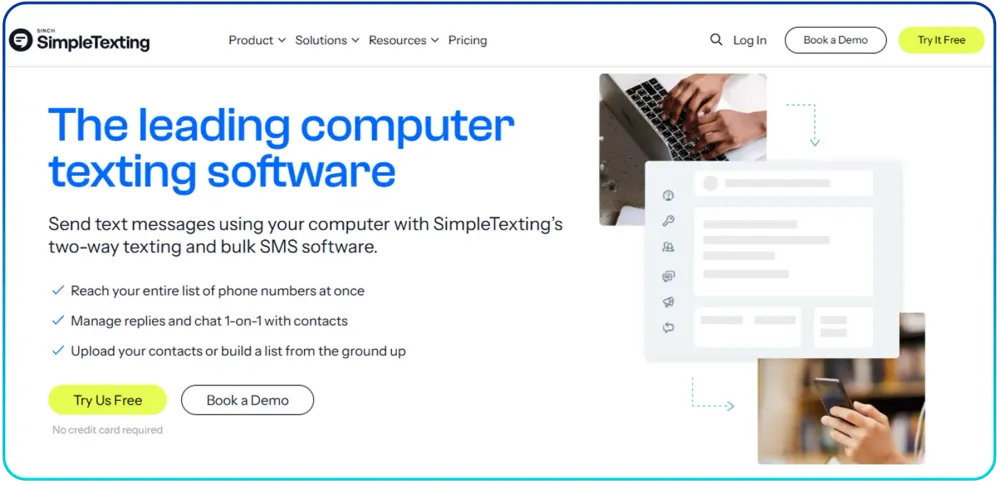
Key Features:
- Two-way messaging
- Autoresponders
- Data Collection
- Picture Messaging (MMS)
Pros | Cons |
|
|
7. EZ Texting
EZ Texting’s PC texting app allows you to send both one-to-one and bulk messages from your computer. As such, it's useful for personal conversations with customers or sending large-scale marketing, promotional, or alert messages to groups. EZ Texting uses a credit-based pricing model. Each SMS (up to 160 characters) costs one credit, while each MMS (up to 1600 characters) costs three credits.
Key Features:
- RCS (Rich Communication Services)
- AI Message Composer
- Click-to-Text Generator
- Message Personalization
Pros | Cons |
|
|
8. Textedly
Textedly is one of the top texting apps for computers, as you can send bulk SMS and MMS through your PC. Plus, it offers a clean web inbox that is easier to navigate. Moreover, you can also interact with customers in one-on-one chat for better customer support. Likewise, you can also set up campaigns to send text messages automatically throughout the desired time slot. Then, you can track clicks and performance with built-in reports. Likewise, its prices start with $29 going upto $125 per month.
Key Features:
- Mass SMS/MMS blasts from a web app
- Two-way inbox for customer replies
- Message scheduling and drip campaigns
- Easy contact import
Pros | Cons |
|
|
9. SlickText
SlickText is a marketing-focused app for texting from a computer. It is also a reliable bulk SMS messaging app, designed for marketing campaigns. Moreover, the platform supports multimedia messaging, including images, videos, and audio files. SlickText’s pricing plans are based on monthly text messages. The starting plan costs $29 per month with 500 credits, and the pro plan costs $49 / month for 1K credits.
Key Features:
- Mass Texting
- Real-Time Collaboration
- Review Collection
- Personalization
Pros | Cons |
|
|
10. AirDroid
AirDroid is a powerful tool that allows you to manage your Android device from your computer. It allows you to send and receive SMS and MMS messages, manage notifications, and transfer files between your phone and PC, providing a seamless cross-device experience. AirDroid offers a free plan for basic texting features. Likewise, the premium plan starts at $2.99/month and includes additional features like remote control, file transfers, and no ads.
Key Features:
- Cross-platform Compatibility
- Message History
- SMS and Notification Management
Pros | Cons |
|
|
Streamline Your Communication with Calilio’s All-in-One SMS and Calling Features
Conclusion
Using texting apps for computers makes communication smoother and more convenient. You can send messages and share files without switching between devices, improving both personal and work productivity.
However, apps like MySMS and Signal often come with certain drawbacks, such as limited features and occasional sync or connection issues. Some also lack advanced tools for managing professional communication efficiently.
That’s where Calilio stands out. It’s designed for seamless communication across devices with no compromise on speed, security, or reliability. Unlike most free apps, Calilio offers advanced texting features such as SMS scheduling and multi-user support, helping teams manage business communication more efficiently. It’s built for both casual users and professionals who value quality and control in their communication.



Summarize this blog with:
Frequently Asked Questions
Can I send a text message from my computer for free?
Yes, you can send text messages from your computer for free by using free PC texting apps such as MySMS, MightyText, and Signal.
Do texting apps for computers sync with mobile devices?
How to find the best business app to text from a computer?

Still have questions?
Can’t find the answer you’re looking for? Please chat with our friendly team.
Stay in the loop
Get the latest call insights, trends, and updates delivered straight to your inbox.
By subscribing, you agree to receive updates from Calilio.
You can unsubscribe anytime.
Enter the World of AI Business Phone System with Calilio
Improve your business operation with Calilio's advanced virtual phone system. Join today for a better way to connect.