
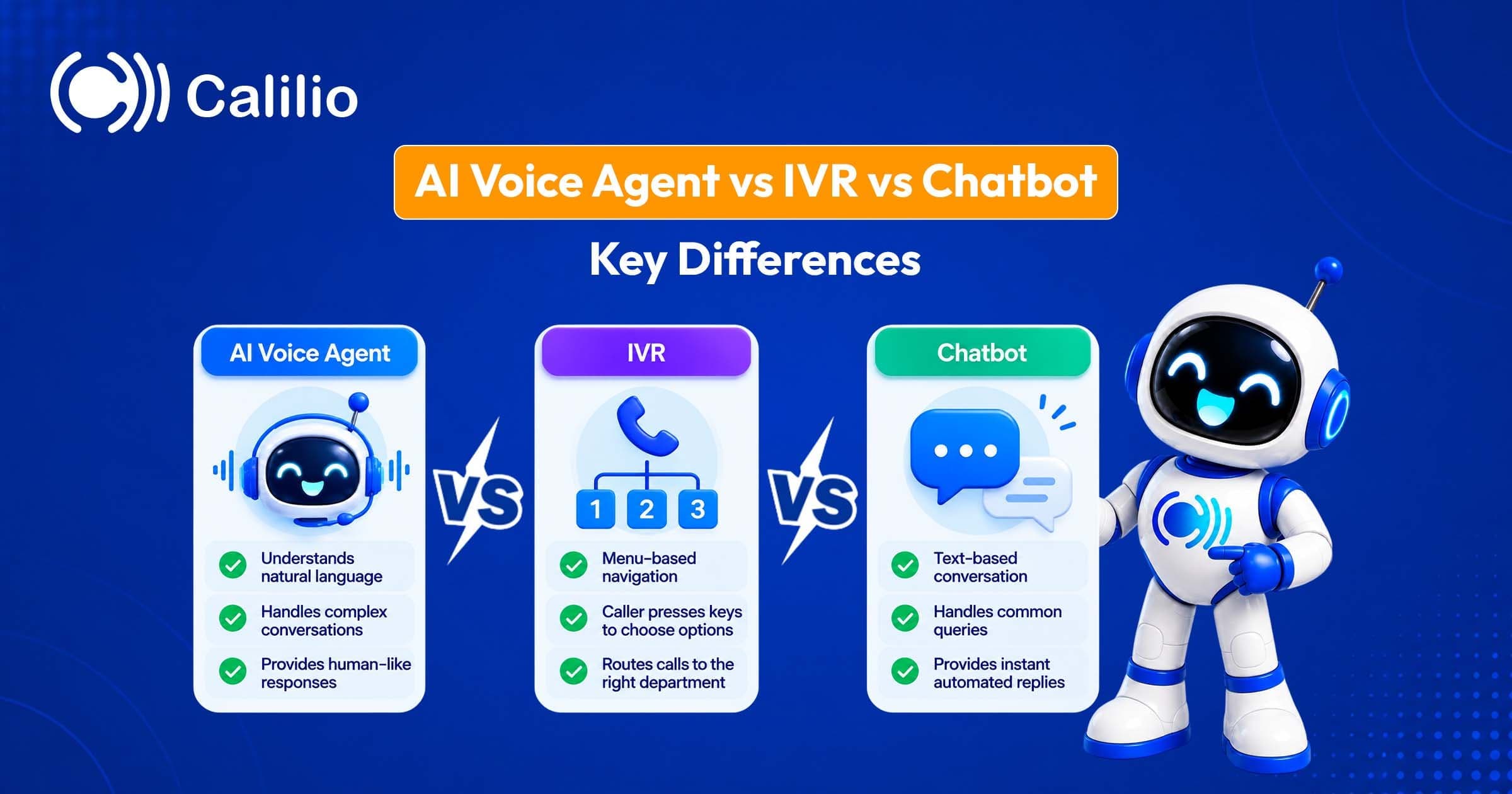

What Is an IVR?
An IVR, or interactive voice response system, is the automated phone menu that greets a caller with options such as "press 1 for sales, press 2 for support". IBM describes it as an automated telephone system that lets callers receive or provide information or make requests using prerecorded messages or text-to-speech, usually with a keypad, known as DTMF, as the input.
The strength of a traditional IVR is that it's deterministic. Press 2 and you always get the same result, which makes it easy to test, cheap to run and suitable for simple routing, announcing store hours or entering an account number on the keypad. Setting one up is mostly design work: you write a short greeting, choose four or five options, record or generate the prompts, point each option at a person, team or voicemail box, and decide what happens when nobody presses anything. The best menus put the most common request first, avoid more than one level where possible and always offer a way to reach a person.
The weakness is that real callers don't always fit the menu. A caller with an unusual request ends up pressing 0, hanging up or looping through options that don't apply to them, and every extra layer of menu adds to abandoned calls.
IVRs have evolved beyond keypad menus. IBM lists three broad types: touch-tone replacement, directed dialog where callers say a short phrase, and natural language, where speech recognition lets callers speak more freely. That last type is what most people now mean by conversational IVR.
What Is a Conversational IVR?
A conversational IVR lets callers say what they need in their own words instead of pressing keys, then routes the call or answers a simple request based on the intent it detects. A caller who says "I'd like to pay my bill" is sent to billing without hearing a menu, and one who says "my router's down" goes to technical support.
The important limit is that the system still maps what you say to a pre-designed set of intents. It's far more flexible than keypad menus, but it works within a flow that someone built in advance, so a request nobody anticipated will fall back to "I didn't catch that" or a transfer. Building a conversational IVR means listing the reasons people call, writing the phrases that signal each one and testing them against real accents and background noise. It sits between a traditional IVR and a full AI voice agent: better at understanding people than a keypad menu, but more predictable than an open conversation.
What Is an AI Voice Agent?
An AI voice agent is software that holds a spoken conversation over the phone using speech recognition, a large language model and text-to-speech. Instead of matching what you say to a fixed list, it interprets your request, draws on your business information, decides what to do and answers out loud. It can usually be interrupted mid-sentence and can take actions such as booking an appointment or sending a text.
The technology is typically built in one of two ways. OpenAI's documentation describes a speech-to-speech approach, where one model interprets audio and responds in speech, and a chained approach, where speech-to-text feeds a language model that feeds text-to-speech, which gives more control over each step. Twilio's ConversationRelay, for example, handles the speech recognition and text-to-speech and passes the transcribed text to your own language model.
Speed matters because people notice pauses. Twilio's published starting targets put the gap between a caller finishing a sentence and hearing a reply at roughly 1.1 seconds on average, with about 1.4 seconds as an upper limit, and Deepgram notes that lag becomes noticeable at around 800 milliseconds. A good voice agent keeps that gap short and stops talking when the caller interrupts, which is called barge-in.
AI voice agents are most often used for answering inbound calls, which is the job of an AI receptionist: greeting the caller, answering common questions, taking a message or booking a callback, and passing the call to a person when needed. They are also used for outbound jobs such as appointment reminders and lead follow-up, which carry stricter legal requirements.
What Is a Chatbot?
A chatbot is software that converses with customers in text on a website, in an app or through messaging channels such as SMS and WhatsApp. IBM separates rule-based chatbots, which follow predefined rules, decision trees or scripted responses, from AI chatbots, which use language models to interpret natural language, keep context and generate replies.
The difference between the two matters a great deal in practice. A rule-based chatbot behaves predictably but can only answer what it was built for, while an AI chatbot can handle far more questions but can also state something incorrect with confidence. Many modern chatbots are AI-based, grounded in your help content, and able to hand over to a human agent in live chat.
The key difference from the other two is the channel. A chatbot works when the customer is already online, and the conversation can be asynchronous, so a slightly slower reply doesn't break the experience the way a long pause on a phone call does.
AI Voice Agent vs IVR vs Chatbot: Side-by-Side Comparison
The table below compares the four options on the points that usually decide the choice. It's a general guide drawn from how each technology works, so individual products will vary.
| # | Touch-tone IVR | Conversational IVR | AI voice agent | Chatbot |
| Channel | Phone | Phone | Phone, sometimes web voice | Web, app, SMS, WhatsApp |
| How the customer interacts | Presses keys | Says a short request | Speaks naturally and can interrupt | Types |
| Flexibility | Fixed menu tree | Moderate; set intents | High; open conversation | Rule-based: low. AI: high |
| Off-script requests | Fails, loops or sends to an operator | Falls back or asks again | Handles many, may still be wrong | Rule-based: fallback. AI: handles many |
| Predictability | Highest | High | Lower; needs guardrails and review | Rule-based: high. AI: lower |
| Setup effort | Menu design and recorded prompts | Intent design and tuning | Instructions, knowledge base, actions, testing | Rule-based: flows. AI: knowledge base |
| Typical cost model | Per-minute telephony plus platform | Per-minute plus speech recognition | Per-minute bundle | Per message, per resolution or per seat |
| Escalation to a human | Press 0 or queue | Transfer when it fails | Transfer through a defined action | Handoff to live chat |
| Best for | Simple routing, short menus | Routing by what callers say | Open, multi-step phone conversations | Digital-first, asynchronous support |
Two rows deserve emphasis. Predictability is the main reason IVRs haven't disappeared, because for some tasks you want the same result every time. Escalation is the row that determines whether customers forgive the automation, since a failure with an easy exit is far less damaging than one that traps them.
How Much Do They Cost?
The cost models differ as much as the technology, so compare what you'd pay at your expected call or conversation volume, not the headline figure. The numbers below come from vendors' public pages in October 2026 and will change.
IVR and telephony Twilio's US voice pricing lists inbound local calls at $0.0085 per minute plus $1.15 a month per number, and speech recognition on a Gather prompt at $0.02 to $0.04 per use, with no extra charge for keypad input. Cloud phone systems often include a basic IVR in a per-user or per-number monthly plan, so check what's included before adding a separate platform.
AI voice agents Developer platforms charge by the minute. Retell lists $0.07 to $0.31 per minute depending on the voice and language model, with an example configuration at about $0.11. Vapi charges a $0.05 per minute hosting fee plus the cost of each provider it connects, and Bland lists $0.14 per minute on its Start plan. Telephony is sometimes billed separately. Packaged products for small businesses are often priced by call, by customer or by minute bundle instead.
Chatbots AI chatbots are often priced per resolved conversation. Intercom's Fin AI agent, for instance, starts at $0.99 per outcome. WhatsApp charges per message for template messages, though replies inside an open customer service window are free.
The pattern to watch is that AI voice agents cost more per minute than basic IVR but can replace a call that would otherwise tie up a person. The comparison that matters is cost per resolved call, not cost per minute.
What Customers and Analysts Say
Customer attitudes are mixed, and that should shape how you deploy any of these tools. A Gartner survey published in July 2024 found that 64% of customers would prefer that companies didn't use AI for customer service, and 53% would consider switching to a competitor if they learned a company would use it. The top concerns were difficulty reaching a person, job losses and wrong answers.
At the same time, Zendesk's 2025 CX Trends report found that about half of consumers had already used voice AI, and Gartner predicts that by 2029 agentic AI will autonomously resolve 80% of common customer service issues without human intervention. That's a forecast, not a measurement.
One measurement caution applies to voice agents and chatbots alike. CX Network points out that containment, meaning calls that never reached a human, doesn't tell you whether the customer's problem was solved, and that high containment can coexist with high frustration. Judge any of these tools by resolution and satisfaction, not by how many calls they kept away from your team.
Strengths and Weaknesses of Each
No option wins on every dimension, and the weaknesses often show up only after launch. This is a closer look at what each is good and bad at.
Touch-tone IVR It's cheap, reliable and easy to audit, and it works for callers who prefer pressing keys or can't use speech in a noisy place. Because every path is designed, you know exactly what a caller will hear. It's rigid, though, and it frustrates callers with unusual needs. Long menus lead to abandoned calls, and every change to the menu means re-recording prompts.
Conversational IVR It removes menus and gets callers to the right place faster, and it's predictable because intents are designed in advance. Callers who say "I need to pay a bill" skip three levels of options. It needs careful tuning, it can mishear accents and noise, and it can't handle requests that fall outside its intents, so you still need a fallback to a person.
AI voice agent It handles open requests, multi-step tasks and many languages, and it can work around the clock without queues. A caller can ask two questions in one sentence, change their mind and still be understood. It's probabilistic, so it can give wrong answers, it needs testing against real calls and accents, and delays or interruptions handled badly are obvious to callers. It also needs an owner who keeps its knowledge current.
Chatbot It lets customers type at their own pace, can include links, images and forms, and often costs less per conversation than a call. A customer can leave a chat open and return to it later. It only reaches customers who are online, rule-based versions fail on questions they weren't built for, and AI versions can answer incorrectly with confidence unless they are grounded in your help content.
Using Them Together
In practice, the most effective setups combine these tools. Each handles the job it's best at, and the handoffs between them are designed rather than accidental. These combinations are design patterns that many businesses use rather than standards.
IVR in front of an AI voice agent A short keypad menu handles language choice, department or entering an account number, then passes open requests to the voice agent. This keeps simple, high-volume choices cheap and predictable and saves the more expensive conversation for callers who need it. Twilio's Gather supports both keypad and speech input on the same prompt.
Voice agent that sends a text The agent answers the question, then sends an SMS link for a form, payment or document, so the caller doesn't have to type details on a phone call. Spelling an email address aloud is where voice agents make the most mistakes, and a text link removes the problem.
AI as first line, human as second The AI handles routine requests and transfers the rest with a summary, so the customer doesn't repeat themselves. A warm call transfer, where the next person knows who is calling and why, works far better than a cold one that drops the caller in cold.
Chatbot and voice together The same knowledge base can power both, so a customer gets consistent answers on the website and the phone, and you only have to correct a wrong answer once.
Whatever the combination, build a visible route to a person into every path. Gartner's finding that customers worry about reaching a human is the clearest argument for doing so.
Legal and Compliance Points
Automating conversations doesn't remove legal obligations. The rules depend on whether the call is inbound or outbound, where the people are located and whether the conversation is recorded. This is general information, not legal advice.
AI voices and outbound calls in the US The FCC ruled in February 2024 that AI-generated voices count as "artificial" under the Telephone Consumer Protection Act, which means outbound calls and texts that use them need the recipient's consent. That ruling addresses calls to consumers, so inbound customer service use is a different question that's worth discussing with a lawyer. In practice that means written consent before AI-voiced telemarketing calls, calling only between 8 a.m. and 9 p.m. in the recipient's time zone, and honouring opt-outs, which is the core of the TCPA autodialer rules.
Call recording consent Federal law follows one-party consent, but several US states, including California, Florida, Illinois, Maryland, Massachusetts, Montana, New Hampshire, Pennsylvania and Washington, generally require everyone's consent. Announcing that a call is recorded at the start of the call is the safest practice, and it matters for voice agents because they usually record or transcribe every call. A short line in the greeting such as "this call may be recorded" covers most call recording compliance requirements, but check the rules where your callers are.
Disclosing that it's AI Some laws require you to say a customer is talking to an AI. California's bot disclosure law applies when a bot is used to knowingly deceive someone to incentivise a transaction, and Utah requires disclosure when a consumer clearly asks and, for high-risk interactions, upfront. In the European Union, Article 50 of the AI Act requires people to be told they're interacting with an AI system unless it's obvious, and that obligation has applied since 2 August 2026.
Regulated industries For finance, legal and other calls that involve sensitive personal data, favour deterministic flows or humans and add strict guardrails if you use AI. Check which data-protection and sector rules apply before an automated system collects anything sensitive.
How to Choose Between an AI Voice Agent, IVR and Chatbot
The best choice follows from your customers' behaviour and the stakes of the conversation, not from which technology is newest. Use these scenarios as a starting point.
You have a few clear options and high call volume Use a touch-tone IVR. Store hours, department routing and keypad account lookups don't need a language model, and the predictability is a benefit.
You want to route by what callers say Use a conversational IVR if you have a limited set of well-defined intents, such as billing, support and sales, and want to skip menus.
Callers need open conversations or multi-step help Use an AI voice agent with a human transfer if you handle appointment booking, lead capture, FAQs or after-hours coverage and can invest in testing and review. Many small businesses start with a packaged service rather than building from scratch, and the best AI answering services differ mainly in how they handle transfers, bookings and after-hours calls.
Your customers are mostly digital Use a chatbot, an AI version if your knowledge base is large and a rule-based version if your flows are fixed or tightly regulated.
The stakes are high For health, finance or legal conversations, keep the flow deterministic or human, and use AI only with strict guardrails and disclosure.
You need several of these Combine them, starting with the channel where most of your volume arrives.
Whichever you pick, run it on real calls or conversations before launch, read transcripts regularly in the first weeks and track resolution and satisfaction rather than containment alone.
Next step
Ready to Get Started?
IVRs, AI voice agents and chatbots each have a place. Choose touch-tone or conversational IVR when you want predictable routing, an AI voice agent when callers need open conversations, and a chatbot when customers prefer to type. Whichever you use, test with real conversations, make a human easy to reach, and measure resolution rather than how many people the automation kept away from your team.
Calilio's cloud phone system includes IVR and business hours routing, and an AI voice agent that answers incoming calls and hands off to a person when needed.
Frequently Asked Questions
What is the difference between an AI voice agent and an IVR?
An IVR routes callers through fixed menus or short set intents, so it can only do what it was designed to do. An AI voice agent uses a language model to understand open requests, hold a natural conversation and take actions, which makes it more flexible but less predictable.
Is an AI voice agent the same as a chatbot?
They use similar technology, but a chatbot works in text on websites, apps and messaging channels, while an AI voice agent works over the phone and has to handle speech recognition, spoken replies and timing. A voice agent is often described as a chatbot with a voice, but the phone channel adds latency and interruption challenges.
Will AI voice agents replace IVR?
For many use cases, probably partly. Voice agents handle requests that fit poorly into menus, but IVRs remain useful for simple, high-volume tasks where predictability and low cost matter. Many businesses keep an IVR in front and add a voice agent behind it.
Which is cheapest: IVR, AI voice agent or chatbot?
A basic IVR is usually the cheapest per minute, with AI voice agents commonly costing roughly $0.07 to $0.35 per minute on developer platforms, and chatbots often charging per resolved conversation. The cheaper option on paper isn't always cheaper per resolved request, so compare by outcome.
Can an AI voice agent transfer to a human?
Yes. Most platforms can transfer a call to a person when a request is outside the agent's scope, the caller asks for a human or confidence is low. The quality of the handoff depends on whether the agent passes a summary, which saves the caller from repeating themselves.
Do I have to tell callers they're talking to an AI?
It depends on where you operate. Some US states and the European Union require disclosure in certain situations, and telling callers is good practice even where it isn't required. Check the rules that apply to your location and industry.
Is a conversational IVR the same as an AI voice agent?
No. A conversational IVR recognises what callers say and maps it to designed options, while an AI voice agent uses a language model to hold open-ended conversations. The line blurs in marketing, so ask a vendor whether callers can go beyond a set list of intents.