
Blog9 Best AI Call Analysis Tools in 2026

Almost every tool in this category will transcribe a call and hand you a summary. That part is now a commodity. What separates them is what happens next — whether you get a coaching workflow, a deal forecast, a quality scorecard, or just a tidy set of notes nobody reads.

We compared 24 tools on that basis and kept the 9 best. Every price below is for the plan that includes the analysis features described, not the cheapest tier on the pricing page.

Quick Answer

“AI call analysis” covers four different product types, and picking the wrong type costs more than picking the wrong vendor within one. Four shortlists cover almost every team:

You want analysis on calls you already make
Calilio ($28/user/mo) and Dialpad include transcripts, summaries and sentiment inside the phone system, so there is no second subscription and no separate place to look for a call record.
You want deal forecasting and pipeline risk
Gong is the category leader for revenue intelligence, with Chorus the alternative for teams already deep in the ZoomInfo and Zoom ecosystem. Both are quote-only and priced accordingly.
You want cheap, reliable meeting notes
Fireflies and Otter start around $10 to $20 per user per month and handle transcription, summaries and search well. They analyse meetings rather than manage a sales process.
You need contact centre quality assurance at scale
Observe.AI and CallMiner score 100% of interactions against evaluation forms, with the compliance and calibration workflows a regulated contact centre needs.

How we compared AI call analysis tools

We weighted 6 criteria to compare 24 AI call analysis tools and kept the 9 best. We reviewed current official product, pricing and documentation pages rather than relying on reseller estimates or affiliate roundups.

Transcription accuracy: Every metric downstream is derived from the transcript, so errors on accents, noise and jargon carry straight through into the analysis.
Depth of analysis: Whether you get a summary and sentiment, or genuine coaching signals such as talk ratios, question counts, objection tracking and next-step detection.
Where the calls come from: Some tools only analyse video meetings, some only phone calls, and some need to sit inside a specific phone system to work at all.
Workflow, not just insight: Whether findings become an action — a coaching queue, a scorecard, a CRM field — or sit in a dashboard nobody opens twice.
CRM and phone system integration: Whether call data writes back natively into the tools your team already works in, or needs a Zapier chain someone has to maintain.
Real cost: The plan that includes the analysis you need, plus platform fees, seat minimums and annual commitments that are not on the pricing page.

Why you should trust our reviews and comparisons

Calilio builds a business phone system with AI call reporting, so we compete in this category. That is a conflict of interest, and pretending otherwise would be the fastest way to lose your trust. Here is how we handle it and how this comparison was actually produced.

📄

We read the vendors’ own documentation, not roundups
Every capability and price in this article comes from official product pages, pricing pages, support documentation and public plan comparisons reviewed in August 2026. Where a vendor does not publish pricing we say so rather than inventing a figure.

🏷️

We price the plan that actually includes the feature
The most common way these comparisons mislead is quoting an entry price for a plan that does not contain the capability being described. We name the qualifying tier, flag seat minimums, and note where annual billing is required to reach the advertised rate.

⚖️

We state our conflict of interest openly
Calilio sells a phone system with AI call reporting and appears in this list. We have written our own limitations into our entry in the same detail as everyone else’s, and the verdict names competitors as the better choice wherever they are.

🚫

No paid placements and no affiliate links
No vendor paid to appear here, to be ranked in a particular position, or to have criticism removed. Nothing in this article earns us a commission if you click through and buy.

🔍

We say what we did not test
This is desk research, not a nine-platform live deployment. We are explicit about that so you can weigh it properly rather than assuming a depth of testing that did not happen.

🗓️

We date everything and revise it
Pricing and features in this category change frequently. Every figure carries the month it was verified, and we update the article rather than leaving stale numbers in place.
What this comparison is not: we have not deployed all nine platforms across a live sales team for a quarter. Anyone claiming they have, across nine enterprise tools, is stretching it. This is careful desk research from official documentation, published pricing and buyer reports — read it as a shortlisting aid, then demo your final two.

Four product types wearing the same label

This is the decision that matters most and it is rarely made explicitly. Teams compare vendors across categories, then find out three months later that the tool they bought was never designed for the job. Identify your type first and the shortlist follows.

1. Phone systems with built-in AI analysis

These platforms combine everyday business calling with AI-powered conversation analysis in the same phone system. They make the most sense when your team wants call insights without buying and managing a separate conversation intelligence platform.

Strength
Analysis happens automatically on calls you already make, on the number you already use, with no second subscription and one place to find any call record.
Trade-off
Analysis depth stops short of deal forecasting or formal QA scorecards.

2. Revenue intelligence platforms

Revenue intelligence platforms analyze sales conversations alongside pipeline and deal activity to help teams improve coaching and forecasting. They are designed for structured sales organizations that want deeper insight into how conversations influence revenue.

Strength
Ties conversations to pipeline: deal risk scoring, forecast accuracy, coaching programs and market intelligence across every rep.
Trade-off
Expensive, quote-only, and needs a dedicated owner to be worth the money.

3. Contact center QA platforms

Contact center QA platforms evaluate customer interactions against defined quality standards, scorecards, and compliance requirements. They are better suited to larger service or contact center operations where supervisors need consistent oversight across a high volume of conversations.

Strength
Scores every interaction against your evaluation forms, with calibration, dispute handling and compliance controls built for hundreds of agents.
Trade-off
Heavy implementation and administration; overkill below roughly 50 agents.

4. Meeting note-takers

Meeting note-takers record, transcribe, summarize, and organize conversations from online meetings. They are a simpler option for teams that mainly need searchable meeting records and reliable notes rather than full sales or contact center intelligence.

Strength
Cheapest route to reliable transcripts, summaries and searchable meeting history across your whole company.
Trade-off
Analyses meetings rather than managing a sales process — little coaching workflow and no pipeline view.

#

Product Type

What It Does

Right for

1.Phone systems with built-in AI analysisAnalyzes business calls directly inside the phone system.Teams whose calls are the work — sales, support, service — and who want insight without another platform.
2.Revenue intelligence platformsConnects sales conversations with pipeline and revenue data.Sales organizations with a defined process, a sales leader and enough deals for patterns to be meaningful.
3.Contact center QA platformsEvaluates customer interactions against QA and compliance standards.Contact centers with a quality function and regulatory obligations.
4.Meeting note-takersRecords, transcribes and summarizes online meetings.Small teams and anyone who mainly needs reliable meeting notes rather than full sales or contact center intelligence.

The 9 best AI call analysis tools in 2026

Here are the top AI call analysis tools ordered by overall buyer value, depth of analysis, price transparency and suitability for common team sizes. Each entry names the plan the described features actually sit on.

#

Tool

Best For

Price

Type

1CalilioBest value — AI analysis inside your phone system$28/user/monthPhone system + AI
2GongBest for revenue intelligence and forecastingQuote onlyRevenue intelligence
3Chorus by ZoomInfoBest for Zoom and ZoomInfo ecosystemsQuote onlyRevenue intelligence
4Observe.AIBest for contact centre QA at scaleQuote onlyContact centre QA
5Dialpad AiBest real-time coaching during callsFrom ~$15/user/monthPhone system + AI
6Fireflies.aiBest budget option for whole-company notesFrom ~$10/user/monthMeeting note-taker
7Otter.aiBest transcription for meeting-heavy teamsFrom ~$17/user/monthMeeting note-taker
8CallMinerBest for enterprise speech analyticsQuote onlyContact centre QA
9AvomaBest mid-market alternative to GongFrom ~$19/user/monthRevenue intelligence

Pricing reflects published rates as of August 2026. Four of these vendors quote privately — where we cite a figure for those, it is from buyer reports rather than the vendor, and is labelled as such.

1. Calilio

Best value — the analysis runs on calls you are already making

Calilio generates an AI call report on every recorded conversation automatically. Each report contains a full transcript, a written summary, the reason for the call, a sentiment read and the conclusion, and it attaches to the contact alongside the notes, tags and disposition the agent logged. There is nothing to connect and no separate app to open — the analysis appears against the call in your normal call history.
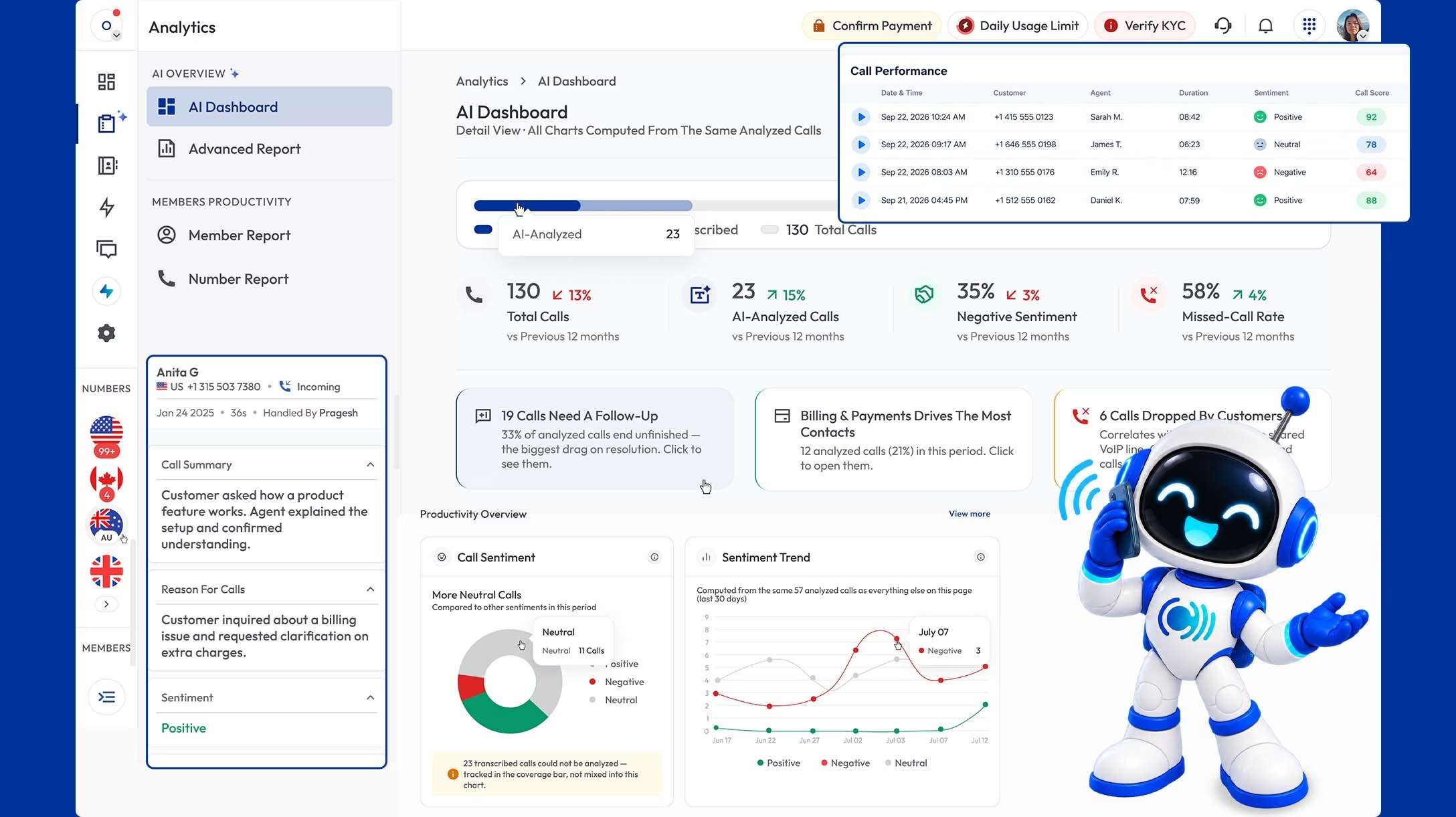
The reason it leads on value is that most teams shopping for call analysis already pay for a phone system. Buying a dedicated platform means a second bill, a second login, and call records split across two places. Calilio includes the AI reporting, live call monitoring with whisper and barge-in. What it does not do is manage a sales process: there is no deal risk scoring, no forecast, and no formal QA scorecard workflow.

What works
AI transcript, summary, call reason and sentiment on every recorded call
Reports attach to the contact with notes, tags and disposition in one place
AI reports include call conclusions to show the outcome or resolution of each conversation
Live monitoring, whisper and barge-in included at the same price
Power Dialer and bulk SMS on the same plan
What to watch
No deal risk scoring or pipeline forecasting
No weighted QA scorecards or calibration workflow
Analysis covers phone calls, not video meetings
Smaller integration library than Gong or Fireflies

Pricing:

Premium $28/user per month billed annually — AI reports included Standard $12/user per month covers calling without AI reporting No separate AI add-on fee
Type: Business phone system with built-in AI call reporting
Verdict: Best choice if you want analysis on your calls, not a sales-management platform.

2. Gong

The category leader for revenue intelligence

Gong is the benchmark other tools in this space are measured against, and it earns that on depth rather than transcription. It captures calls, emails and meetings, then ties them to pipeline: which deals are at risk, which have no next step, where a competitor was mentioned, which reps handle a specific objection badly. Its coaching tooling is genuinely built for a sales organisation, with call libraries, scorecards and trackers that flag defined phrases across every conversation.

The cost is the barrier. Gong does not publish pricing, and buyer reports consistently describe a per-seat licence commonly in the region of $1,200 to $1,600 per user per year plus a separate platform fee, on an annual contract with a seat minimum. It also needs an owner — a sales leader or enablement person who actually runs coaching from it. Bought without that, it becomes an expensive recording archive.

What works
Automatically records, transcribes, and analyzes sales calls and meetings
Trackers that flag defined phrases and topics across all calls
Strong coaching workflow with call libraries and scorecards
Captures calls, emails and meetings in one timeline
Very mature Salesforce and HubSpot integration
What to watch
Quote-only pricing
Annual contracts with seat minimums
Needs a dedicated owner to deliver value
Substantial overkill for a small team or a support desk

Pricing:

Gong does not publish fixed pricing on its website, but it typically costs from $1,200–$1,600 per user per year. May apply an annual platform fee between $5,000 and $50,000+, depending on team size and deployment scope.
Type: Revenue intelligence platform
Verdict: The right answer for a real sales organisation with budget and an owner.

3. Chorus by ZoomInfo

Strongest fit for teams already inside ZoomInfo and Zoom

Chorus does most of what Gong does — conversation capture, deal intelligence, coaching libraries, competitor and objection tracking — and its distinguishing advantage is context. Because it belongs to ZoomInfo, call insights connect to ZoomInfo’s contact and company data, so a conversation sits alongside firmographics and buying signals rather than in isolation. It also handles Zoom meetings particularly cleanly.

It is generally regarded as slightly less deep than Gong on pure deal intelligence, and it makes most sense as part of a broader ZoomInfo commitment rather than as a standalone purchase. Pricing is quote-only and typically bundled into that wider agreement, which makes it hard to benchmark and easy to end up paying for platform capability you are not using.

What works
Uses AI to identify objections, deal risks, and coaching moments from conversations
Native connection to ZoomInfo contact and company data
Excellent Zoom meeting capture
Strong CRM write-back
What to watch
Quote-only, usually bundled into a wider ZoomInfo agreement
Less deep than Gong on pure deal intelligence
Value drops sharply outside the ZoomInfo ecosystem
Hard to benchmark against published-price alternatives

Pricing:

ZoomInfo does not publish fixed public pricing for Chorus. Typically costs $8,000/year for the first 3 seats, plus about $1,200/user/year for additional seats.
Type: Revenue intelligence platform
Verdict: Buy it if you are already committed to ZoomInfo, not on its own merits.

4. Observe.AI

Built for contact centre quality assurance, not sales coaching

Observe.AI is aimed squarely at contact centres. It scores 100% of interactions against your own evaluation forms rather than sampling a few per agent per month, surfaces compliance risks automatically, and provides the calibration and dispute workflows a quality team needs to keep scoring consistent across many reviewers. Its real-time agent assist can also prompt agents mid-call.

That focus is also its limit. It is not a revenue intelligence tool and will not forecast your pipeline, and the implementation and administration effort assumes a dedicated quality function. Below roughly fifty agents, the setup cost is difficult to justify against the volume of calls being scored. Pricing is quote-only.

What works
Automated scoring of 100% of interactions against your own forms
Calibration and dispute workflows for consistent QA at scale
Automatic compliance risk detection
Real-time agent assist during live calls
What to watch
Quote-only enterprise pricing
Not a revenue intelligence or forecasting tool
Assumes a dedicated quality-management function
Hard to justify below roughly 50 agents

Pricing:

Observe.AI costs $69 per agent per month, but it requires an annual commitment with a minimum of 100 seats. That means you need $69 × 12 × 100 = $82, 800 to start.
Type: Contact centre QA and agent assist
Verdict: Excellent for a contact centre with a QA team; wrong for a sales floor.

5. Dialpad Ai

Best real-time assistance while the call is still happening

Dialpad’s distinguishing feature is that its AI works live rather than after the fact. Transcription runs in real time, and the system can surface answers and prompts to the rep mid-conversation. Post-call it produces summaries, action items and sentiment. Because it is built into Dialpad’s own phone system, there is no integration step and the analysis is included from a low entry price.

The trade-off is that you must use Dialpad as your phone system — it is not a layer you can add to an existing provider. Its post-call analysis is also shallower than Gong’s or Avoma’s: you get good summaries and sentiment rather than deal risk scoring or a structured coaching programme. For teams that want help during the call more than analysis after it, that is the right trade.

What works
Real-time transcription and live coaching prompts mid-call
AI summaries, action items and sentiment included at a low entry price
No integration needed — built into the phone system
Clean, well-regarded admin experience
What to watch
Requires Dialpad as your phone system
Post-call analysis is shallower than dedicated platforms
No pipeline forecasting or deal risk scoring
Contact centre features are a separately priced product

Pricing:

Standard: $15/user/month with annual billing or $27/user/month with monthly billing Pro: $25/user/month with annual billing or $35/user/month with monthly billing Enterprise: Custom pricing; 100-user minimum Advanced call analysis and coaching are available separately through Dialpad Support and Dialpad Sell.
Type: Phone system with built-in AI
Verdict: The pick if live in-call assistance matters more than post-call depth.

6. Fireflies.ai

Cheapest credible way to give a whole company call notes

Fireflies joins your meetings across Zoom, Google Meet and Teams, transcribes them, and produces summaries and action items you can search across your entire history. Its AI assistant answers questions about past conversations, and the low per-seat cost makes it realistic to roll out across a company rather than just a sales team.

It is a note-taker, not a sales system. There is no pipeline view, no deal risk scoring and no structured coaching workflow, and its phone-call coverage is weaker than its meeting coverage since it is built around video conferencing. As a way to stop losing what was said in meetings it is excellent value; as a sales management tool it is not competing.

What works
Very low per-seat cost, viable company-wide
Works across Zoom, Google Meet and Teams
Searchable transcript history with an AI assistant
Simple setup with no administration overhead
What to watch
No pipeline view or deal intelligence
No structured coaching workflow
Phone-call coverage weaker than meeting coverage
Limited value for managing a sales process

Pricing:

Free tier with limited transcription Paid plans from around $10/user per month Higher tiers add storage and AI credits
Type: Meeting note-taker
Verdict: Best value for meeting notes; not a sales analysis platform.

7. Otter.ai

The strongest pure transcription experience

Otter has been doing this longer than most and its transcription and live-notes experience is the most polished in the note-taker category. It joins meetings automatically, produces clean summaries and action items, and lets you search and share transcripts easily. For meeting-heavy teams that mainly need an accurate, well-organised record, it does that job better than tools trying to do more.

Like Fireflies, it is built around meetings rather than phone calls, and it offers no sales-specific analysis — no deal intelligence, no coaching scorecards, no CRM pipeline view. Storage and feature limits vary noticeably by tier, so check the minute allowances on the plan you are considering rather than assuming the top-tier experience.

What works
Best-in-class transcription quality and live note experience
Automatic meeting join across major platforms
Easy search, sharing and collaboration on transcripts
Mature product with a long track record
What to watch
Meeting-focused, weak on phone call analysis
No sales-specific analysis or coaching features
Minute and storage allowances vary sharply by tier
No CRM pipeline integration of substance

Pricing:

Basic: Free; 300 transcription minutes/month, live transcription, AI Chat, automated summaries, and speaker identification Pro: $8.33/user/month with annual billing; 1,200 transcription minutes/month, automated summaries and advanced meeting templates Business: $19.99/user/month with annual billing; unlimited meetings and in-app recordings, custom AI workflows, unlimited audio/video file imports, and usage analytics Enterprise: Custom pricing; adds advanced CRM integrations, live coaching, and enterprise-level controls
Type: Meeting note-taker
Verdict: Buy it for transcription quality, not for sales insight.

8. CallMiner

Enterprise speech analytics with the deepest analytical control

CallMiner comes from the speech analytics tradition rather than the AI-summary wave, and it shows in the depth of control it offers. You can build highly specific scoring categories, analyse acoustic signals such as tone and overtalk alongside language, and run analysis across enormous interaction volumes with the compliance and audit capability regulated industries require.

It is unambiguously an enterprise product. Implementation runs as a project, configuring the analytical categories properly requires expertise, and pricing is quote-only. For a large contact centre with an analytics function it offers control the newer tools do not; for anyone else, that control is complexity without benefit.

What works
Extremely granular, configurable analytical categories
Acoustic analysis alongside language — tone, overtalk, silence
Proven at very large interaction volumes
Strong compliance and audit capability
What to watch
Quote-only enterprise pricing
Implementation runs as a project with professional services
Requires analytical expertise to configure well
Far too heavy for SMB or mid-market teams

Pricing:

CallMiner costs roughly $100 to $200 per agent per month, but it requires a 12-month commitment and a minimum of 60 seats. On top of that, you must factor in a mandatory custom setup and implementation fee that typically accounts for 25% to 40% of your first-year contract. That means you need at least $80,000 to $100,000 to start.
Agent Licensing: 60 agents × $150/mo average × 12 months = $108,000
Implementation & Services: (Estimated at roughly 30% of software cost) = $32,400
Estimated Year-One Total: $140,400
Type: Enterprise speech analytics
Verdict: The specialist choice for large regulated contact centres.

9. Avoma

The most credible mid-market alternative to Gong

Avoma covers a surprising amount of Gong’s territory at published, mid-market prices. You get meeting recording and transcription, AI notes organised into topics, conversation intelligence with talk-ratio and question analysis, coaching scorecards, and deal intelligence tied to your CRM. Critically, it publishes its pricing, which makes it possible to evaluate without entering a sales cycle.

It is less deep than Gong on pipeline forecasting and its trackers are less sophisticated, and features are spread across tiers so the plan with conversation intelligence and deal analysis is not the entry one. But for a team that wants real coaching and deal insight without a five-figure annual commitment, it is the most sensible middle option in this list.

What works
AI Scorecards automatically evaluate calls against predefined or custom criteria
Conversation intelligence with talk ratios and question analysis
Coaching scorecards and deal intelligence tied to the CRM
Provides call scores with reasoning, timestamps, and question-level breakdowns
What to watch
Less deep than Gong on pipeline forecasting
Conversation intelligence and deal analysis sit above the entry tier
Trackers less sophisticated than Gong’s
Meeting-first, so phone-only teams get less from it

Pricing:

Core plans start at $19/user/month Advanced call analysis features require the Conversation Intelligence add-on, priced at $29/user/month
Type: Revenue intelligence platform
Verdict: Best middle ground between a note-taker and enterprise revenue intelligence.

Features that actually matter when choosing

Transcription and summaries are table stakes now, so comparing them tells you little. These six things decide whether a tool is still useful to you in six months, and none of them is obvious from a feature grid.

Where your calls actually happen
A meeting-first tool will do little for a team on the phone all day, and a phone-system AI will not analyse your Zoom calls. Match the tool to where the conversations occur before comparing anything else.
Whether insight becomes an action
The difference between a useful platform and an expensive archive is workflow. Does a finding create a coaching task, a scorecard, a CRM field update? If everything ends in a dashboard, nothing will change.
Transcription quality on your audio
Accuracy claims are made on clean audio. Test with real recordings from your own environment — accents, speakerphones, industry jargon and poor mobile signal are where accuracy collapses, and every metric downstream inherits the error.
What happens to your recordings
Ask where audio and transcripts are stored, how long for, who can access them, whether your data trains the vendor’s models, and how you export everything if you leave. This is the question buyers skip and regret.
Who administers it
Revenue intelligence and QA platforms need an owner. Without a named person running coaching or calibration from the tool, adoption collapses within a quarter regardless of how good the software is.
Consent and disclosure
Recording consent rules vary by state and country, and AI analysis of recordings raises additional questions in some jurisdictions. Confirm your obligations before rollout, not after.

Mistakes buyers make in this category

These five account for most of the abandoned subscriptions and disappointed renewals we see discussed publicly. All are avoidable before you sign.

!

Buying revenue intelligence for a support team
Deal risk scoring is meaningless when there is no deal. Support and service teams need QA scorecards or simple summaries, and paying enterprise sales-tool prices for that is the most expensive mistake in this category.

!

Paying twice for the same transcript
Many teams already get transcription and summaries from their phone system or meeting platform. Check what you own before adding a subscription that duplicates it.

!

Assuming the entry tier includes the analysis
Conversation intelligence, coaching scorecards and deal analysis routinely sit above the advertised price. Price the qualifying plan, not the cheapest one on the page.

!

Skipping the accuracy test
A polished demo on clean studio audio tells you nothing about how a tool handles your reps on a bad line. Insist on running your own recordings through it during evaluation.

!

Rolling out without an owner
Tools in this category do not produce value passively. If nobody is accountable for running coaching from it, you have bought storage.

The Verdict

Transcription is solved. So the real question is what you want the analysis to do, and the answer splits three ways. If you need deals forecast and pipeline risk scored, Gong is still the benchmark and Avoma is the sensible mid-market version at a published price. If you need every interaction scored against evaluation forms, that is Observe.AI or CallMiner, and neither makes sense below about fifty agents.

If you mainly want to know what was said and how it went, you probably do not need a new platform at all. Fireflies and Otter cover meetings cheaply, and Calilio puts transcripts, summaries, call reason and sentiment on every call inside the phone system you were already paying for at $28 per user per month. It has no forecasting and no QA scorecards, which is the honest trade — but it also means no second bill and no second place to look for a call record.
Cut the Per-Minute Meter for Routine Calls

Calilio's AI receptionist handles your repetitive calls at a fraction of virtual-receptionist rates, with no staffing contract or per-agent training to manage.

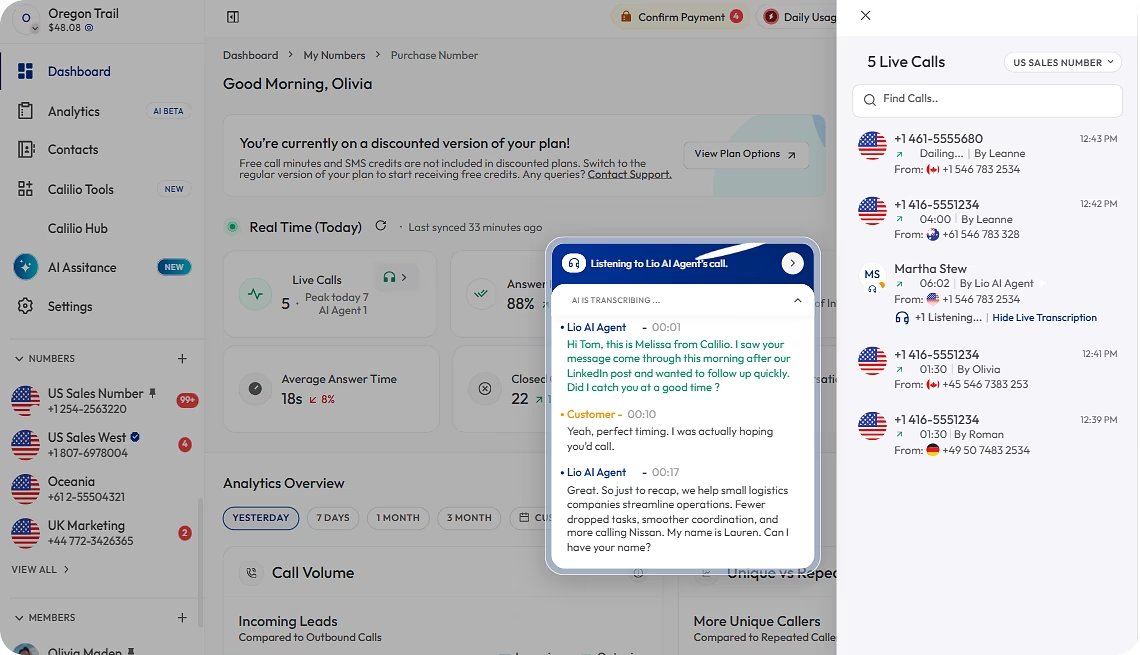
Calilio AI receptionist and call analysis dashboard

Frequently Asked Questions

What is the best AI call analysis tool in 2026?
It depends what you need the analysis for. Gong is the strongest for revenue intelligence and deal forecasting. Chorus suits teams already inside the ZoomInfo and Zoom ecosystem. Calilio is the best value when you want transcripts, summaries and sentiment on every call inside a phone system you already pay for. Fireflies and Otter are the cheapest way to get reliable meeting notes, Avoma is the mid-market middle ground, and Observe.AI and CallMiner are built for contact centre quality assurance at scale.
What is AI call analysis?
AI call analysis transcribes recorded calls and then extracts meaning from them automatically. Rather than a manager listening to calls one at a time, the software produces a transcript, a summary, the reason for the call, sentiment, topics discussed, and often a coaching score. The value is seeing patterns across hundreds of conversations instead of anecdotes from a handful.
How much do AI call analysis tools cost?
Costs fall into three bands. Meeting note-takers such as Fireflies and Otter run roughly $10 to $30 per user per month. Phone systems with built-in AI analysis, such as Calilio at $28 per user per month or Dialpad from around $15, bundle it with your calling. Dedicated revenue intelligence platforms such as Gong are quote-only, with buyer reports commonly citing $1,200 to $1,600 per user per year plus a platform fee. Contact centre QA platforms are quote-only enterprise agreements.
Do I need a separate AI call analysis tool if my phone system already has one?
Often not. If you mainly need to know what was said, what the call was about and how the customer sounded, a phone system with built-in AI reporting covers it without a second subscription or a second place to look for a call record. A dedicated platform earns its cost when you need deal-level forecasting, pipeline risk scoring, or formal quality assurance workflows at contact centre scale.
How accurate is AI call transcription?
Good on clear audio and noticeably worse with strong accents, background noise, speakerphones and poor connections. Industry jargon and product names are frequent casualties. Since every metric is derived from the transcript, errors carry straight through into the analysis — so test with your own recordings during evaluation rather than trusting a demo on clean audio.
What is the difference between AI call analysis and conversation intelligence?
They largely overlap and vendors use both terms loosely. In practice, AI call analysis usually describes the output — transcript, summary, sentiment, topics. Conversation intelligence usually implies the layer above that: coaching workflows, trackers, deal risk scoring and pipeline connection. If a tool calls itself conversation intelligence, ask specifically which of those workflow features are included in your tier.
Can AI call analysis replace call quality monitoring by managers?
It changes the work rather than removing it. AI can score or flag every call, which is impossible manually, so managers stop sampling and start reviewing by exception. But judgement on a difficult conversation, and the coaching conversation itself, still needs a person. Teams that treat the scores as final rather than as a filter tend to coach the wrong things.
Is AI call analysis compliant with privacy regulations?
It depends on your configuration and jurisdiction. Recording consent rules vary by US state and by country, GDPR requires a lawful basis and a defined retention period, and some sectors add further obligations. Ask vendors where data is stored, how long it is retained, who can access it, and whether your recordings are used to train their models. Confirm your specific position with counsel before rollout.

Summarize this blog with:

Avatar Group

Still have questions?

Can’t find the answer you’re looking for? Please chat with our friendly team.

Stay in the loop

Get the latest call insights, trends, and updates delivered straight to your inbox.

By subscribing, you agree to receive updates from Calilio.
You can unsubscribe anytime.

Enter the World of AI Business Phone System with Calilio

Improve your business operation with Calilio's advanced virtual phone system. Join today for a better way to connect.

4.6
125+ Reviews16+ Badges