
How to Create an Email Account without a Phone Number?

Many email platforms ask for a phone number during sign-up, just like other online services. However, not everyone has a phone number, and many people prefer not to share their personal number due to privacy concerns. Using numbers often leaves users worried about how their personal information is stored, shared, or exposed.
Thankfully, there are ways to create an email without a phone number. Creating one helps you protect your personal information, lower the risk of data leaks, and maintain better privacy online.
In this guide, let’s learn how to do it, which email providers allow it, and what things you should consider before signing up.
Key Highlights:
You can create an email without a phone number by choosing privacy-focused providers or using approved workarounds during sign-up.
Email services like Proton Mail, Atomic Mail, and Tuta Mail offer permanent email accounts without mandatory phone verification.
Temporary email providers work well for short-term needs but are not suitable for long-term or sensitive communication.
Major providers like Gmail and Yahoo may allow skipping phone numbers in some cases, depending on security checks and sign-up behavior.
Using a virtual phone number is a practical option when phone verification is required, and you want to keep your personal number private.
Proper security setup, such as recovery emails, backup codes, and authenticator apps, is essential when creating an email without a phone number.
How to Create an Email without a Phone Number?
You can create an email without a phone number by signing up with providers like Proton Mail that allow registration without phone verification. You can also use temporary or disposable email services for short-term needs. Moreover, some platforms, like Gmail, also allow you to skip phone number verification occasionally.
However, if a number is required, using a virtual phone number is another option to protect your privacy.
1. Sign Up with Email Providers That Do Not Require a Number
You can get an email without a phone number by choosing email providers that do not ask for one during sign-up. Services like Proton Mail, Atomic Mail, and Tuta Mail let you create permanent email accounts for long-term use without phone verification.
Alternatively, you can use temporary email services such as Temp Mail, 10 Minute Mail, or Guerrilla Mail. These are useful for short-term needs.
i. Proton Mail
Proton Mail is a privacy-focused email service based in Switzerland that lets you create an email without a phone number while keeping your messages fully secure. With end-to-end encryption, open-source apps on all devices, and strong protection, Proton Mail gives you complete control over your inbox and your privacy.
- Step 1: Open the Proton account sign-up page and select the Proton Free plan.
- Step 2: Enter your preferred username and choose a domain, either @proton.me or @protonmail.com.
- Step 3: Create a strong password, re-enter it, and click Create account.
- Step 4: Complete the human verification using CAPTCHA or email verification.
- Step 5: Add an optional display name and click Continue.
- Step 6: Choose a recovery option if you want. Adding a phone number is optional and not required.
- Step 7: Click Save or Maybe later to finish and access your new email account.
ii. Atomic Mail
Atomic Mail lets you make an email without a phone number while keeping your identity private and your data secure. It removes phone verification, tracking, and ads so that you can sign up instantly with just a username and password.
- Step 1: Open the Atomic Mail sign-up page to start the registration process.
- Step 2: Create your username and set a strong password.
- Step 3: Skip phone verification, as Atomic Mail does not require a phone number or SMS confirmation.
- Step 4: Save your recovery seed phrase, which acts as your private key if you ever need account access.
- Step 5: Begin using your encrypted email inbox.
iii. Tuta Mail
Tuta Mail is another secure and privacy-focused email service that lets you create a free email account without a number. It uses end-to-end, quantum-safe encryption to protect your emails, contacts, and calendars from tracking or data scanning.
- Step 1: Open the Tuta Mail (formerly Tutanota) client in your web browser.
- Step 2: Click Sign up and choose the free plan to create an email account.
- Step 3: Select an email address.
- Step 4: Choose from several available domains, including tuta.com, tutamail.com, tutanota.com, tutanota.de, tuta.io, and keemail.me.
- Step 5: Enter a strong password and save it securely. Tuta Mail will also give you a recovery code, which you must store safely.
- Step 6: Complete the sign-up process and access your encrypted inbox.
iv. Visit Temporary Mail Providers
Temporary mail services give you a quick email address for short-term use. You do not need to create an account, and you can read messages right on the same website. Popular options include Temp Mail, 10 Minute Mail, Guerrilla Mail, Maildrop, YOPMail, and Email On Deck.
- Step 1: Visit a temporary mail site like Temp Mail, 10 Minute Mail, or Guerrilla Mail.
- Step 2: Copy the email address shown, or generate a new one if the site lets you.
- Step 3: Paste that email address wherever an email ID is required.
- Step 4: Return to the temporary mail site and wait for the message to appear in the inbox/webpage.
- Step 5: Open the email on the site and view your message or the code/link you need.
However, keep in mind that these email addresses are short-term. Messages and inboxes get deleted after a while, so they work best for quick sign-ups or one-time use.
2. Use Workarounds for Major Email Services
In many cases, though not guaranteed, both Google and Microsoft list the phone number as optional during sign-up, and the Skip option may appear. However, their security systems sometimes require phone verification.
This usually happens if you create multiple accounts from the same device, use a new or private browser session, or sign up from a region with stricter rules. So, to improve your chances, use a regular browser, avoid rapid sign-ups, and provide a recovery email instead.
Below are specific steps for both Gmail and Microsoft email services.
Google (Gmail)
Step 1: Use a desktop browser and go to the official Gmail sign-up page.
Step 2: Enter your name, username, and password.
Step 3: When you reach the phone number field, look for the Skip option and select it if available.
Step 4: Add a secondary email address for account recovery instead of a phone number.Microsoft (Outlook / Hotmail)
Step 1: Start the sign-up process on the official Microsoft website.
Step 2: Create your new Outlook or Hotmail email address.
Step 3: Set a strong and unique password.
Step 4: Verify your account using another existing email address rather than a phone number.
3. Alternative Verification Methods
If you want to use Gmail or Outlook but keep your personal number private, you can verify your email with a virtual phone number. This way, you still pass the SMS check, but you do not link your real number to the account.
Here is how you can get a virtual phone number from Calilio:
- Step 1: Sign up and log in to your Calilio account.
- Step 2: Subscribe to a plan.
- Step 3: Go to Settings > My Numbers and click Add a New Number, or click the “+” icon beside Numbers in the left sidebar to purchase a new number.
- Step 4: Pick the country and area code you want, then choose an available number.
- Step 5: Complete the purchase and wait for the number to activate.
- Step 6: Open your email provider’s sign-up page and enter your bought number for verification.
- Step 7: Check your Calilio inbox for the verification code, then enter the code to finish verification.
Disclaimer: One-time password (OTP) delivery is facilitated by third-party providers and is not controlled by Calilio. Successful OTP reception depends on the policies of the email providers you are signing up for. Certain providers may restrict OTP delivery to VoIP numbers.
Things to Consider Before Creating Your Email without a Phone Number
Before creating an email without a phone number, make sure you have a verified recovery email, saved recovery codes, and strong security settings like an authenticator app. Also consider network behavior, possible account limits, and whether a free or paid plan best matches your long-term needs.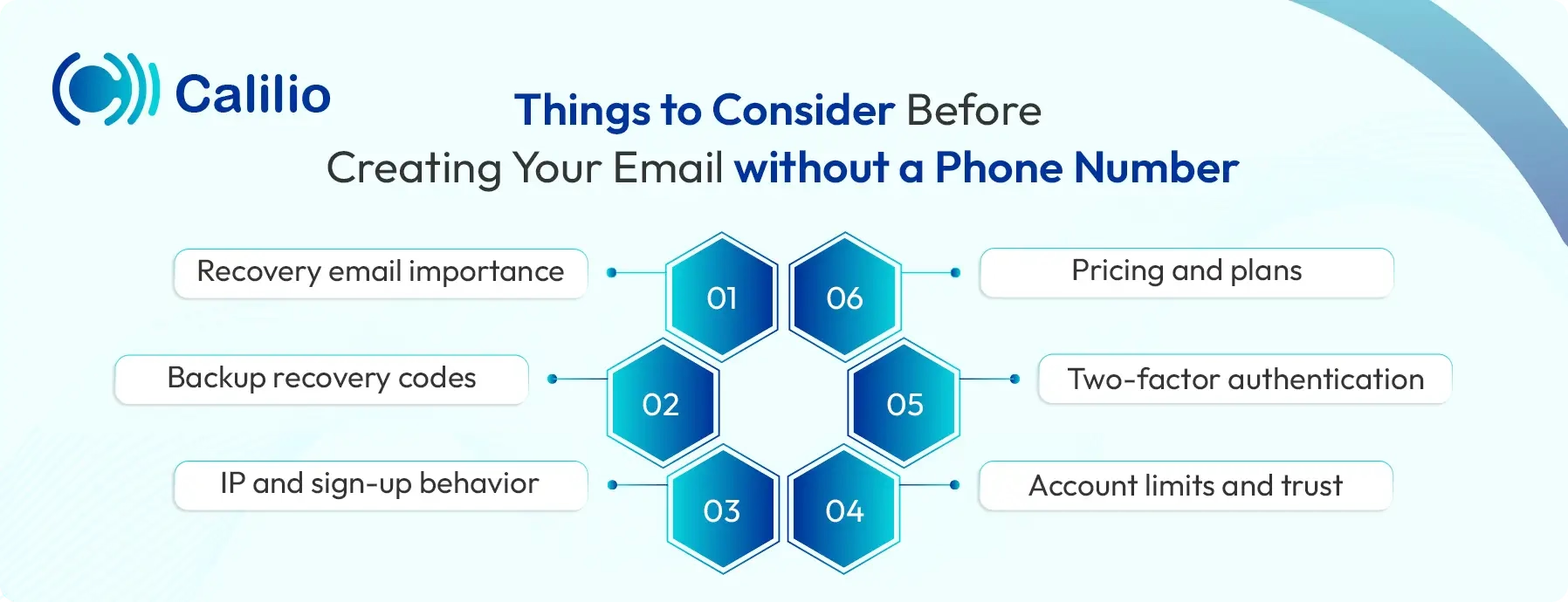
- Recovery email importance: When you skip providing a phone number while making an email, your recovery email becomes the only way to regain access. Make sure it works, verify it right away, and check it often.
- Backup recovery codes: Privacy-first email providers give you a recovery code or seed phrase instead of password resets. Write it down and store it safely offline.
- IP and sign-up behavior: Your IP address affects whether you see the “Skip” option. Home or office networks work better than VPNs (Virtual Private Networks), which may trigger extra checks.
- Account limits and trust: Accounts without phone numbers may have lower sending limits at first and stricter security checks. This improves over time as the account gains trust.
- Two-factor authentication: Set up an authenticator app for 2FA right after sign-up. It adds strong protection without using SMS or a phone number.
- Pricing and plans: If you want a free email account, choose the free plan during sign-up. For paid plans, review the features, storage, and security options to decide what fits your needs.
Conclusion
Creating an email without a phone number is possible if you choose the right approach. Privacy-focused providers, temporary email services, and careful sign-up methods give you options based on whether you need a long-term inbox or quick access. Moreover, the key is to balance privacy with security by using strong passwords, recovery emails, and authenticator apps.
Summarize this blog with:
Frequently asked questions
Can you set up an email without a phone number?
Yes, you can set up an email without a phone number by choosing privacy-focused providers that do not require phone verification or by using temporary email services for short-term needs.
How do I skip my phone number on Gmail?
How to create a Yahoo email without a phone number?

Still have questions?
Can’t find the answer you’re looking for? Please chat with our friendly team.
Stay in the loop
Get the latest call insights, trends, and updates delivered straight to your inbox.
By subscribing, you agree to receive updates from Calilio.
You can unsubscribe anytime.
Enter the World of AI Business Phone System with Calilio
Improve your business operation with Calilio's advanced virtual phone system. Join today for a better way to connect.